Join us at FabCon Atlanta from March 16 - 20, 2026, for the ultimate Fabric, Power BI, AI and SQL community-led event. Save $200 with code FABCOMM.
Register now!The Power BI Data Visualization World Championships is back! Get ahead of the game and start preparing now! Learn more
Hi
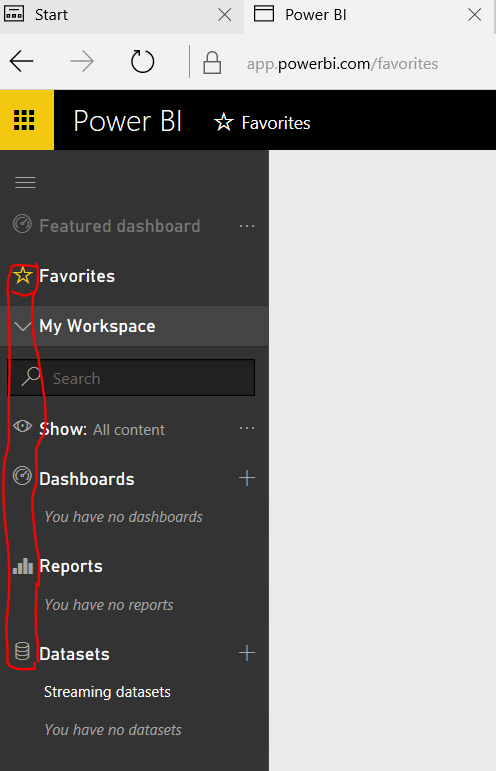
I am in the process of adding new users to our tenanant and am experiencing an issue with one of them. He is part of a group and the dashboard has been shared with him. Logging on to Power BI on his desktop shows the correct menu screen with the dashboard link, however, clicking on it does nothing. I also noted that the normal "icons" do not appear next to the menu items
He has recently migrated to Windows 10 - not sure if this is an issue or not?
Any suggestions appreciated
Thanks Doug
Hi DougM,
I also running Windows 10 and the Power BI Navigation Pane at my side looks like below:
And it displays well both in Microsoft Edge and Internet Explorer 11.
By the way, are there any restrictions regarding webpage displaying configured under this client machine? What about the other clients?
Please take a try with a different Browser and see if issue insists.
If the display is still an issue, then we may need to perform a fiddler tracing.
Regards
I run Windows 10 so I do not think that is the issue.
The Power BI Data Visualization World Championships is back! Get ahead of the game and start preparing now!
| User | Count |
|---|---|
| 56 | |
| 56 | |
| 35 | |
| 18 | |
| 14 |