
cancel
Showing results for 
Search instead for 
Did you mean: 

View all the Fabric Data Days sessions on demand. View schedule

Reply
ChicagoJay
New Member

New Get Data leaving me stranded - can't create reports!

The new experience of creating a new report starting with Get Data is just resulting with a new Excel file on the Workbooks tab in My Workspace. All the documents I've found online and books I have show the result of "getting data" should be a new report or dataset being created. I can't find any way to create a new report from an Excel file that has been imported online so I'm really stuck. 

5 REPLIES 5
v-frfei-msft
Community Support
Community Support

Hi @ChicagoJay,


Did you get data in Power BI service? By that way, You cannot create a normal report. When you choose Connect, your workbook will appear in Power BI just like it would in Excel Online. You can refer the document here. 

https://docs.microsoft.com/en-us/power-bi/service-excel-workbook-files


You can only get data using Power BI desktop, Please check the online document.


Regards,

Frank

Community Support Team _ Frank
If this post helps, then please consider Accept it as the solution to help the others find it more quickly.

Hi @ChicagoJay,


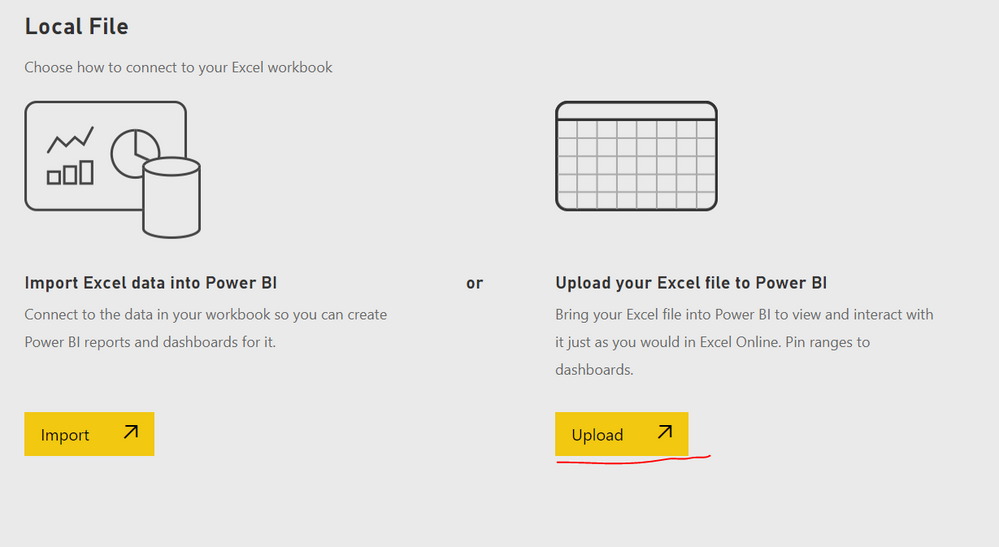
I tested it again by uploading an excel file. You can refer to the step as below.


1. get data - local file - upload


1.PNG


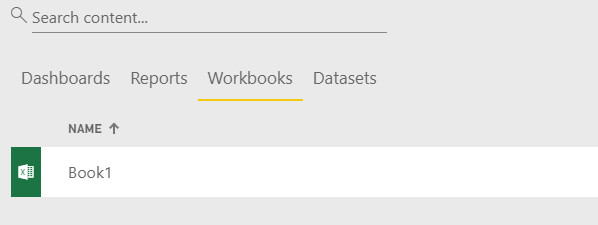
2. Then you can find it in Workbooks and datasets. Also you can use the dataset to create reports as well.


2.PNG3.PNG


Regards,

Frank

Community Support Team _ Frank
If this post helps, then please consider Accept it as the solution to help the others find it more quickly.

Hi @ChicagoJay,


Does that make sense? If so, kindly mark my answer as a solution to close the case.


Regards,
Frank

Community Support Team _ Frank
If this post helps, then please consider Accept it as the solution to help the others find it more quickly.

Sorry, but the article you linked to would do exactly what I need to do but the experience in the BI service doesn't match what is documented anymore. If you "get data" in the service, the docs state that once it's been uploaded it can be found under Reports or Datasets. Neither is the case anymore, it's only showing up under Workbooks. I'm dead in the water when it comes to my Excel files. Performing get data on a CSV file however, does result in a new report and dataset being created. This is really frustrating because I can't even find where these workbooks are being saved - OneDrive? SharePoint?

I replicated what you are trying to do and it works as intended, importing a csv got the same file named dataset and also allowed me to create a thereof. If you have a multi-tab excel I believe PBI Service would give you an option which says import data or upload file. 

Helpful resources

Announcements
November Power BI Update Carousel

Power BI Monthly Update - November 2025

Check out the November 2025 Power BI update to learn about new features.

Fabric Data Days Carousel

Fabric Data Days

Advance your Data & AI career with 50 days of live learning, contests, hands-on challenges, study groups & certifications and more!

FabCon Atlanta 2026 carousel

FabCon Atlanta 2026

Join us at FabCon Atlanta, March 16-20, for the ultimate Fabric, Power BI, AI and SQL community-led event. Save $200 with code FABCOMM.

Top Solution Authors