Forum Discussion

Modifying JIRA content Pack
Hi Everyone!
I'm trying to modify the original template of the JIRA content Pack to get more information about the issues of my organization.
https://powerbi.microsoft.com/es-es/blog/explore-your-jira-data-with-power-bi/https://powerbi.microsoft.com/es-es/blog/explore-your-jira-data-with-power-bi/
At my local dektop:
I maintained all the functions of the original in Power Query to get a list of Issues from my JIRA and everything works perfect.
Once I have this list of Issues, I need to get the information for each of them, so I added a new function to bring it:
let
    SearchIssues = () =>
    let
        Source = Table.Buffer(FetchPages("", 500)),
        table = Table.ExpandRecordColumn(Source, "Column1", {"id"}, {"id"}),
        Search = (id) =>
        let
            Issue = Json.Document(Web.Contents(URL,[RelativePath="rest/api/2/issue/"&id]))
        in
            Issue,
        Output = Table.Buffer(Table.AddColumn(table, "incidencia",each Search([id])))

    in
        Output
in
    SearchIssues
After that I call to the function and make all the data transformations:
let
    Origen = SearchIssues(),
    #"Se expandió Incidencia" = Table.ExpandRecordColumn(Origen, "incidencia", {"key", "fields"}, {"key", "fields"}),
    #"Columnas con nombre cambiado" = Table.RenameColumns(#"Se expandió Incidencia",{{"id", "id issue"}, {"key", "key issue"}}),
    #"Se expandió fields" = Table.ExpandRecordColumn(#"Columnas con nombre cambiado", "fields", {"issuetype", "timespent", "timeoriginalestimate", "description", "project", "resolutiondate", "summary", "creator", "created", "priority", "customfield_10100", "timeestimate", "worklog", "status"}, {"issuetype", "timespent", "timeoriginalestimate", "description", "project", "resolutiondate", "summary", "creator", "created", "priority", "customfield_10100", "timeestimate", "worklog", "status"}),
    #"Se expandió worklog" = Table.ExpandRecordColumn(#"Se expandió fields", "worklog", {"worklogs"}, {"worklogs"}),
    #"Se expandió worklogs" = Table.ExpandListColumn(#"Se expandió worklog", "worklogs"),
    #"Se expandió worklogs1" = Table.ExpandRecordColumn(#"Se expandió worklogs", "worklogs", {"author", "comment", "started", "timeSpent", "timeSpentSeconds"}, {"author", "comment", "started", "timeSpent.1", "timeSpentSeconds"}),
    #"Se expandió author" = Table.ExpandRecordColumn(#"Se expandió worklogs1", "author", {"displayName"}, {"displayName"}),
    #"Columnas con nombre cambiado1" = Table.RenameColumns(#"Se expandió author",{{"started", "Fecha de Imputación"}, {"timeSpent.1", "Tiempo Imputado"}, {"timeSpentSeconds", "Tiempo Imputado (seg)"}}),
    #"Se expandió issuetype" = Table.ExpandRecordColumn(#"Columnas con nombre cambiado1", "issuetype", {"name"}, {"name"}),
    #"Columnas con nombre cambiado2" = Table.RenameColumns(#"Se expandió issuetype",{{"name", "type issue"}, {"timespent", "timespent total"}}),
    #"Se expandió project" = Table.ExpandRecordColumn(#"Columnas con nombre cambiado2", "project", {"key", "name"}, {"key", "name"}),
    #"Se expandió creator" = Table.ExpandRecordColumn(#"Se expandió project", "creator", {"displayName"}, {"displayName.1"}),
    #"Columnas con nombre cambiado3" = Table.RenameColumns(#"Se expandió creator",{{"displayName.1", "creator"}}),
    #"Se expandió priority" = Table.ExpandRecordColumn(#"Columnas con nombre cambiado3", "priority", {"name"}, {"name.1"}),
    #"Columnas con nombre cambiado4" = Table.RenameColumns(#"Se expandió priority",{{"name.1", "priority"}}),
    #"Se expandió customfield_10100" = Table.ExpandRecordColumn(#"Columnas con nombre cambiado4", "customfield_10100", {"key", "name"}, {"key.1", "name.1"}),
    #"Columnas con nombre cambiado5" = Table.RenameColumns(#"Se expandió customfield_10100",{{"key.1", "key account"}, {"name.1", "name account"}, {"displayName", "author displayName"}}),
    #"Se expandió status" = Table.ExpandRecordColumn(#"Columnas con nombre cambiado5", "status", {"name"}, {"name.1"}),
    #"Columnas con nombre cambiado6" = Table.RenameColumns(#"Se expandió status",{{"name.1", "status name"}}),
    #"Tipo cambiado:created" = Table.TransformColumnTypes(#"Columnas con nombre cambiado6",{{"created", type datetimezone}}),
    #"Tipo cambiado2:created" = Table.TransformColumnTypes(#"Tipo cambiado:created",{{"created", type date}}),
    #"Tipo cambiado:Fecha de Imputación" = Table.TransformColumnTypes(#"Tipo cambiado2:created",{{"Fecha de Imputación", type datetimezone}}),
    #"Tipo cambiado2:Fecha de Imputación" = Table.TransformColumnTypes(#"Tipo cambiado:Fecha de Imputación",{{"Fecha de Imputación", type date}}),
    #"Tipo cambiado:resolutiondate" = Table.TransformColumnTypes(#"Tipo cambiado2:Fecha de Imputación",{{"resolutiondate", type datetimezone}}),
    #"Tipo cambiado2:resolutiondate" = Table.TransformColumnTypes(#"Tipo cambiado:resolutiondate",{{"resolutiondate", type date}}),
    #"Tipo cambiado:id issue" = Table.TransformColumnTypes(#"Tipo cambiado2:resolutiondate",{{"id issue", Int64.Type}}),
    #"Tipo cambiado:timespent total" = Table.TransformColumnTypes(#"Tipo cambiado:id issue",{{"timespent total", Int64.Type}}),
    #"Tipo cambiado:timeoriginalestimate" = Table.TransformColumnTypes(#"Tipo cambiado:timespent total",{{"timeoriginalestimate", Int64.Type}}),
    #"Tipo cambiado:timeestimate" = Table.TransformColumnTypes(#"Tipo cambiado:timeoriginalestimate",{{"timeestimate", Int64.Type}}),
    #"Tipo cambiado:Tiempo Imputado (seg)" = Table.TransformColumnTypes(#"Tipo cambiado:timeestimate",{{"Tiempo Imputado (seg)", Int64.Type}}),
    #"Columnas con nombre cambiado7" = Table.RenameColumns(#"Tipo cambiado:Tiempo Imputado (seg)",{{"id issue", "Id Incidencia"}, {"key issue", "Clave Incidencia"}, {"type issue", "Tipo Incidencia"}, {"timespent total", "Tiempo Total Imputado (seg)"}, {"timeoriginalestimate", "Tiempo Original Estimado (seg)"}, {"description", "Descripción"}, {"key", "Clave Proyecto"}, {"name", "Nombre Proyecto"}, {"resolutiondate", "Fecha Resolución"}, {"summary", "Resumen"}, {"creator", "Creador"}, {"created", "Fecha Creación"}, {"priority", "Prioridad"}, {"key account", "Clave Unidad"}, {"name account", "Nombre Unidad"}, {"timeestimate", "Tiempo Estimado (seg)"}, {"author displayName", "Persona"}, {"comment", "Comentario"}, {"status name", "Estatus"}}),
    #"Consultas combinadas" = Table.NestedJoin(#"Columnas con nombre cambiado7",{"Nombre Proyecto"},#"Proyecto/Unidad",{"Nombre del proyecto"},"Proyecto/Unidad",JoinKind.LeftOuter),
    #"Se expandió Proyecto/Unidad" = Table.ExpandTableColumn(#"Consultas combinadas", "Proyecto/Unidad", {"Unidad"}, {"Unidad"})
in
    #"Se expandió Proyecto/Unidad"
And everything works fine in my local desktop.
When I publish in the Power BI online Service and I schedule a refresh, It shows me this error:
Anyone can give some advice about this?
Thanks!
13 Replies
 v-caliao-msftMicrosoft Employee
Anonymous,
You can get more error message to make further analysis by using Fiddler.
please capture the following logs while recreating the issue.
Fiddler Trace
============
- Install Fiddler from http://www.telerik.com/download/fiddler/fiddler4 if not already done
- Launch fiddler, then click Tools > Fiddler Options
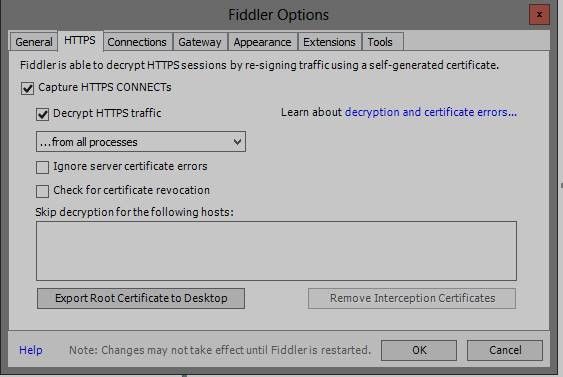
- Click the ‘HTTPS’ tab.
- Verify the options are set as shown in this screenshot:
5. If fiddler prompts you to trust their root certificates, then click ‘Yes’.
6. Then navigate to repro the problem while fiddler is capturing traffic.
7. After the trace is captured, go to File > uncheck box next to Capture Traffic
8. File > Save > All Sessions and post it here.
Regards,
Charlie Liao
- AnonymousNot applicable
Hi v-caliao-msft,
Here is the capture:
https://www.dropbox.com/s/pmyedrjwwa18hlc/Capture.saz?dl=0I hope you can give me some advice.
Thanks!
- miguelCommunity Admin
Hey!
The fiddler tracer shows no records of any connection attempts to JIRA. It does show your email address and some other PII information to your Power BI host in north europe.
I believe that you're actually trying to find out why your query doesn't refresh on the cloud, rather than trying to trace your local pbix file. If this is the case, the first thing that you need to check is your query that has the name "AutoRemovedColumns 1" which is probably doing a reference to another query.
Referencing queries that come from APIs is usually a good idea in theory, but due to how the formula firewall pops up, is actually better to not use referencing at all and do everything in just one query. Try removing and simplifying your query to the point where there are no references and see if that makes your query refresh on the Power BI service.
PS: I'd delete that fiddler trace if I were you
 pgomesRegular Visitor
Hi Anonymous,
I have the same necessity to get Jira worklogs. Can you share with me you modified content pack?
Another question: How can i modify the JIRA Content Pack?
- AnonymousNot applicable
Hi pgomes!
It's easy to modify the Jira Content pack.Since the query editor I add a new function that look for the issues:
let
    SearchIssues = () =>
    let
        Source = Table.Buffer(FetchPages("", 500)),
        table = Table.ExpandRecordColumn(Source, "Column1", {"id"}, {"id"}),
        Search = (id) =>
        let
            Issue = Json.Document(Web.Contents(URL,[RelativePath="rest/api/2/issue/"&id]))
        in
            Issue,
        Output = Table.Buffer(Table.AddColumn(table, "incidencia",each Search([id])))

    in
        Output
in
    SearchIssues
And after that I call this function from a new query and make the data transformations.
let Origen = SearchIssues(), #"Se expandió Incidencia" = Table.ExpandRecordColumn(Origen, "incidencia", {"key", "fields"}, {"key", "fields"}) in #"Se expandió Incidencia" fi1234Frequent Visitor
Did following the steps in this blog end up resolving your issue for you so that you can refresh in the Cloud?
I'm experiencing the exact same issue.
https://www.excelguru.ca/blog/2015/03/11/power-query-errors-please-rebuild-this-data-combination/