Forum Discussion

Microsoft.PowerBI.OleDb is not registered
Hi folks,
when i try to open a Excel File i get following Error Message:
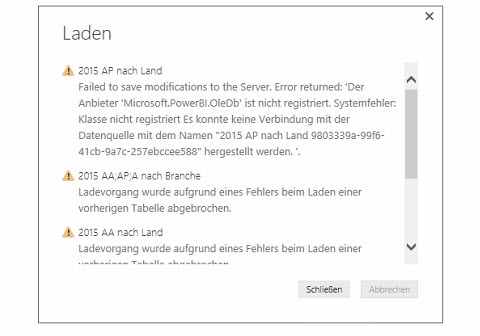
please advise.
thanks
20 Replies
 VKoch93New Member
Has anyone found a solution for this error message?
Un- and reinstalling does not help :(
 AnonymousNot applicable
I too am seeing this error when trying to create a reference calculation. Any eta on a solution?
- fsim
Responsive Resident
same issue here with the november version...
- emendozaNew Member
There is not solution yet? Still having this issue :(
- emendozaNew Member
There is not solution yet?
- AnonymousNot applicable
I found this issue in my environment. I turned out to be from a user dragging the Power BI Desktop icon onto the Windows Desktop as a Shortcut. I am guessing for whatever reason in doing so the app runs under different permission since Windows Store Apps have different permissions inside the directories it wasn't creating the cache folders inside the temp directory causing these errors.
Long story short, delete the desktop shortcut that was created and run it from the start menu. Otherwise, create the shortcut from the start menu intsead.
 FranxCuckooNew Member
Thank you Anonymous
 Spicer
Advocate I
Same issue with a CSV File
 trutz
Advocate IV
I get the same, but with an uploaded PowerBI Desktop file that only contains OData feeds and 3 "parameter values" created via QueryProcessing error: The provider 'Microsoft.PowerBI.OleDb' is not registered. The following system error occurred: Class not registered A connection could not be made to the data source with the Name of 'TimesheetLines 57d6206f-61bc-4a06-af4b-5822f6586e23'.Cluster URIWABI-NORTH-EUROPE-redirect.analysis.windows.netActivity ID40f09ffe-01f9-4e5e-b2a3-c77f332a1fabRequest IDb7b55857-091c-47cf-0445-154e9a5dcf41Time2015-12-17 12:46:11Z- Spicer
Hi, I solved it by unistallation and re-install
- lbellFrequent Visitor
is there any solution for this yet?
