Forum Discussion

MS SQL server timeout
- 8 years ago
Hi,
we have checked on the SQL server timeout and it set far beoynd our timeout error. We have one more time republished all reports and manually set timeout to 120min prior to publishing to PBI service and it worked. Very strangely, now data sets are refreshed normally without hitting original timeout period of around 55 mins.
I just hope this will be stable now :)
Thanks for help!
Jan


Hi JanRambo,
Please refer to below link to share some details contents about your issue:
Troubleshooting the on-premises data gateway
Tools for troubleshooting
Collecting logs from the gateway configurator
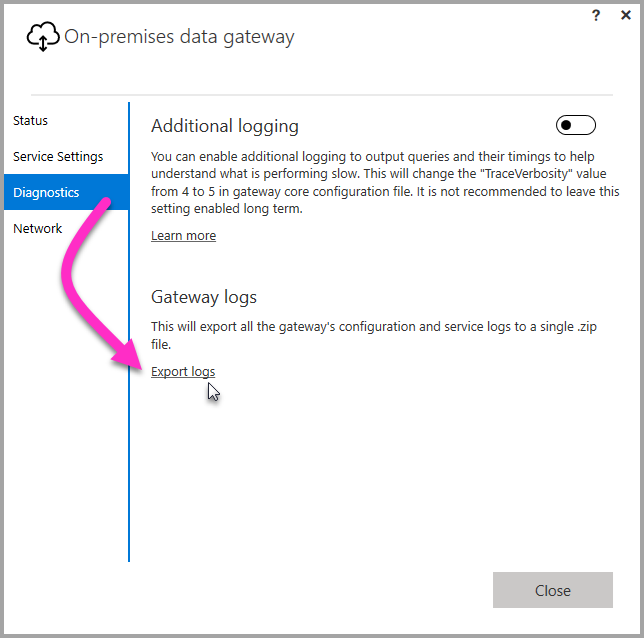
There are several logs you can collect for the gateway, and you should always start with the logs. The simplest way to collect logs after installing the gateway is through the user interface. In the On-premises data gateway user interface, select Diagnostics and then select the Export logslink near the bottom of the page, as shown in the following image.
Installer logs
%localappdata%\Temp\On-premises_data_gateway_*.log
Configuration logs
%localappdata%\Microsoft\On-premises Data Gateway\GatewayConfigurator*.log
On-premises data gateway service logs
C:\Users\PBIEgwService\AppData\Local\Microsoft\On-premises Data Gateway\Gateway*.log
Event Logs
The On-premises data gateway service event logs are present under Application and Services Logs.

Fiddler Trace
Fiddler is a free tool from Telerik that monitors HTTP traffic. You can see the back and forth with the Power BI service from the client machine. This may show errors and other related information.

Refresh History
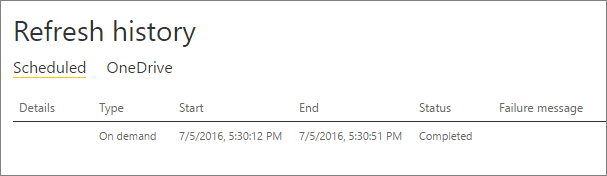
When using the gateway for scheduled refresh, Refresh History can help you see what errors have occurred, as well as provide useful data if you should need to create a support request. You can view both scheduled, as well as on demand, refreshes. Here is how you can get to the Refresh History.
-
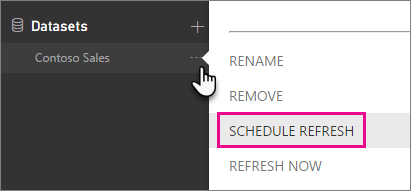
In the Power BI navigation pane, in Datasets, select a dataset > Open Menu > Schedule Refresh.
-
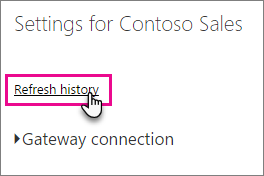
In Settings for... > Schedule Refresh, select Refresh History.
E.g.
Refresh history, local gateway log, trace session...
Regards,
Xiaoxin Sheng