This is best Fabric, Power BI, SQL and AI community event. How do we know? The last event sold out! Save €200 with code FABCMTY200.
Register nowA new Data Days event is coming soon! This time we’re going bigger than ever. Fabric, Power BI, SQL, AI and more. Don't miss out.
Dears,
I'm trying to configure a Schedule Refresh for some reports that are using data from a local SQL Server. My actual problem is that I don't to configure the gateway on my Windows Server. My notebook is configured with a on-premisses gateway and it is working just fine. The problem is when I'm away from office and not connected on my local network.
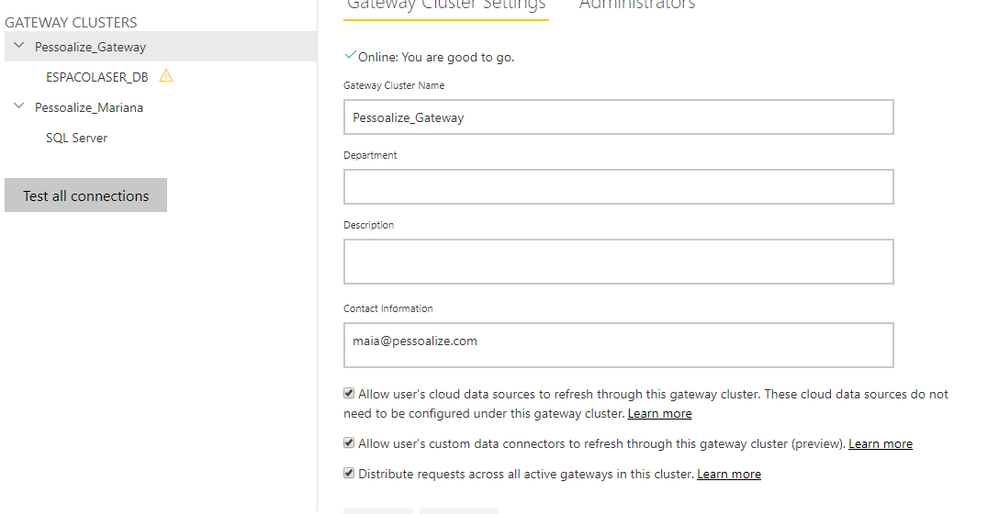
For this, I've configured another Gateway on another machine that runs on the same network and same configs. For example, here follows a print screen of both gateways. In this case one is ok and ready to go and the other cannot reach the server.
I've flagged the option of "load balance throught gateways on this cluster" but - or is not working fine or I did not understood how it is supposed to work.
When I try to update the data and the schedule refresh is appointing to the "not working" gateway, it crashes.
My question is:
1) The gateway cluster is configured right?
2) This funcionality has been misunderstood?
Hi @Anonymous ,
Does that make sense? If so, kindly mark the proper reply as a solution to help others having the similar issue and close the case. If not, let me know and I'll try to help you further.
Best regards
Amy
Hi @Anonymous ,
Your getaway cluster is configured correctly. The gateway cloud service always uses the primary gateway in a cluster unless that gateway is not available. In that case, the service switches to the next available gateway in the cluster.
You can refer to the documents to learn more about gateway cluster:
https://docs.microsoft.com/en-us/data-integration/gateway/service-gateway-high-availability-clusters,
https://docs.microsoft.com/en-us/power-bi/service-gateway-mashup-on-premises-cloud .
Best Regards,
Amy
If this post helps, then please consider Accept it as the solution to help the other members find it more quickly.
Hi @Anonymous
1) The gateway cluster is configured right?
No, you are actually configured 2 different gateway clusters
2) This funcionality has been misunderstood?
Pls read https://docs.microsoft.com/en-us/data-integration/gateway/service-gateway-high-availability-clusters
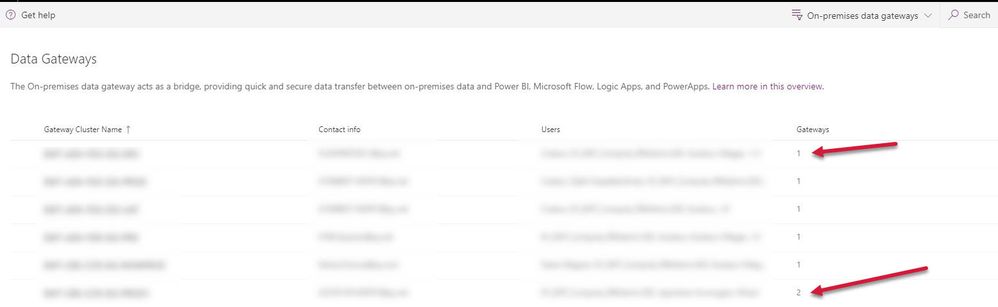
In order to find how many gateways are installed in your Single Cluster you can find it by logging into
https://admin.powerplatform.microsoft.com/ext/DataGateways
Basically while setup the 2 gateway you should select the existing gateway cluster
Check out the May 2026 Power BI update to learn about new features.
Sign up to receive a private message when registration opens and key events begin.
If you have recently started exploring Fabric, we'd love to hear how it's going. Your feedback can help with product improvements.
| User | Count |
|---|---|
| 11 | |
| 9 | |
| 7 | |
| 7 | |
| 6 |
| User | Count |
|---|---|
| 23 | |
| 22 | |
| 19 | |
| 19 | |
| 16 |