This time we’re going bigger than ever. Fabric, Power BI, SQL, AI and more. We're covering it all. You won't want to miss it.
Learn moreGet Fabric Certified for FREE during AI Skills Fest. This week only. Secure your voucher now.
Hello,
I created a report on the power bi service portal from an existing dataset. This report is supposed to be created using a live connection to the power bi dataset.
I then downloaded the report from the File - Download this file menu:
Issue I face is that once the .pbix is downloaded and opened in Power BI Desktop, I see the connection to the dataset is in Import Mode and not a live connection.
This is not the behaviour being stated here:
https://docs.microsoft.com/en-us/power-bi/connect-data/desktop-report-lifecycle-datasets#establish-a...
"When you select Create, you establish a live connection to the selected dataset."
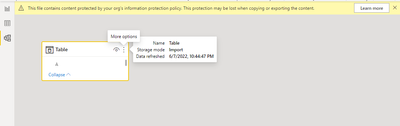
I basically would like to avoid that users creating their report from my dataset can access the full tables content instead of a live connection.
Thanks in advance for any support.
Regards,
Marc.
Hi @Marco57
What I would suggest doing is using Power BI desktop and let them create the connect in that way to the dataset. This will ensure that it only ever uses it as a LiveConnection.
Unfortunately that would not always work as they can still have the possibility to create a report from the portal and download it.
Unless there is a mean to only allow live connections to a given dataset?
Hi @Marco57
Yeah for sure, I would suggest asking the users to create it from PBI Desktop. This ensures that you always have got a copy of the report. It is a good thing to have in place.
Check out the May 2026 Power BI update to learn about new features.
Sign up to receive a private message when registration opens and key events begin.
If you have recently started exploring Fabric, we'd love to hear how it's going. Your feedback can help with product improvements.
| User | Count |
|---|---|
| 16 | |
| 10 | |
| 9 | |
| 8 | |
| 7 |
| User | Count |
|---|---|
| 42 | |
| 36 | |
| 35 | |
| 24 | |
| 20 |