Join us at FabCon Atlanta from March 16 - 20, 2026, for the ultimate Fabric, Power BI, AI and SQL community-led event. Save $200 with code FABCOMM.
Register now!The Power BI Data Visualization World Championships is back! Get ahead of the game and start preparing now! Learn more
Hello Everyone , I have an issues with publishing public embed code on website or portal, I have enable the all setting which required and on generating public embed code I am getting this message-(This embed code is disabled because your organization uses private links which are not supported by Publish to web.)
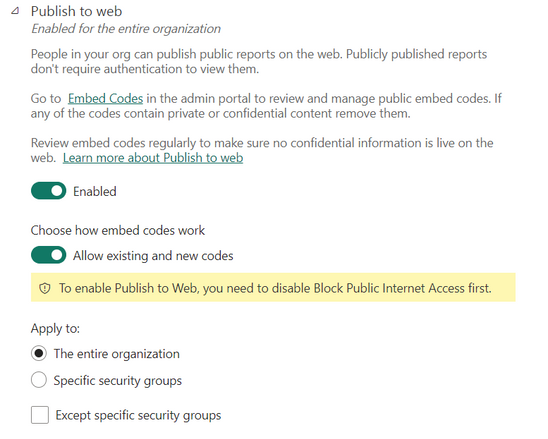
Also Please refer Below image w.r.t to publish on Web settings- It's shows message- "To enable Publish to Web, you need to disable Block Public Internet Access first." I can't publish any of my reports on the web, and I can't find any solution. Can someone help me?
Solved! Go to Solution.
Hi. Like the message says you need to look for another setting at the same place. Make sure you have disabled the block public internet access
If you have both settings correct and you still can't publish to web. Please read the considerations and limitations to check if you really can do it for the report: https://learn.microsoft.com/en-us/power-bi/collaborate-share/service-publish-to-web#considerations-a...
I hope that helps,
Happy to help!
Hi. Like the message says you need to look for another setting at the same place. Make sure you have disabled the block public internet access
If you have both settings correct and you still can't publish to web. Please read the considerations and limitations to check if you really can do it for the report: https://learn.microsoft.com/en-us/power-bi/collaborate-share/service-publish-to-web#considerations-a...
I hope that helps,
Happy to help!
The Power BI Data Visualization World Championships is back! Get ahead of the game and start preparing now!