cancel
Showing results for 
Search instead for 
Did you mean: 

The Power BI Data Visualization World Championships is back! Get ahead of the game and start preparing now! Learn more

Reply
JWinsor
New Member

Issue connecting published report to on-premis Access database.

Hi.

I have a user who is starting out with Power BI, he is the first to use this and I have been helping as best I can. He is trying to generate a report from an Access Database that is on-premis and publish it to the cloud and share it with others to view. The user has created the report and can connect to the database with the desktop application when he is on the corporate network or via VPN but as soon as it is published, he gets various sync errors. We have installed the gateway to the same PC as the database and set it in its default mode and on the face of things, the gateway connection is established.

Initially, the error was scheduled sync is disabled due to one data source not having credentials provided. We granted access as admin and it appears to all be green (below).


Capture1.JPG


Now when we try to schedule a sync, the error we are getting is unspecified error, DataFormat.Error.
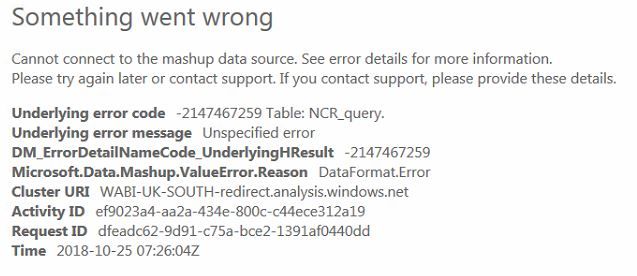
 

Capture2.JPG

We are struggling to understand why the report renders correctly when we are connected using the desktop app but when published it appears to be a format error, the connection also appears to be stable and configured correctly.


Please advise!

1 ACCEPTED SOLUTION
v-danhe-msft
Microsoft Employee
Microsoft Employee

Hi @JWinsor,

Based on my research, the Access database could not use the on-premises gateway, Power BI only support 64 bit personal gateway, you could refer to below link that may help you solve the problem.

https://community.powerbi.com/t5/Integrations-with-Files-and/Using-MS-Access-as-a-data-source-with-O...


Regards,

Daniel He

Community Support Team _ Daniel He
If this post helps, then please consider Accept it as the solution to help the other members find it more quickly.

View solution in original post

2 REPLIES 2
v-danhe-msft
Microsoft Employee
Microsoft Employee

Hi @JWinsor,

Could you please tell me if your problem has been solved? If it is, could you please mark the helpful replies as Answered?


Regards,

Daniel He

Community Support Team _ Daniel He
If this post helps, then please consider Accept it as the solution to help the other members find it more quickly.
v-danhe-msft
Microsoft Employee
Microsoft Employee

Hi @JWinsor,

Based on my research, the Access database could not use the on-premises gateway, Power BI only support 64 bit personal gateway, you could refer to below link that may help you solve the problem.

https://community.powerbi.com/t5/Integrations-with-Files-and/Using-MS-Access-as-a-data-source-with-O...


Regards,

Daniel He

Community Support Team _ Daniel He
If this post helps, then please consider Accept it as the solution to help the other members find it more quickly.

Helpful resources

Announcements
November Power BI Update Carousel

Power BI Monthly Update - November 2025

Check out the November 2025 Power BI update to learn about new features.

Fabric Data Days Carousel

Fabric Data Days

Advance your Data & AI career with 50 days of live learning, contests, hands-on challenges, study groups & certifications and more!

FabCon Atlanta 2026 carousel

FabCon Atlanta 2026

Join us at FabCon Atlanta, March 16-20, for the ultimate Fabric, Power BI, AI and SQL community-led event. Save $200 with code FABCOMM.