Join us at FabCon Atlanta from March 16 - 20, 2026, for the ultimate Fabric, Power BI, AI and SQL community-led event. Save $200 with code FABCOMM.
Register now!Get Fabric Certified for FREE during Fabric Data Days. Don't miss your chance! Request now
Hey! I have PowerBI dataset and trying to set up an incremental refresh to it.
I did everything exactly how it is explained here https://learn.microsoft.com/en-us/power-bi/connect-data/incremental-refresh-configure#filter-data
and in this thread https://community.fabric.microsoft.com/t5/Desktop/Incremental-Refresh-RangeStart-vs-RangeEnd-Paramet...
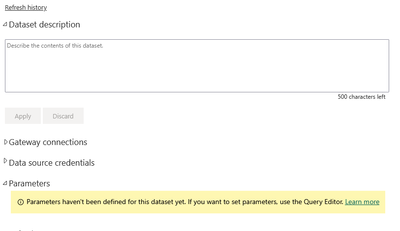
What's confusing that my RangeStart and RangeEnd parameters are not seen in the settings tab
Is there any other indication that my incremental refresh is set up and works?
Based on the speed changes/improvements, I don't think so.
If it is not working - why?
@ppm1 -As I observe, there are two timestamps in the refresh history panel. One is at the top with Start-End date/timestamp and the other one in yellow window with duration. Which one should be actually considered?
@Anonymous- I am looking for the same answer currently. If you have found the solution please reply in this thread. It would be really helpful.
Thank you
@Anonymous - The incremental refresh parameters are deifned in the power bi desktop (.pbix file). Basically, the dataset refresh in power bi service uses the same parameters set up in the dekstop. They are not set up separately in the Power BI Service.
Did I answer your question? Mark my post as a solution!
Also, I would ❤ Kudos if my solution helped. It is a token of appreciation!
Thank you @gauthamboppana ! That is clear and that is what I did. The question is - should I see those parameters in the Service when it is all set? And how can I make sure it's all set up properly, incremental refresh is working?
Once you configure incremental refresh, the service manages those parameters so you won't see them. If you had other parameters, you would see those. If your dataset is published to a workspace back by Premium (or PPU), you could connect with Tabular Editor or SSMS to the XMLA endpoint to see your partitions (and last refreshed datetime). If not, you should notice a much faster refresh time in the refresh history. The first one after publish will be all partitions, but the subsequent ones should be much faster.
Pat
@Anonymous - Unfortunately, you will not see these paramters in Power BI Service.
Check out the November 2025 Power BI update to learn about new features.
Advance your Data & AI career with 50 days of live learning, contests, hands-on challenges, study groups & certifications and more!