FabCon is coming to Atlanta
Join us at FabCon Atlanta from March 16 - 20, 2026, for the ultimate Fabric, Power BI, AI and SQL community-led event. Save $200 with code FABCOMM.
Register now!- Power BI forums
- Get Help with Power BI
- Desktop
- Service
- Report Server
- Power Query
- Mobile Apps
- Developer
- DAX Commands and Tips
- Custom Visuals Development Discussion
- Health and Life Sciences
- Power BI Spanish forums
- Translated Spanish Desktop
- Training and Consulting
- Instructor Led Training
- Dashboard in a Day for Women, by Women
- Galleries
- Data Stories Gallery
- Themes Gallery
- Contests Gallery
- QuickViz Gallery
- Quick Measures Gallery
- Visual Calculations Gallery
- Notebook Gallery
- Translytical Task Flow Gallery
- TMDL Gallery
- R Script Showcase
- Webinars and Video Gallery
- Ideas
- Custom Visuals Ideas (read-only)
- Issues
- Issues
- Events
- Upcoming Events
The Power BI Data Visualization World Championships is back! Get ahead of the game and start preparing now! Learn more
- Power BI forums
- Forums
- Get Help with Power BI
- Service
- Re: In Power Bi Service, Images are broken in tabl...
- Subscribe to RSS Feed
- Mark Topic as New
- Mark Topic as Read
- Float this Topic for Current User
- Bookmark
- Subscribe
- Printer Friendly Page

- Mark as New
- Bookmark
- Subscribe
- Mute
- Subscribe to RSS Feed
- Permalink
- Report Inappropriate Content
In Power Bi Service, Images are broken in table
Hi All,
In PowerBI desktop images are displaying properly when I published the report why the images are broken in tables. It started in Chrome so we thought it was a browser-specific issue but now it happens in Edge as well.
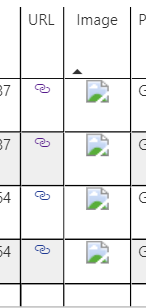
Solved! Go to Solution.


- Mark as New
- Bookmark
- Subscribe
- Mute
- Subscribe to RSS Feed
- Permalink
- Report Inappropriate Content
Hi @SwathiKundar,
If the image is from local, please check the file path.
If you use URL to insert images, please check if the datatype was configured correct as:
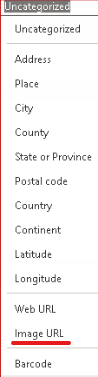
Here is the methods to insert images, please refer:
https://www.sqlshack.com/working-with-images-in-power-bi-desktop-reports/
Best Regards,
Link
If this post helps then please consider Accept it as the solution to help the other members find it more quickly.
- Mark as New
- Bookmark
- Subscribe
- Mute
- Subscribe to RSS Feed
- Permalink
- Report Inappropriate Content
Hi @SwathiKundar,
Is the issue solved? You can follow the above mentioned method to test.
Best Regards,
Link
If this post helps then please consider Accept it as the solution to help the other members find it more quickly.
- Mark as New
- Bookmark
- Subscribe
- Mute
- Subscribe to RSS Feed
- Permalink
- Report Inappropriate Content
Hi @SwathiKundar,
I reproduce you issue as:
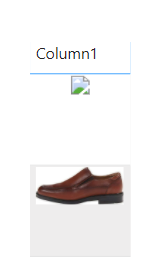
I try the url in different browsers, and they both appear with the message not secure.
Sometimes service blocks untrusted URLs.


The workaround is to download images to local.
Or you can check the source of images to ensure service will not block them.
Best Regards,
Link
- Mark as New
- Bookmark
- Subscribe
- Mute
- Subscribe to RSS Feed
- Permalink
- Report Inappropriate Content
Hi @SwathiKundar,
If the image is from local, please check the file path.
If you use URL to insert images, please check if the datatype was configured correct as:
Here is the methods to insert images, please refer:
https://www.sqlshack.com/working-with-images-in-power-bi-desktop-reports/
Best Regards,
Link
If this post helps then please consider Accept it as the solution to help the other members find it more quickly.


- Mark as New
- Bookmark
- Subscribe
- Mute
- Subscribe to RSS Feed
- Permalink
- Report Inappropriate Content
what is the image source? A website, or your PC's hard disk?
- Mark as New
- Bookmark
- Subscribe
- Mute
- Subscribe to RSS Feed
- Permalink
- Report Inappropriate Content
A website
- Mark as New
- Bookmark
- Subscribe
- Mute
- Subscribe to RSS Feed
- Permalink
- Report Inappropriate Content
Hi @SwathiKundar,
Is the issue solved? You can follow the above mentioned method to test.
Best Regards,
Link
If this post helps then please consider Accept it as the solution to help the other members find it more quickly.
- Mark as New
- Bookmark
- Subscribe
- Mute
- Subscribe to RSS Feed
- Permalink
- Report Inappropriate Content
Still facing same issue.
- Mark as New
- Bookmark
- Subscribe
- Mute
- Subscribe to RSS Feed
- Permalink
- Report Inappropriate Content
Hi @SwathiKundar,
Which method do you use to insert images? Please provide details.
Best Regards,
Link
- Mark as New
- Bookmark
- Subscribe
- Mute
- Subscribe to RSS Feed
- Permalink
- Report Inappropriate Content
Im loading data through azure, when I inserted data into table in Power BI desktop it is working fine but it is not working Service.
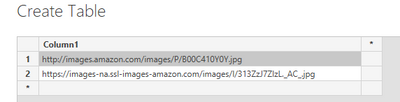
But I followed the same procedure. We have two image url
Report one which contain these type of url, actually this will work. https://images-na.ssl-images-amazon.com/images/I/313ZzJ7ZlzL._AC_.jpg
but Report 2 contain this type of url but it is not working http://images.amazon.com/images/P/B00C410Y0Y.jpg
- Mark as New
- Bookmark
- Subscribe
- Mute
- Subscribe to RSS Feed
- Permalink
- Report Inappropriate Content
It works well in my environment.

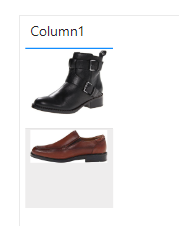
You can recreate the url, or download the images to local computer.
Best Regards,
Link
- Mark as New
- Bookmark
- Subscribe
- Mute
- Subscribe to RSS Feed
- Permalink
- Report Inappropriate Content
It works well on a Desktop. When I published Report, In-service first image doesn't display
Regards,
Swathi
- Mark as New
- Bookmark
- Subscribe
- Mute
- Subscribe to RSS Feed
- Permalink
- Report Inappropriate Content
Hi @SwathiKundar,
I reproduce you issue as:
I try the url in different browsers, and they both appear with the message not secure.
Sometimes service blocks untrusted URLs.
The workaround is to download images to local.
Or you can check the source of images to ensure service will not block them.
Best Regards,
Link

Helpful resources

Power BI Dataviz World Championships
The Power BI Data Visualization World Championships is back! Get ahead of the game and start preparing now!

Power BI Monthly Update - December 2025
Check out the December 2025 Power BI Holiday Recap!

FabCon Atlanta 2026
Join us at FabCon Atlanta, March 16-20, for the ultimate Fabric, Power BI, AI and SQL community-led event. Save $200 with code FABCOMM.


