Forum Discussion

 Advocate I
IE 11 - left menu not working
Had to move to a different computer today, after getting it set up, went into Power BI and I am unable to see the left menu.
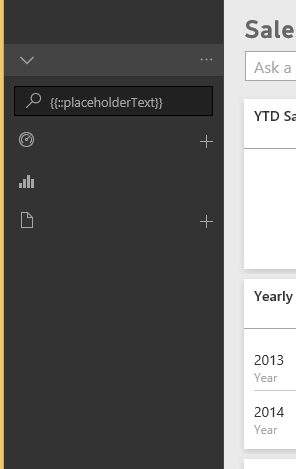
Tried changing the security setting with no luck.
Using Dev tools I get "Access is Denied" on localytics.min.js.
Any help would be appreciated.
10 Replies
 pedramr
Microsoft Employee
Hey, if the problem persists for you, I recommend opening a support case. I would love to have a dev help you on this.
Cheers,
Pedram
Architect @ Microsoft
- gazzatopdude
I have the exact same issue in IE10
 DaveBreyley
I had tried a couple things with adjusting security settings and even a registary setting change. After a restart at the endof the day, issues resolved it's self.
- Greg_Deckler
Community Champion
I don't believe that this is an IE11 issue. I am able to see my Power BI Service fine in IE11 and Edge on Windows 10. Looks like a rendering issue of some sort definitely seems related to javascript. Are you able to see if there is a disruption in your Office 365 dashboard related to Power BI?
- DaveBreyley
UPDATE:
Power BI works fine in Chrome.
Also I can view correctly if I am in InPrivate browsing
- jillian
Advocate II
I am also experiencing the same left menu issue on one of my pc's with IE11 on Win8.1.
 MohsenNew Member
Exactly the same issue with IE11 on Win 7. Yet do not work in IE's in-private mode.
has no problem in Chrome,
Any solution for IE11?
 AnonymousNot applicable
I am having the same issue with IE 11.

