Forum Discussion
How to access reports under workspace that users cannot access?
- Anonymous4 years ago
Hi MiSeKa ,
Yes, there are ways to achieve what you want, perhaps you could consider setting up RLS? It can be used to restrict data access for given users.
If you want to learn more about this function, please refer to this doc:Row-level security (RLS) with Power BI - Power BI | Microsoft Docs.
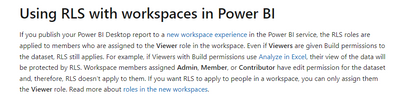
At the same time, you need to notice that If you publish your Power BI Desktop report to a new workspace experience in the Power BI service, the RLS roles are applied to members who are assigned to the Viewer role in the workspace. And Workspace members assigned Admin, Member, or Contributor have edit permission for the dataset and, therefore, RLS doesn’t apply to them.
As the image shows:
All relevant information is available in the link above, which you can refer to in detail.
Best regards,
Community Support Team Selina zhu
If this post helps, then please consider Accept it as the solution to help the other members find it more quickly
Hello,
I want to have all my reports under the same workspace and some reports are visible to everyone, and some are only visible to users that I authorize. Is there a way to do this?
Thank you for your help
Hi MiSeKa ,
Yes, there are ways to achieve what you want, perhaps you could consider setting up RLS? It can be used to restrict data access for given users.
If you want to learn more about this function, please refer to this doc:Row-level security (RLS) with Power BI - Power BI | Microsoft Docs.
At the same time, you need to notice that If you publish your Power BI Desktop report to a new workspace experience in the Power BI service, the RLS roles are applied to members who are assigned to the Viewer role in the workspace. And Workspace members assigned Admin, Member, or Contributor have edit permission for the dataset and, therefore, RLS doesn’t apply to them.
As the image shows:
All relevant information is available in the link above, which you can refer to in detail.
Best regards,
Community Support Team Selina zhu
If this post helps, then please consider Accept it as the solution to help the other members find it more quickly
