cancel
Showing results for 
Search instead for 
Did you mean: 

View all the Fabric Data Days sessions on demand. View schedule

Reply
Anonymous
Not applicable

How much time did an user logged in?

Hello guys,


Supposed I have the following data of users, each time they logged in and logged out:

User    LoggingType   Date 

1         In                     2018-10-05 13:18:26.900

1         Out                  2018-10-05 13:18:54.353

1         In                     2018-10-05 13:19:23.637

1         Out                  2018-10-05 13:20:03.887

2         In                     2018-10-05 13:21:25.887

2         Out                  2018-10-05 13:22:01.247

3         In                     2018-10-10 18:24:33.867

3         Out                  2018-10-10 18:25:35.443


How do I create another column illustrating how long an user was logged in for a session? For example, here's what I wish to see:

User    LoggingType   Date                                      Duration

1         In                     2018-10-05 13:18:26.900      

1         Out                  2018-10-05 13:18:54.353      2018-10-05 13:18:54.353 - 2018-10-05 13:18:26.900

1         In                     2018-10-05 13:19:23.637

1         Out                  2018-10-05 13:20:03.887      2018-10-05 13:20:03.887 - 2018-10-05 13:19:23.637

2         In                     2018-10-05 13:21:25.887

2         Out                  2018-10-05 13:22:01.247      2018-10-05 13:22:01.247 - 2018-10-05 13:21:25.887

3         In                     2018-10-10 18:24:33.867

3         Out                  2018-10-10 18:25:35.443      2018-10-10 18:25:35.443 - 2018-10-10 18:24:33.867

1 ACCEPTED SOLUTION
v-danhe-msft
Microsoft Employee
Microsoft Employee

Hi @Anonymous ,

Based on my test, you could refer to below steps:

Add index for your data in query editor:

1.PNG

Apply it and create below formula:

Column = var a=[Index]-1
return CALCULATE(MAX(Table1[Date]),FILTER('Table1','Table1'[Index]=a))

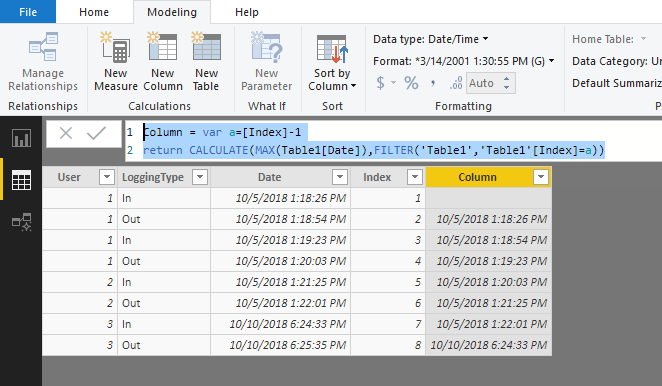
Result:

1.PNG

Now you could use the [Date] column to minus the [Column].


Regards,

Daniel He


Community Support Team _ Daniel He
If this post helps, then please consider Accept it as the solution to help the other members find it more quickly.

View solution in original post

3 REPLIES 3
v-danhe-msft
Microsoft Employee
Microsoft Employee

Hi @Anonymous ,

Based on my test, you could refer to below steps:

Add index for your data in query editor:

1.PNG

Apply it and create below formula:

Column = var a=[Index]-1
return CALCULATE(MAX(Table1[Date]),FILTER('Table1','Table1'[Index]=a))

Result:

1.PNG

Now you could use the [Date] column to minus the [Column].


Regards,

Daniel He


Community Support Team _ Daniel He
If this post helps, then please consider Accept it as the solution to help the other members find it more quickly.
Anonymous
Not applicable

Thanks this is what I was looking for

GilbertQ
Super User
Super User

Hi there

What you would need to do, is to create an Index column and then you can create a calculated column which will then put in the data on the corresponding row

This answer explains how to achieve this: https://community.powerbi.com/t5/Desktop/How-to-get-previous-row-value-for-text-column/td-p/312560


Did I answer your question? Mark my post as a solution!

Proud to be a Super User!


Power BI Blog

Helpful resources

Announcements
November Power BI Update Carousel

Power BI Monthly Update - November 2025

Check out the November 2025 Power BI update to learn about new features.

Fabric Data Days Carousel

Fabric Data Days

Advance your Data & AI career with 50 days of live learning, contests, hands-on challenges, study groups & certifications and more!

FabCon Atlanta 2026 carousel

FabCon Atlanta 2026

Join us at FabCon Atlanta, March 16-20, for the ultimate Fabric, Power BI, AI and SQL community-led event. Save $200 with code FABCOMM.