Forum Discussion

How do you change the data label number format in Power BI Charts?
- 11 years ago
I tried the following with one of my calcuations in "Power BI Desktop" and I was able to get the type of formatting that you were looking for vs. the default #.##K type formatting you had in your screenshot. Unfortuneatly that only works for card style tyles since it changes the numeric format to text (And text style calcs can't be used in bar graphs and other charts)
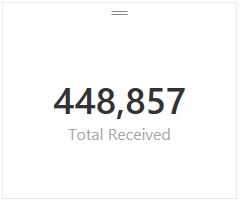
Total Received = FORMAT(SUM(Receipts[Receipts]),"#,###") -- This measure formula rendered like this:
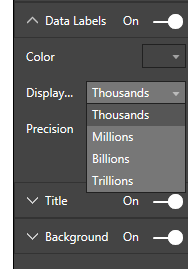
Based on the current version the only changes you can make to label formatting for measures are the following:
Hope this helped. I would expect that we'll see more control for formatting in a future build at some point although I don't know when that will happen.

The data source is a simple flat table in Excel. I'm then pulling that table into Power BI Designer like you mentioned.
In Power BI Designer, I created a simple measure that uses COUNTROWS to give me the total number of row instances in the table, which I am simply displaying in a line chart to view the data over a 12-month period (e.g. Monthly Users Per Month).
So, I'm using a measure as my 'Values' field for the line chart visualization, and not a column from the source table (I'm not sure if that's why I can't format the numbers correctly or not).
Please see the screen shot below for more details.
Again, I'm simply trying to change the "66.22k" to "66,220" and so on.
Thanks!


 Memorable Member
click on a chart then click on the paint brush icon ( on the Visualizations section on the right) to see the formatting options. then click on Data Labels and now you can adjust the format.
- Anonymous11 years agoNot applicable
Thanks for the response, but this does not allow you to adjust the number format in a chart. All you can do here is change the number of decimal places. For example, instead of "50.25k", you can change it to "50.3k", etc.
I'm trying to change "50.3k" to "50,300", etc.
There is a "Display" drop-down button in this options section, but it is grayed out and inactive.
Thanks!
- andre11 years ago
I don't think it's possible, there has to be an option to display numbers in a default format. You can click on a smily face at the top and submit this as a bug or feature request.
- cdotzenrod11 years ago
Advocate I
Like I said, you can only use the text formatting option I shared for card type layouts where a text format would be possible. If you wan't to adjust the format of measures on a bar chart you just have the built-in chart formatting options for Thousands, Millons, and Billions currently. I don't see way to get around that with the current build of Power BI.
- Anonymous4 years agoNot applicable
Thanks for this!!