FabCon is coming to Atlanta
Join us at FabCon Atlanta from March 16 - 20, 2026, for the ultimate Fabric, Power BI, AI and SQL community-led event. Save $200 with code FABCOMM.
Register now!- Power BI forums
- Get Help with Power BI
- Desktop
- Service
- Report Server
- Power Query
- Mobile Apps
- Developer
- DAX Commands and Tips
- Custom Visuals Development Discussion
- Health and Life Sciences
- Power BI Spanish forums
- Translated Spanish Desktop
- Training and Consulting
- Instructor Led Training
- Dashboard in a Day for Women, by Women
- Galleries
- Data Stories Gallery
- Themes Gallery
- Contests Gallery
- QuickViz Gallery
- Quick Measures Gallery
- Visual Calculations Gallery
- Notebook Gallery
- Translytical Task Flow Gallery
- TMDL Gallery
- R Script Showcase
- Webinars and Video Gallery
- Ideas
- Custom Visuals Ideas (read-only)
- Issues
- Issues
- Events
- Upcoming Events
The Power BI Data Visualization World Championships is back! Get ahead of the game and start preparing now! Learn more
- Power BI forums
- Forums
- Get Help with Power BI
- Service
- Historic data (last 4 days data), dataflow vs data...
- Subscribe to RSS Feed
- Mark Topic as New
- Mark Topic as Read
- Float this Topic for Current User
- Bookmark
- Subscribe
- Printer Friendly Page

- Mark as New
- Bookmark
- Subscribe
- Mute
- Subscribe to RSS Feed
- Permalink
- Report Inappropriate Content
Historic data (last 4 days data), dataflow vs dataset ?
I have premium capacity p1 workspace
I have an oracle pipeline query that gets data for the previous working day only (more than a million rows)
business need is to get data , at any given time, for the last 4 days...
what should be the best possible approach for this, is dataflow a better approach ?
i am right now experimenting with power bi dataset import mode, since 30 minutes screen shows loading from...so i think its loading into azure ?
how do I get historic data into my report if the business need is to get data for last 4 days ? mind you i cannot expand the pipeline query where clause to get 4 days data, each day is 1 million rows, so it has to be one day at a time
please suggest how to show historic data in the report ? and if dataflow is faster compared to dataset ?
Solved! Go to Solution.


- Mark as New
- Bookmark
- Subscribe
- Mute
- Subscribe to RSS Feed
- Permalink
- Report Inappropriate Content
Can you just close this thread by accepting it, if it is solved
Thanks
Regards
Amine Jerbi
If I answered your question, please mark this thread as accepted
and you can follow me on
My Website, LinkedIn and Facebook
- Mark as New
- Bookmark
- Subscribe
- Mute
- Subscribe to RSS Feed
- Permalink
- Report Inappropriate Content
Trying to apply incremental refresh to my DQ dataset in power bi desktop, I will close this topic once its done, if thats ok, also when I right click on the table (after transform data), I dont see see native query enabled, my understanding is it needs to be enabled for incremental refresh to work
and in general do you think incremental refresh makes sense for direct query ? cause its direct query and there's no refresh concept at all
- Mark as New
- Bookmark
- Subscribe
- Mute
- Subscribe to RSS Feed
- Permalink
- Report Inappropriate Content
Closing this topic, actually I could not even specify parameters to direct query dataset in desktop

- Mark as New
- Bookmark
- Subscribe
- Mute
- Subscribe to RSS Feed
- Permalink
- Report Inappropriate Content
Hi @Anonymous
Your questions are really clear;
"what should be the best possible approach for this, is dataflow a better approach ?"
Better approach than what?
"i am right now experimenting with power bi dataset import mode, since 30 minutes screen shows loading from...so i think its loading into azure ?"
Are you talking about after publishing to the service or in your desktop?
"how do I get historic data into my report if the business need is to get data for last 4 days ?"
Are you talking about how to refresh your report?
please suggest how to show historic data in the report ?
It depends where the source is, a Gateway is a solution
and if dataflow is faster compared to dataset ?
Can't campare as the Dataflow will become the source for your dataset.
Regards
Amine Jerbi
If I answered your question, please mark this thread as accepted
and you can follow me on
My Website, LinkedIn and Facebook
- Mark as New
- Bookmark
- Subscribe
- Mute
- Subscribe to RSS Feed
- Permalink
- Report Inappropriate Content
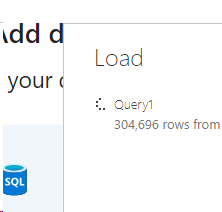
This (below screenshot) is in power bi desktop import mode, does that mean the data is being loaded into azure ?
- Mark as New
- Bookmark
- Subscribe
- Mute
- Subscribe to RSS Feed
- Permalink
- Report Inappropriate Content
No, It's been loaded into your desktop, into the Dataset File.
Regards
Amine Jerbi
If I answered your question, please mark this thread as accepted
and you can follow me on
My Website, LinkedIn and Facebook
- Mark as New
- Bookmark
- Subscribe
- Mute
- Subscribe to RSS Feed
- Permalink
- Report Inappropriate Content
So my data is 3 million rows, takes forever to load in the power bi desktop. (import mode)
is it going to be the same refresh time when I upload it to service (import mode)
- Mark as New
- Bookmark
- Subscribe
- Mute
- Subscribe to RSS Feed
- Permalink
- Report Inappropriate Content
@Anonymous
Not sure about 3 million rows will take for ever! besides you are gonna have to do some ETL to your data, and build a dataset. You are gonna keep only the data you need for your reports. Direct Query mode is another way to bring your data.
Refreshing the data in the service: there are other techinques to make the refresh takes less time, like using paramaters or incremental refresh.
Regards
Amine Jerbi
If I answered your question, please mark this thread as accepted
and you can follow me on
My Website, LinkedIn and Facebook
- Mark as New
- Bookmark
- Subscribe
- Mute
- Subscribe to RSS Feed
- Permalink
- Report Inappropriate Content
Thank you so much, one last question, is incremental refresh possible only with import mode ? I am having a timeout issue with dataflow eventhough i set command timeout to be 60 minutes but i opened another thread for it
- Mark as New
- Bookmark
- Subscribe
- Mute
- Subscribe to RSS Feed
- Permalink
- Report Inappropriate Content
No both Import and DQ but maybe with some limitations, here is a link to follow
https://docs.microsoft.com/en-us/power-bi/connect-data/incremental-refresh-overview
https://docs.microsoft.com/en-us/power-bi/guidance/power-query-folding
Where is the thread to your other issue?
Regards
Amine Jerbi
If I answered your question, please mark this thread as accepted
and you can follow me on
My Website, LinkedIn and Facebook
- Mark as New
- Bookmark
- Subscribe
- Mute
- Subscribe to RSS Feed
- Permalink
- Report Inappropriate Content
The dataflow topic is here
https://community.powerbi.com/t5/Service/dataflow-operation-timed-out/m-p/1798401#M126631
- Mark as New
- Bookmark
- Subscribe
- Mute
- Subscribe to RSS Feed
- Permalink
- Report Inappropriate Content
Can you just close this thread by accepting it, if it is solved
Thanks
Regards
Amine Jerbi
If I answered your question, please mark this thread as accepted
and you can follow me on
My Website, LinkedIn and Facebook
Helpful resources

Power BI Dataviz World Championships
The Power BI Data Visualization World Championships is back! Get ahead of the game and start preparing now!

Power BI Monthly Update - December 2025
Check out the December 2025 Power BI Holiday Recap!

FabCon Atlanta 2026
Join us at FabCon Atlanta, March 16-20, for the ultimate Fabric, Power BI, AI and SQL community-led event. Save $200 with code FABCOMM.


| User | Count |
|---|---|
| 58 | |
| 56 | |
| 35 | |
| 18 | |
| 14 |


