Forum Discussion
Exporting Summarized data with live connection not refreshing in Excel
- 2 years ago
Hello All,
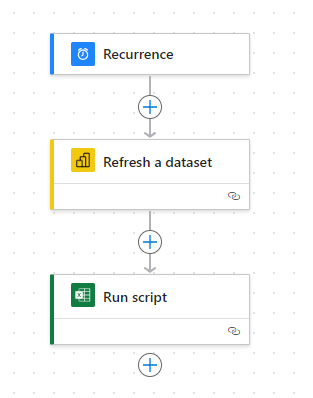
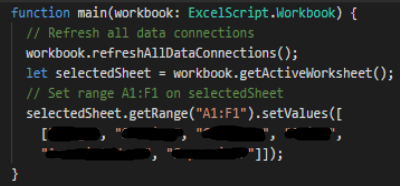
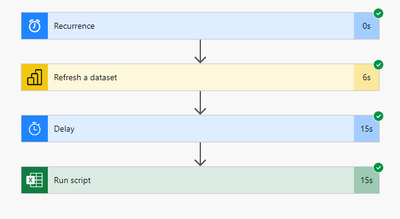
I used the following script and Power Automate flow to work.
Hi nleuck_101 ,
It is important to note that when using a live connection in Power BI, the data is not stored in Power BI. This means that the data in the Excel file on SharePoint needs to be updated in the source to be reflected in Power BI through the live connection.
You can refer to below document:
Refresh a semantic model created from an Excel workbook - cloud - Power BI | Microsoft Learn
Connect Excel to Power BI semantic models - Power BI | Microsoft Learn
Best Regards,
Adamk Kong
If this post helps, then please consider Accept it as the solution to help the other members find it more quickly.
- nleuck_1012 years ago
Continued Contributor
Hello Anonymous
I think you misunderstand. I'm not connecting this data to Power BI. I'm exporting the data from Power BI to Excel using the export data and live connection. My Power BI data is connected to SQL Server that refreshes everyday. I export that data to Excel but need it to refresh everyday. My Power BI report refreshes but it's not refreshing the Excel data.
- Raj37982 years agoFrequent Visitor
Hey nleuck_101 did you find a solution? Am looking for somthing similar as well !
- foodd2 years ago
Community Champion
Hello Raj3798 , thanks for reaching out to the Fabric Community Forum. Since the original post has a Soution, and three months old, please create a new post for your questions instead of replying to the existing one. With that, please reply to your post with this detail, and then mark as a Solution. Rest assured, our community is here to support you, and this approach will help ensure that your question is seen by more people and answered more quickly.