Join us at FabCon Atlanta from March 16 - 20, 2026, for the ultimate Fabric, Power BI, AI and SQL community-led event. Save $200 with code FABCOMM.
Register now!View all the Fabric Data Days sessions on demand. View schedule
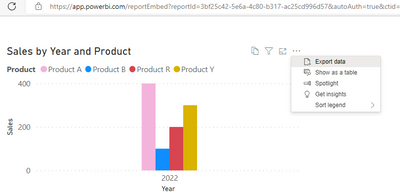
I have an embedded report (iframe) published in web page for demo reasons for some clients. It is vital for our clients to have the "three dots" button on the visual with the option to export data. I don't know how can I have it appeared on the published visual.
Even better is it possible to create a button on a report, labeled e.g. "Download Data", with that potential?
Thanks in advance
Solved! Go to Solution.
Hi @Anonymous
If you export the report through "Embed a report in a secure portal or website" , for the whole report , you can only filter data if you add fields in report-level filter . But the visual in the report supports export data , you can do it with three dots on the visual .
As for the idea you came up with, you can post it on the Ideas forum. If a feedback is high voted there by other customers, it will be promising that Microsoft Product Team will take it into consideration when designing the next version in the future.
https://ideas.powerbi.com/ideas/
Best Regards,
Community Support Team _ Ailsa Tao
If this post helps, then please consider Accept it as the solution to help the other members find it more quickly.
Hi @Anonymous
If you export the report through "Embed a report in a secure portal or website" , for the whole report , you can only filter data if you add fields in report-level filter . But the visual in the report supports export data , you can do it with three dots on the visual .
As for the idea you came up with, you can post it on the Ideas forum. If a feedback is high voted there by other customers, it will be promising that Microsoft Product Team will take it into consideration when designing the next version in the future.
https://ideas.powerbi.com/ideas/
Best Regards,
Community Support Team _ Ailsa Tao
If this post helps, then please consider Accept it as the solution to help the other members find it more quickly.
Check out the November 2025 Power BI update to learn about new features.
Advance your Data & AI career with 50 days of live learning, contests, hands-on challenges, study groups & certifications and more!