FabCon is coming to Atlanta
Join us at FabCon Atlanta from March 16 - 20, 2026, for the ultimate Fabric, Power BI, AI and SQL community-led event. Save $200 with code FABCOMM.
Register now!- Power BI forums
- Get Help with Power BI
- Desktop
- Service
- Report Server
- Power Query
- Mobile Apps
- Developer
- DAX Commands and Tips
- Custom Visuals Development Discussion
- Health and Life Sciences
- Power BI Spanish forums
- Translated Spanish Desktop
- Training and Consulting
- Instructor Led Training
- Dashboard in a Day for Women, by Women
- Galleries
- Data Stories Gallery
- Themes Gallery
- Contests Gallery
- QuickViz Gallery
- Quick Measures Gallery
- Visual Calculations Gallery
- Notebook Gallery
- Translytical Task Flow Gallery
- TMDL Gallery
- R Script Showcase
- Webinars and Video Gallery
- Ideas
- Custom Visuals Ideas (read-only)
- Issues
- Issues
- Events
- Upcoming Events
The Power BI Data Visualization World Championships is back! Get ahead of the game and start preparing now! Learn more
- Power BI forums
- Forums
- Get Help with Power BI
- Service
- Re: Excel Sharepoint Data Refresh - Can't refresh ...
- Subscribe to RSS Feed
- Mark Topic as New
- Mark Topic as Read
- Float this Topic for Current User
- Bookmark
- Subscribe
- Printer Friendly Page


- Mark as New
- Bookmark
- Subscribe
- Mute
- Subscribe to RSS Feed
- Permalink
- Report Inappropriate Content
Excel Sharepoint Data Refresh - Can't refresh your data
I have an excel file in Sharepoint Online, which has a simple table of data. Using Power BI Desktop, I can connect to it and create a report. After I publish the report to Power BI Service, I can see the report, and it all looks good. However, as soon as I try to refresh the Dataset, I get the following error:
Please try again later or contact support. If you contact support, please provide these details.
Solved! Go to Solution.
- Mark as New
- Bookmark
- Subscribe
- Mute
- Subscribe to RSS Feed
- Permalink
- Report Inappropriate Content
Hi @cmncp,
Firstly, for excel located in on-premises SharePoint site, we need to use Windows authenticaion. For Excel located in SharePoint Online, we need to use OAuth2 authentication.
Secondly, to access on-premises data source, gateway is required when refreshing dataset. And both personal gateway and on-premises gateway require Pro.
Thanks,
Lydia Zhang

- Mark as New
- Bookmark
- Subscribe
- Mute
- Subscribe to RSS Feed
- Permalink
- Report Inappropriate Content
Similar issue, my file has data from tabular model and 2 sheets of plain table data.
Created excel file with 2 sheets of plain table data and 3 sheets with pivot table connecting to tabular model(external data connection). developed Power Bi report off of this file.
This file is saved in sharepoint site but need help to understand how this file can be refreshed automatically including the data refresh, so that power bi displays latest data.
has anyone come across this issue?


- Mark as New
- Bookmark
- Subscribe
- Mute
- Subscribe to RSS Feed
- Permalink
- Report Inappropriate Content
Hi,
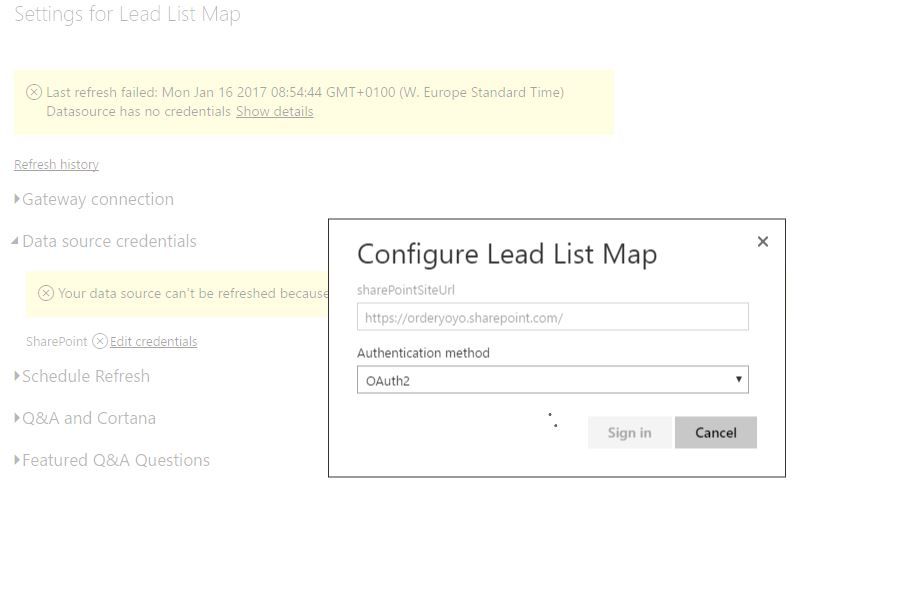
I have the same issue. Created a report connecting to sharepoint, published and now I can't refresh because it never signs in.
- Mark as New
- Bookmark
- Subscribe
- Mute
- Subscribe to RSS Feed
- Permalink
- Report Inappropriate Content
Hi @cmncp,
I am not able to reproduce your issue. How do you connect to the Excel file in Power BI Desktop, via “Get Data->Web” entry?
When you connect to the Excel file, please choose Organizational account type in Power BI Desktop, once you publish the Power BI Desktop file to Power BI Service, go to Settings for your dataset, then check if you get OAuth2 authentication method under Data source credentials section.
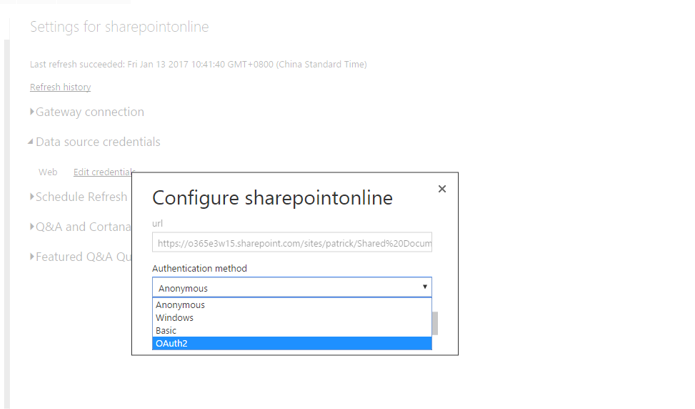
Thanks,
Lydia Zhang


- Mark as New
- Bookmark
- Subscribe
- Mute
- Subscribe to RSS Feed
- Permalink
- Report Inappropriate Content
You are right! OAuth2 is the answer for Get Data --> Web and credentials fail in Power BI Services!!!! Thanks x 10000.
Spent 10 hours and finally find the answer here. Please spread the message so more people can be saved.
- Mark as New
- Bookmark
- Subscribe
- Mute
- Subscribe to RSS Feed
- Permalink
- Report Inappropriate Content
Hi Lydia.
Thanks for the reply. I was using Get Data > Excel, not Get Data > Web.
When I use the Web option, and then choose OAuth2, it works when my file is in One Drive for Business, but not when it is in Sharepoint Online, which is the requirement.
When trying to connect to Sharepoint Online, I do the following:
- Get Data > Web
- Enter the URL of the excel file (minus the ?Web=1 querystring)
- I then choose Organizational Account and click Sign In. I get the following error:
"The WWW-Authenticate header doesn't contain a valiud authorization URI. Header value: 'NTLM'."
- Mark as New
- Bookmark
- Subscribe
- Mute
- Subscribe to RSS Feed
- Permalink
- Report Inappropriate Content
Hi @cmncp,
Enter URL using format like: https://XXXXX.sharepoint.com/sites/XXXX/Shared%20Documents/excelname.xlsx .
Thanks,
Lydia Zhang
- Mark as New
- Bookmark
- Subscribe
- Mute
- Subscribe to RSS Feed
- Permalink
- Report Inappropriate Content
I discovered that my issue was that the Sharepoint installation was actually on premise, not online.
- Mark as New
- Bookmark
- Subscribe
- Mute
- Subscribe to RSS Feed
- Permalink
- Report Inappropriate Content
Hi @cmncp,
Please follow the guide in this similar thread to connect to Excel file located at on-premises SharePoint from Power BI Desktop. After you publish Power BI Desktop to Power BI Service, you would need to add the excel data source under on-premises gateway in order to refresh the dataset.
Thanks,
Lydia Zhang
- Mark as New
- Bookmark
- Subscribe
- Mute
- Subscribe to RSS Feed
- Permalink
- Report Inappropriate Content
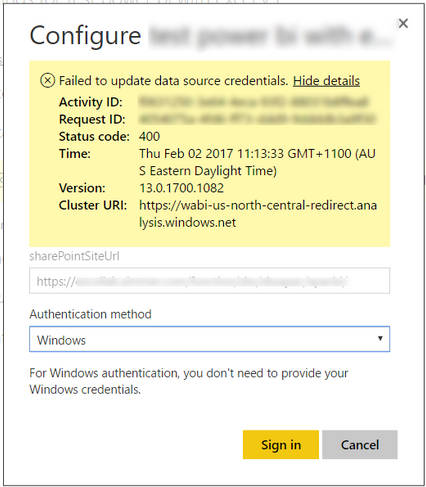
Sorry for the late reply. When I use this method, I am still unable to refresh the data. See the error message below. The only options in authentication method are Anonymous and Windows.
- Mark as New
- Bookmark
- Subscribe
- Mute
- Subscribe to RSS Feed
- Permalink
- Report Inappropriate Content
Hi @cmncp,
In Power BI Desktop, you should use Windows authentication to connect to Excel file located at on-premises SharePoint Site. And when you refresh dataset in Power BI Service, you should use Windows authentication as well.
Thanks,
Lydia Zhang
- Mark as New
- Bookmark
- Subscribe
- Mute
- Subscribe to RSS Feed
- Permalink
- Report Inappropriate Content
Hi @Anonymous
This is what I am doing. I get the error message shown above when I am in the Power BI web service, trying to edit the connection details. I choose Windows Auth, click sign in, and get that error.
Chris
- Mark as New
- Bookmark
- Subscribe
- Mute
- Subscribe to RSS Feed
- Permalink
- Report Inappropriate Content
Hi @cmncp,
Are you able to use on-premises gateway to refresh your dataset?
Thanks,
Lydia Zhang
- Mark as New
- Bookmark
- Subscribe
- Mute
- Subscribe to RSS Feed
- Permalink
- Report Inappropriate Content
@Anonymous,
I didn't know you could do that! 2 questions
- Should I use Windows or OAuth2 athentication?
- Is it possible to set it up without using the gateway? Using the gateway means we have to go on the PRO license.
- Mark as New
- Bookmark
- Subscribe
- Mute
- Subscribe to RSS Feed
- Permalink
- Report Inappropriate Content
Hi @cmncp,
Firstly, for excel located in on-premises SharePoint site, we need to use Windows authenticaion. For Excel located in SharePoint Online, we need to use OAuth2 authentication.
Secondly, to access on-premises data source, gateway is required when refreshing dataset. And both personal gateway and on-premises gateway require Pro.
Thanks,
Lydia Zhang
- Mark as New
- Bookmark
- Subscribe
- Mute
- Subscribe to RSS Feed
- Permalink
- Report Inappropriate Content
Hi @Anonymous
Now that I am trying to configure this is production, I am having more problems. Using a test folder I got this working ok. But now trying to connect to a different folder, it is not working.
A folder has been created in a Sharepoint Library, and I have uploaded my spreadsheet into it. I can point my data connection in PowerBI Desktop to it and it refreshes. I am now trying to add a new connection to the Power BI Gateway.
The sharepoint (on prem) URL is "https://<site>.<company>.com/function/ZZBS/ZZBSAPAC/DH/DRMHR" I think "DH" is the site, and "DRMHR" is the library. There is a folder within the library that contains my files.
If I try and add a new gateway datasource and use the full URL "https://<site>.<company>.com/function/ZZBS/ZZBSAPAC/DH/DRMHR", I get the error "SharePoint: Request failed: The remote server returned an error: (400) Bad Request.".
If I use the URL "https://<site>.<company>.com/function/ZZBS/ZZBSAPAC/DH", it works ok. However when I publish my Power BI report, it does not allow me to "Use a data gateway". The option is grayed out. It is like it is not recognizing that the connections are the same.
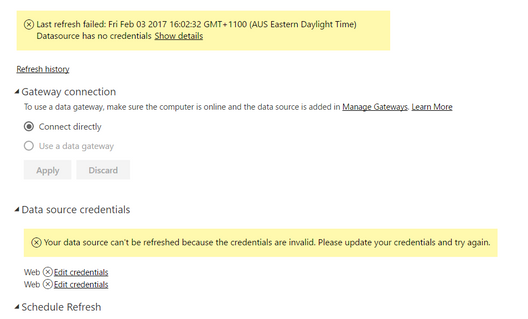
Please help!
- Mark as New
- Bookmark
- Subscribe
- Mute
- Subscribe to RSS Feed
- Permalink
- Report Inappropriate Content
For anyone who has the same problem, this issue was resolved by selecting "Web" rather than "Sharepoint" when adding the new datasource to ther gateway.

- Mark as New
- Bookmark
- Subscribe
- Mute
- Subscribe to RSS Feed
- Permalink
- Report Inappropriate Content
I have a similar issue. I have a Power BI file that is using Excel file on Sharepoint as data souces. When I refresh the dataset from Power BI desktop, it goes through without any problem but the refresh for the file published on the Power BI service fails with "Edit Credentials" message.
what is happening?

Helpful resources

Power BI Dataviz World Championships
The Power BI Data Visualization World Championships is back! Get ahead of the game and start preparing now!

Power BI Monthly Update - November 2025
Check out the November 2025 Power BI update to learn about new features.

FabCon Atlanta 2026
Join us at FabCon Atlanta, March 16-20, for the ultimate Fabric, Power BI, AI and SQL community-led event. Save $200 with code FABCOMM.


