Hello,
After April 1st, the following issue emerged in the Power BI Service. If the consumer's service account language is set to Bulgarian (Български), the consumer is unable to change dates in a date range slicer. This applies both to manual input and calendar pop-up input. All consumers have PRO licenses.
Here are the steps to reproduce:
- Set your service language to English
- Open a report with date slicer
- Make changes to the date range via calendar popup or manual input [SUCCESS]
- Set your service language to Bulgarian (Български)
- Open a report with date slicer
- Make changes to the date range via calendar popup or manual input [FAIL]
This behavior applies to all date range slicers.
A workaround is to change the slicer type to Relative date picker or add a slider.
Here's how the slicer looks with service language set to English:
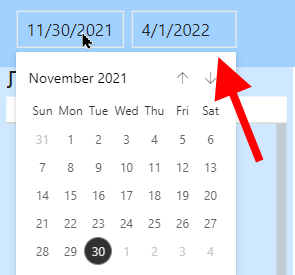 Service language set to English
Here's how the slicer looks with service language set to Bulgarian:
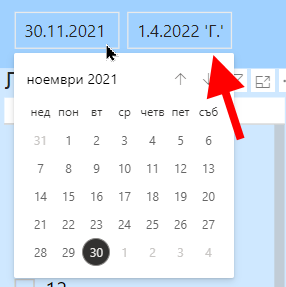 Service language set to Bulgarian


