Join us at FabCon Atlanta from March 16 - 20, 2026, for the ultimate Fabric, Power BI, AI and SQL community-led event. Save $200 with code FABCOMM.
Register now!Get Fabric Certified for FREE during Fabric Data Days. Don't miss your chance! Request now
Hi,
I want to keep the original date format (UK - dd/mm/yy) of my source Excel sheets. It's in the UK format there and it's specifically set to the UK format too. It shows in the US format in the Power BI service even after changing it via locale to UK format and it does the same in the PBIX.
I've tried:
- Setting the format to date with GB locale on the dataflow
- Setting the format to date with GB locale on the pbix
- Setting the format to date with US locale on the dataflow (as this has weirdly flipped it and worked on other reports)
- Setting the format to date with US locale on the pbix
- All combinations of the above!
- I've checked the language format of my PC, browser, Power BI desktop and the Power BI service and they're all set to UK.
I just want the date to stay the same all the way through, I don't need BI to do anything to it!
Can anyone help please?
Hi @Liam01 ,
According to your description, I sugget you recheck these two settings:
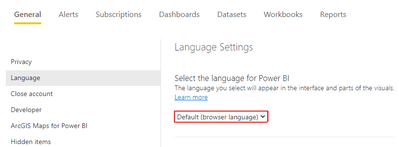
In the Power BI Service, under Settings > Language, set it to Default (browser language).
Then, in the browser language setting, checked the "Display Google Chrome/Edge in this language."
Here're related document for reference:
Manage Date Formats in the Power BI Service
Date format changing desktop to web - Microsoft Power BI Community .
How to change the date Format in the Power BI Service | NFORM | Perth, Australia
Best Regards,
Community Support Team _ kalyj
If this post helps, then please considerAccept it as the solution to help the other members find it more quickly.
Thanks, I've checked and changed it in Power BI to Default (rather than English)
I don't know if this has worked or not because now the issue is that the columns are in the correct date format in the Dataflow (I've added steps to both the Query and to the Transform File) but after refreshing, the PBIX shows them as Text format?! Not sure what i'm doing wrong.
Not sure if it's the issue but before getting further into it it's worth checking your settings office 365 settings in My Account (microsoft.com)
Thanks, i've checked that and it's also set to the UK.
My current workaround is to set the Date column in the source Excel sheet to Text format and that seems to be okay - This isn't ideal though as i'm not managing that sheet so whoever is putting data in there may (unintentionally) affect that and I might have to keep returning to fix it.
Check out the November 2025 Power BI update to learn about new features.
Advance your Data & AI career with 50 days of live learning, contests, hands-on challenges, study groups & certifications and more!