Forum Discussion
Datamart - Error when trying to create on a Workspace
Hi,
I am getting this error when trying to create a DataFlow
Underlying Error{"code":"RequiresAutoPremiumCapacityError","parameters":{"ErrorMessage":"Unable to create datamarts in this workspace. Datamarts are supported in Premium Generation 2 (PPU/PPC) workspaces only"},"details":[],"exceptionCulprit":1}
Anyone know as to why? We are using a Premium Workspace.
Thanks
Just fyi, you will need Power BI Admin role or Capacity Admin to see this.
- Go to Power BI service, and in the top right corner, click Settings ( gear icon) and click admin portal
- In the admin portal, navigate to Capacity settings.
- Select Power BI Premium.
- If you have already allocated capacity, select it.
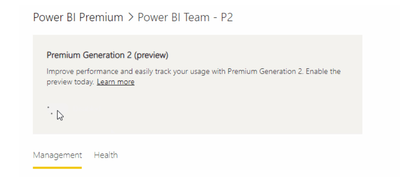
- A section appears titled Premium Generation 2. If the slider is at off, then you are still on Gen1.
Here is a link:
https://docs.microsoft.com/en-us/power-bi/enterprise/service-premium-gen2-what-is#enabling-premium-gen2
3 Replies
- Tutu_in_YYC
Super User
Are you still on Premium Gen1?
- AvPowerBI
Post Patron
Hi Tutu_in_YYC , how would I find this out?
- Tutu_in_YYC
Super User
Just fyi, you will need Power BI Admin role or Capacity Admin to see this.
- Go to Power BI service, and in the top right corner, click Settings ( gear icon) and click admin portal
- In the admin portal, navigate to Capacity settings.
- Select Power BI Premium.
- If you have already allocated capacity, select it.
- A section appears titled Premium Generation 2. If the slider is at off, then you are still on Gen1.
Here is a link:
https://docs.microsoft.com/en-us/power-bi/enterprise/service-premium-gen2-what-is#enabling-premium-gen2