Forum Discussion

fullthrottle
11 years agoNew Member
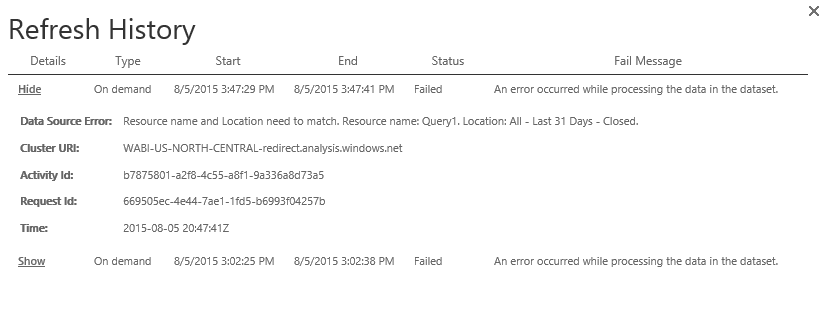
Data Source Error: Resource name and Location need to match. Resource name: Query1. Location:x
I build in Power BI Desktop and then Publish. I scheduled a refresh, but when i manually refresh data, it gives the above error.
can you try this:
- delete your dataset from the service
- open the desktop file and hit Refresh (5th icon in the Home ribbon)
- Use GetData from the service to publish the desktop model again (I still don't trust the Publish feature from the Desktop)
- Go to Schedule Refresh->Manage Datasources and enter credentials for all your connections
- try Refresh Now and see what happens

9 Replies
- Greg_Deckler
Community Champion
What kind of data source?
- fullthrottleNew Member
I pull from a MySQL database. I have about five reports and this is the only one that is having this issue.
- andre
Memorable Member
can you try this:
- delete your dataset from the service
- open the desktop file and hit Refresh (5th icon in the Home ribbon)
- Use GetData from the service to publish the desktop model again (I still don't trust the Publish feature from the Desktop)
- Go to Schedule Refresh->Manage Datasources and enter credentials for all your connections
- try Refresh Now and see what happens

