
cancel
Showing results for 
Search instead for 
Did you mean: 

The Power BI Data Visualization World Championships is back! Get ahead of the game and start preparing now! Learn more

Reply
timhopson
Helper I
Helper I

Credentials greyed out - cloud and on premises

Hi,

My report uses on premises SQL databases plus cloud sharepoint files.


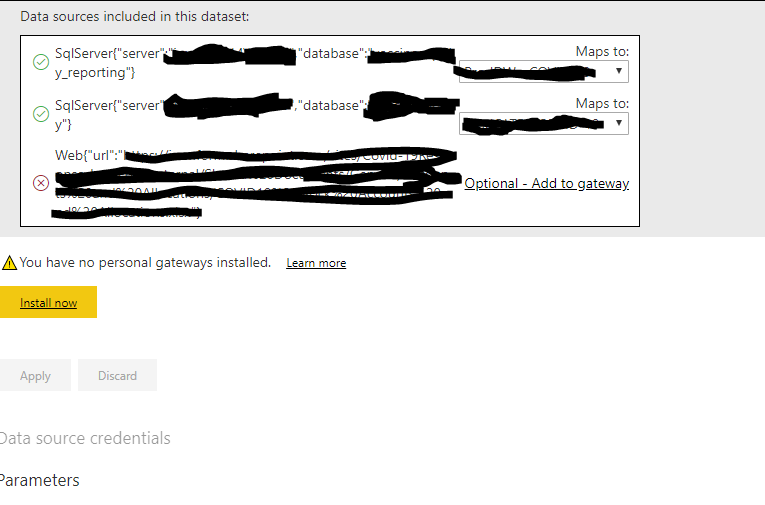
I have a gateway which maps my two on premises data sources and it shows the cloud data source as optional.


I am unable to APPLY the mapping of my two on-premises dataousrces as it is greyed out. Why is this? (see screen shot below)


Interestingly, my colleague is able to apply this gateway mapping and then set credentials for the cloud datasource. The only difference I can see between my colleague and me is that I am using a personal computer with my personal windows login whereas he is using an organisation windows login. We both log into power BI service using our organisation logins.


powerBI.PNG

1 ACCEPTED SOLUTION

Hi @GilbertQ , thank you for replying. Yes, I did have that setting ticked. I think I have solved the problem. I had access to two gateways. I noticed that, although I could complete the mapping of the data sources in my desired gateway, the radio button that selected the gateway was never set. I removed the gateway I wasn't using and hey-presto, I was then able to apply my settings.

regards, Tim.

View solution in original post

3 REPLIES 3
GilbertQ
Super User
Super User

Hi @timhopson 


Can you make sure that you have got the following option below enabled on your Gateway options in the Power BI Service. This will allow you to refresh both On-Premise and cloud sources.


image.png


Did I answer your question? Mark my post as a solution!

Proud to be a Super User!


Power BI Blog

Hi @GilbertQ , thank you for replying. Yes, I did have that setting ticked. I think I have solved the problem. I had access to two gateways. I noticed that, although I could complete the mapping of the data sources in my desired gateway, the radio button that selected the gateway was never set. I removed the gateway I wasn't using and hey-presto, I was then able to apply my settings.

regards, Tim.

Hi there,

Thanks for letting us know you found a solution.


Did I answer your question? Mark my post as a solution!

Proud to be a Super User!


Power BI Blog

Helpful resources

Announcements
Power BI DataViz World Championships

Power BI Dataviz World Championships

The Power BI Data Visualization World Championships is back! Get ahead of the game and start preparing now!

December 2025 Power BI Update Carousel

Power BI Monthly Update - December 2025

Check out the December 2025 Power BI Holiday Recap!

FabCon Atlanta 2026 carousel

FabCon Atlanta 2026

Join us at FabCon Atlanta, March 16-20, for the ultimate Fabric, Power BI, AI and SQL community-led event. Save $200 with code FABCOMM.