Fabric Data Days starts November 4th!
Advance your Data & AI career with 50 days of live learning, dataviz contests, hands-on challenges, study groups & certifications and more!
Get registered- Power BI forums
- Get Help with Power BI
- Desktop
- Service
- Report Server
- Power Query
- Mobile Apps
- Developer
- DAX Commands and Tips
- Custom Visuals Development Discussion
- Health and Life Sciences
- Power BI Spanish forums
- Translated Spanish Desktop
- Training and Consulting
- Instructor Led Training
- Dashboard in a Day for Women, by Women
- Galleries
- Data Stories Gallery
- Themes Gallery
- Contests Gallery
- QuickViz Gallery
- Quick Measures Gallery
- Visual Calculations Gallery
- Notebook Gallery
- Translytical Task Flow Gallery
- TMDL Gallery
- R Script Showcase
- Webinars and Video Gallery
- Ideas
- Custom Visuals Ideas (read-only)
- Issues
- Issues
- Events
- Upcoming Events
Get Fabric Certified for FREE during Fabric Data Days. Don't miss your chance! Request now
- Power BI forums
- Forums
- Get Help with Power BI
- Service
- Re: Credentials for web conection are invalid (cus...
- Subscribe to RSS Feed
- Mark Topic as New
- Mark Topic as Read
- Float this Topic for Current User
- Bookmark
- Subscribe
- Printer Friendly Page

- Mark as New
- Bookmark
- Subscribe
- Mute
- Subscribe to RSS Feed
- Permalink
- Report Inappropriate Content
Credentials for web conection are invalid (custom conector for sharepoint)
So, yeah, another one about sharepoint and credentials. I searched the forum and the web in the last two days and couldnt find anything that could help me.
I have a report that reads data from a SharePoint list, and the client asked me to add two pieces of information that I couldnt find using the connectors available in Power Query: the comments and versions of the items. So, I made two custom connectors using Web.Contents() and Relative Patch to get this information dynamically from this list.
The code is:
let
    CustomFunction =
    ( List_SP as text, Item_ID as number ) =>
    let
        Source =
        Xml.Tables(
            Web.Contents(
                SP,
                [RelativePath =  "/_api/web/Lists/getbytitle('" & List_SP & "')/items(" & Text.From(Item_ID) & ")/Comments()"]
                )
            ),
        Navigation = Source{0}[entry],
        Content = Table.SelectColumns(Navigation,{"content"}),
        ExpandContent =
        Table.ExpandTableColumn(Content, "content", {"http://schemas.microsoft.com/ado/2007/08/dataservices/metadata"}, {"content"}),
        ExpandProprierties = Table.ExpandTableColumn(ExpandeContent, "content", {"properties"}, {"properties"}),
        ExpandSchema = Table.ExpandTableColumn(ExpandeProprierties, "properties", {"http://schemas.microsoft.com/ado/2007/08/dataservices"}, {"properties"})
    in
        ExpandSchema
in
    CustomFunction
NOTES:
- The SP in the web.contents first argument is a parameter that has the website address (https://client.sharepoint.com/sites/SiteName).
- The other tables use the same parameter as source, but with the standard sharepoint connectors.
- The second function is the same, it only changes the last argument of the relative patch from Comments() to versions.
On the desktop everything works and updates, but in services, the credentials for the web connection are invalid, and I tested all possible combinations, whether or not I ignore the test connection, and nothing works, I receive code 400 with the message

and when i try to update the credentials, i receive the message
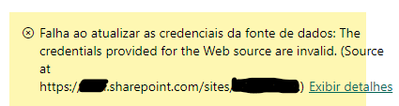
Ive already tried deleting and publish again the semantic model, changing the privacy levels in the desktop file (combine or ignore), and nothing works.
So, what am I doing wrong or not seeing?
Thanks for the support
Solved! Go to Solution.
- Mark as New
- Bookmark
- Subscribe
- Mute
- Subscribe to RSS Feed
- Permalink
- Report Inappropriate Content
I managed to make it work!
I changed the parameter
from https://client.sharepoint.com/sites/SiteName
to https://client.sharepoint.com/sites/SiteName/_api.
I deleted the published semantic model, configured on the desktop the credential and privacy as organizational on all connections (web and sharepoint), then republished it, put the web and sharepoint credentials as OAuth2 and privacy as oragnizational and skipped the test connection on web connector, and it worked!!
In other words, all because of a "/_api".
- Mark as New
- Bookmark
- Subscribe
- Mute
- Subscribe to RSS Feed
- Permalink
- Report Inappropriate Content
I managed to make it work!
I changed the parameter
from https://client.sharepoint.com/sites/SiteName
to https://client.sharepoint.com/sites/SiteName/_api.
I deleted the published semantic model, configured on the desktop the credential and privacy as organizational on all connections (web and sharepoint), then republished it, put the web and sharepoint credentials as OAuth2 and privacy as oragnizational and skipped the test connection on web connector, and it worked!!
In other words, all because of a "/_api".


- Mark as New
- Bookmark
- Subscribe
- Mute
- Subscribe to RSS Feed
- Permalink
- Report Inappropriate Content
Hi @Anonymous
Do you want to try this
This too
Regards
Amine Jerbi
If I answered your question, please mark this thread as accepted
and you can follow me on
My Website, LinkedIn and Facebook
- Mark as New
- Bookmark
- Subscribe
- Mute
- Subscribe to RSS Feed
- Permalink
- Report Inappropriate Content
@aj1973, thanks for reply.
Both topics lead to the same link, which is a code in JQuery, which I was unable to adapt to the M language. They use a JS to make a AJAX request.
- Mark as New
- Bookmark
- Subscribe
- Mute
- Subscribe to RSS Feed
- Permalink
- Report Inappropriate Content
@Anonymous
Why don't you try to connect and import data differently ! :
- Get data and use Sharepoint Online List connector and pick 2.0
- if created delete all steps and start from Source
- In Field "Title" filter your List
- In Field "Items" click here to expand all Items(Or choose or Items)
- From here you can start your ETL.

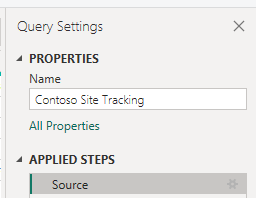

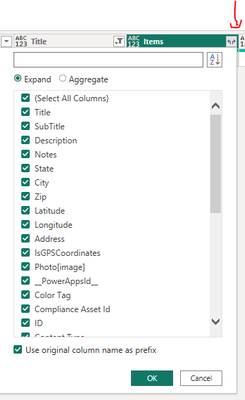
Carefull, do the test seperataly(New Query) and don't delete the steps applied already in the original import.
By the way you can add a new Query just to get the Id of the List and its Items(Comment, version,....) and then join it with the id of the list from the original Query in Model(Power BI Desktop) in case you don't want to delete the original Query.
Please let me know how it works out.
Regards
Amine Jerbi
If I answered your question, please mark this thread as accepted
and you can follow me on
My Website, LinkedIn and Facebook
- Mark as New
- Bookmark
- Subscribe
- Mute
- Subscribe to RSS Feed
- Permalink
- Report Inappropriate Content
I had already tried to find the versions of the items using 1.0 and 2.0.
In 1.0 there is a version column, but it shows the error below when I try to consult
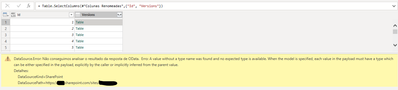
In version 2.0, there is no version information.
- Mark as New
- Bookmark
- Subscribe
- Mute
- Subscribe to RSS Feed
- Permalink
- Report Inappropriate Content
Sorry, but I don't think you are doing the right way. 1.0 and 2.0 are the versions of the connection and not the version of the Items. Use 2.0 version for connection and for "Items.Version" you should see it next to the title of your List
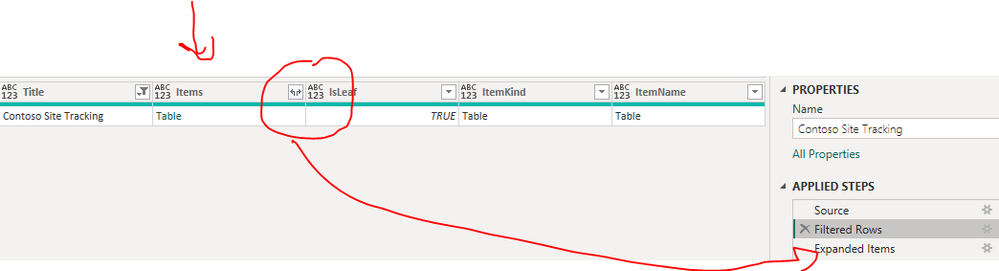
Please follow my points in my previous reply. Delete all steps that were generated by the connector and filter your List as a first step
You should see something like this after you expand field Items

Regards
Amine Jerbi
If I answered your question, please mark this thread as accepted
and you can follow me on
My Website, LinkedIn and Facebook
- Mark as New
- Bookmark
- Subscribe
- Mute
- Subscribe to RSS Feed
- Permalink
- Report Inappropriate Content
@aj1973 Maybe I expressed myself wrongly.
Using the 2.0 implementation and expanded the items column, it has the current version of the item but not the previous ones, which is what my client wants to see
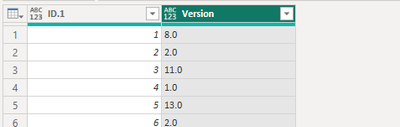
Using the custom connector, I can get all versions
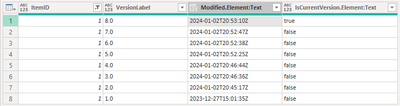
Thanks.
- Mark as New
- Bookmark
- Subscribe
- Mute
- Subscribe to RSS Feed
- Permalink
- Report Inappropriate Content
Looks like we don't have the same sharepoint structure. in mine , Versioning of the Item is represented in Item.ID with its date modified

Anyway, you are welcome
Regards
Amine Jerbi
If I answered your question, please mark this thread as accepted
and you can follow me on
My Website, LinkedIn and Facebook
- Mark as New
- Bookmark
- Subscribe
- Mute
- Subscribe to RSS Feed
- Permalink
- Report Inappropriate Content
I think we have the same structure. In this case you have a list with 3 items (Item.ID) and each of them has one version (Items.Version).
Anyway, thanks for trying.
Helpful resources

Fabric Data Days
Advance your Data & AI career with 50 days of live learning, contests, hands-on challenges, study groups & certifications and more!

Power BI Monthly Update - October 2025
Check out the October 2025 Power BI update to learn about new features.

FabCon Atlanta 2026
Join us at FabCon Atlanta, March 16-20, for the ultimate Fabric, Power BI, AI and SQL community-led event. Save $200 with code FABCOMM.

| User | Count |
|---|---|
| 54 | |
| 18 | |
| 11 | |
| 11 | |
| 9 |


