Forum Discussion

Cannot add Data source to Data gateway


Hi amitgawali,
Can you please provide more detailed information about this issue? It will be help to clarify your scenario.
Troubleshooting the on-premises data gateway
BTW, if you remove current datasource and add new datasource with correspond settings, does it works?
Regards,
Xiaoxin Sheng
 amitgawali8 years agoFrequent Visitor
If I remove current Data source and add new then also it is giving me same problem.
BTW Can you give me answer to this question also?
- Anonymous8 years agoNot applicable
Hi amitgawali,
Please share more detailed contents to help us clarify your issue.
For example:
Collecting logs from the gateway configurator
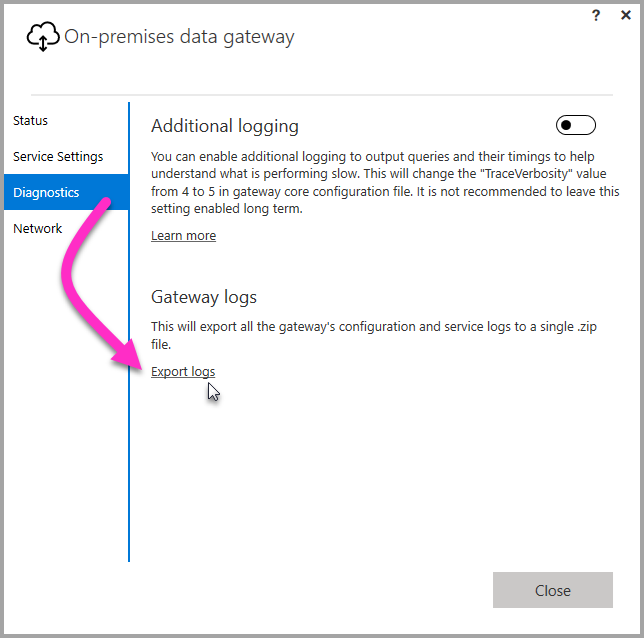
There are several logs you can collect for the gateway, and you should always start with the logs. The simplest way to collect logs after installing the gateway is through the user interface. In the On-premises data gateway user interface, select Diagnostics and then select the Export logslink near the bottom of the page, as shown in the following image.
Installer logs
%localappdata%\Temp\On-premises_data_gateway_*.logConfiguration logs
%localappdata%\Microsoft\On-premises Data Gateway\GatewayConfigurator*.logOn-premises data gateway service logs
C:\Users\PBIEgwService\AppData\Local\Microsoft\On-premises Data Gateway\Gateway*.logEvent Logs
The On-premises data gateway service event logs are present under Application and Services Logs.

Fiddler Trace
Fiddler is a free tool from Telerik that monitors HTTP traffic. You can see the back and forth with the Power BI service from the client machine. This may show errors and other related information.

Refresh History
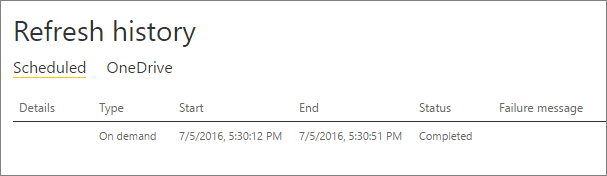
When using the gateway for scheduled refresh, Refresh History can help you see what errors have occurred, as well as provide useful data if you should need to create a support request. You can view both scheduled, as well as on demand, refreshes. Here is how you can get to the Refresh History.
-
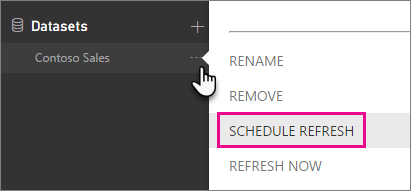
In the Power BI navigation pane, in Datasets, select a dataset > Open Menu > Schedule Refresh.
-
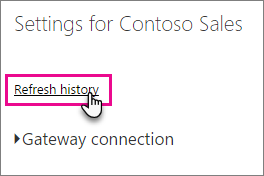
In Settings for... > Schedule Refresh, select Refresh History.
Regards,
Xiaoxin Sheng
- amitgawali8 years agoFrequent Visitor
Here is part of GatewayXXXXXXX.log file:
GatewayPipelineErrorCode=DM_GWPipeline_Gateway_MashupDataAccessError
Reason= --->
[1]Microsoft.PowerBI.DataMovement.Pipeline.Diagnostics.GatewayPipelineWrapperException: Substituted: MashupValueException:<pi>Microsoft.Data.Mashup.MashupValueException (0x80004005): MySQL: Reading from the stream has failed.
   at Microsoft.Data.Mashup.ProviderCommon.MashupResource.StartEvaluationAndGetResultSource[T](Int32 timeout)
   at Microsoft.Data.Mashup.MashupCommand.EvaluateAndGetSource[T](String commandText, CommandType commandType, Int32 commandTimeout, MashupParameterCollection parameters, String resultTransform, Boolean forColumnInfo, Boolean executeAction)
   at Microsoft.Data.Mashup.MashupCommand.ExecuteReader(CommandBehavior commandBehavior, MashupCommandBehavior mashupCommandBehavior)
   at Microsoft.Data.Mashup.MashupCommand.ExecuteReader()
   at Microsoft.Data.Mashup.DataSourceReference.TestConnection(String connectionString)
   at Microsoft.PowerBI.DataMovement.Pipeline.MashupCommon.MashupUtils.DSRTestConnectionAsync(String dsrJson, MashupCredential credential)
   at Microsoft.PowerBI.DataMovement.Pipeline.GatewayDataAccess.MashupOleDbConnectionProvider.<TestConnectionAsync>d__3.MoveNext()</pi>
Can you help here?
-