This is best Fabric, Power BI, SQL and AI community event. How do we know? The last event sold out! Save €200 with code FABCMTY200.
Register nowA new Data Days event is coming soon! This time we’re going bigger than ever. Fabric, Power BI, SQL, AI and more. Don't miss out.
Hi All
I have a created a stardard data table in my PowerBI desktop that I have published as a stand alone table to my PowerBI online workspace where certain people have Viewer access. I would like to give them permission to extract the table into excel so they have do further work to the list if they wish. Is this possible or can it only be extracted as a pdf? I can only see the "Analyse in Excel" option which is something I don't want because it extracts to a pivot which doesn't seem to do anything.
Thanks
Andrew M
Solved! Go to Solution.
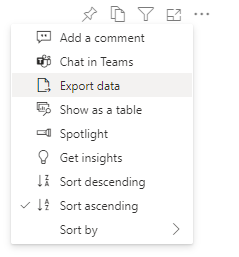
Hi - on the outline of the table visualisation itself, there should be ellipsis/3 dots that, when clicked on, provide an "Export data" option:
Does that provide what is required?
If that option is greyed out then it's likely that either a tenant setting (controlled by your PBI admin), or a report setting (controlled by yourself in PBI Desktop: File > Options and Settings > Options > Current file: Report settings > Export data) is disabling
Hi - on the outline of the table visualisation itself, there should be ellipsis/3 dots that, when clicked on, provide an "Export data" option:
Does that provide what is required?
If that option is greyed out then it's likely that either a tenant setting (controlled by your PBI admin), or a report setting (controlled by yourself in PBI Desktop: File > Options and Settings > Options > Current file: Report settings > Export data) is disabling
Yes, it seems to be the answer I was looking for. Thanks.
Check out the May 2026 Power BI update to learn about new features.
Sign up to receive a private message when registration opens and key events begin.
If you have recently started exploring Fabric, we'd love to hear how it's going. Your feedback can help with product improvements.
| User | Count |
|---|---|
| 14 | |
| 10 | |
| 9 | |
| 7 | |
| 6 |
| User | Count |
|---|---|
| 34 | |
| 28 | |
| 26 | |
| 19 | |
| 16 |