
Don't miss your chance to take exam DP-600 or DP-700 on us!
Request nowLearn from the best! Meet the four finalists headed to the FINALS of the Power BI Dataviz World Championships! Register now
Hello everyone,
I hope you are all keeping safe n sound.
I have pinned a report's live page in a Dashboard in PowerBi Service.
Although everything works fine in BI Service when operating from a browser, when BI app (iOS or Android) is used, all fonts turn into a blue colour.
Have you ever come accross a similar problem? Is there any possible solution?
Thank you all,
Christos
Hi @xpatik ,
I create a sample to test. It works fine in my site. I use the default theme for the report. What's yours? Do you use a .json file to change the theme? Do you open the report? Do they work fine on mobile phone? How about other dashboards? Do they show normally?
The following steps are what I try:
Hello @v-xuding-msft and thank you for your reply.
Actually pinned live page Dashboard, works fine in BI Service but some fonts change colour (from white to blue) only in BI App.
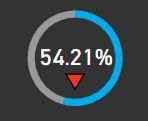
I have included two attachements of dame visual in app and service to check the diferences.
BI Service
BI App
Thank you,
Christos
Forgot to mention i use light from custom themes.
Thank you
Hi @xpatik ,
Do you try to change the theme to a default one? A user encountered an issue which is caused by the theme json file. So if the live page works fine with default theme, it may be caused by the file as well. You could delete the properties one by one to test which cause the issue.
A tip: Avoid setting background and foreground color in the theme without changing other elements such as the canvas background and filter pane background.
If you still can't resolve it, please share the theme file to us.
Share feedback directly with Fabric product managers, participate in targeted research studies and influence the Fabric roadmap.
Check out the February 2026 Power BI update to learn about new features.