cancel
Showing results for 
Search instead for 
Did you mean: 

The Power BI Data Visualization World Championships is back! Get ahead of the game and start preparing now! Learn more

Reply
bo_afk
Post Patron
Post Patron

Allow others to refresh dataset

Hi,


Is it possible to allow other users to refresh the dataset of a report that I've published to Power BI service? Can I grant access for others to do this?


Thanks,

afk

2 ACCEPTED SOLUTIONS
GilbertQ
Super User
Super User

Hi there

Yes you can, you have to go into the Power BI Service and then to "Manage Gateways"

On the data source, click on Users and add the users there.

Then those users in the App Workspace should be able to connect to the Gateway and refresh the dataset.

Just remember if you are using Power BI Pro that you only get 8 refreshes a day.


Did I answer your question? Mark my post as a solution!

Proud to be a Super User!


Power BI Blog

View solution in original post

v-xuding-msft
Community Support
Community Support

Hi @bo_afk ,

Add documents that you could reference:

Manage users 

Use the data source for scheduled refresh 

1.PNG

Best Regards,

Xue Ding

If this post helps, then please consider Accept it as the solution to help the other members find it more quickly.

Best Regards,
Xue Ding
If this post helps, then please consider Accept it as the solution to help the other members find it more quickly.

View solution in original post

5 REPLIES 5
v-xuding-msft
Community Support
Community Support

Hi @bo_afk ,

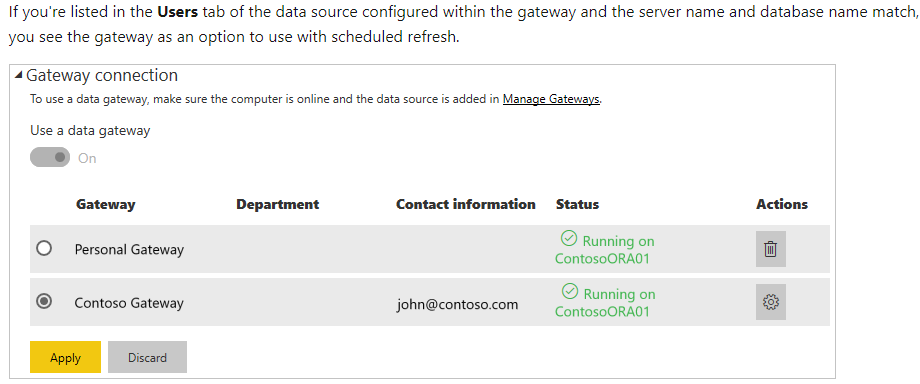
Add documents that you could reference:

Manage users 

Use the data source for scheduled refresh 

1.PNG

Best Regards,

Xue Ding

If this post helps, then please consider Accept it as the solution to help the other members find it more quickly.

Best Regards,
Xue Ding
If this post helps, then please consider Accept it as the solution to help the other members find it more quickly.
GilbertQ
Super User
Super User

Hi there

Yes you can, you have to go into the Power BI Service and then to "Manage Gateways"

On the data source, click on Users and add the users there.

Then those users in the App Workspace should be able to connect to the Gateway and refresh the dataset.

Just remember if you are using Power BI Pro that you only get 8 refreshes a day.


Did I answer your question? Mark my post as a solution!

Proud to be a Super User!


Power BI Blog

This is not entirely true.

Yes, you get eight scheduled refreshes in a day.  However manual refreshes can be manually kicked off from the power bi service at any time and do not count against the scheduled refresh limit.

Hi @GilbertQ , thanks for your response.


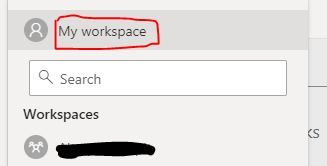
I assume this doesn't work for any reports published on the default "My Workspace" and has to be on a new app workspace?


I was unable to see any access settings for "My Workspace" but I could see for the other workspaces.


workspace.JPG

Hi there

Yes it has to be in an App Workspace because multiple people can belong to it. My Workspace is for individual people only.


Did I answer your question? Mark my post as a solution!

Proud to be a Super User!


Power BI Blog

Helpful resources

Announcements
Power BI DataViz World Championships

Power BI Dataviz World Championships

The Power BI Data Visualization World Championships is back! Get ahead of the game and start preparing now!

November Power BI Update Carousel

Power BI Monthly Update - November 2025

Check out the November 2025 Power BI update to learn about new features.

FabCon Atlanta 2026 carousel

FabCon Atlanta 2026

Join us at FabCon Atlanta, March 16-20, for the ultimate Fabric, Power BI, AI and SQL community-led event. Save $200 with code FABCOMM.