Hello,
I figured out how to update the photo when your tenant does not have Exchange Online licenses and when you do not see the "Members" option - see below
Caption below each screenshot contains instructions:
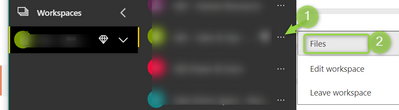 Click "Files"
 Click on gear and click "Site Information"
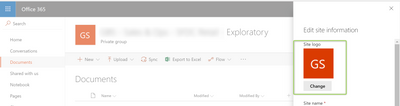 Click "Change" to update the photo. Note: when clicking save, I did not immediately see the photo change on this site. It took ~5 minutes to update here and in Power BI
In case the screenshots do not upload correctly, here are detailed written instructions:
- Click on "Files" where the instructions tell you to click on Members. This opens up the SharePoint page associated with the Power BI Workspace where files can be stored. You should see the title of your workspace and the associated photo
- Click on the gear icon in the top righthand corner of the SharePoint page. Then, click on "Site Information"
- A pane slides up where you can udpate the site information. You should see the photo and click "Change" below it.
- Once you select a photo and click Save, the picture did not update for me right away. It took about 5 minutes for it to show up on that SharePoint page as well as in Power BI
Thanks!


