Join us in Barcelona for FabCon and SQLCon, September 28 - October 1, 2026.
This is best Fabric, Power BI, SQL and AI community event. How do we know? The last event sold out! Save €200 with code FABCMTY200.
Register now- Power BI forums
- Get Help with Power BI
- Desktop
- Service
- Report Server
- Power Query
- Mobile Apps
- Developer
- DAX Commands and Tips
- Custom Visuals Development Discussion
- Health and Life Sciences
- Power BI Spanish forums
- Translated Spanish Desktop
- Training and Consulting
- Instructor Led Training
- Dashboard in a Day for Women, by Women
- Galleries
- Data Stories Gallery
- Themes Gallery
- Contests Gallery
- QuickViz Gallery
- Quick Measures Gallery
- Visual Calculations Gallery
- Fabric Apps Gallery
- Notebook Gallery
- Translytical Task Flow Gallery
- TMDL Gallery
- R Script Showcase
- Webinars and Video Gallery
- Ideas
- Custom Visuals Ideas (read-only)
- Issues
- Issues
- Events
- Upcoming Events
July 28 - August 9 | Final Round of the Power BI Dataviz World Championships. This is your chance. Learn more
- Power BI forums
- Forums
- Get Help with Power BI
- Service
- Re: Add-PowerBIWorkspaceUser - adding group to Wor...
- Subscribe to RSS Feed
- Mark Topic as New
- Mark Topic as Read
- Float this Topic for Current User
- Bookmark
- Subscribe
- Printer Friendly Page

- Mark as New
- Bookmark
- Subscribe
- Mute
- Subscribe to RSS Feed
- Permalink
- Report Inappropriate Content
Add-PowerBIWorkspaceUser - adding group to Workspace
Hi,
I am trying to automate different PowerBI tasks using a service principal.
I can create new PowerBI Workspaces and the service principal is an admin on the Workspace.
Afterwards I would like to add a synchronised AD group as contributor, with the following:
Add-PowerBIWorkspaceUser -Id <ID of PowerBI Workspace> -PrincipalType Group -AccessRight Contributor -Identifier <Object Id of AD group>
I get the error:
Add-PowerBIWorkspaceUser : Operation returned an invalid status code 'NotFound'
Am I missing something - or doing it wrong?
Solved! Go to Solution.
- Mark as New
- Bookmark
- Subscribe
- Mute
- Subscribe to RSS Feed
- Permalink
- Report Inappropriate Content
HI ,
Below worked like a charm :

Add-PowerBIWorkspaceUser -Scope Organization -Id <workspaceid> -UserEmailAddress [email protected] -AccessRight Admin
Ensure: You have Admin Rights to add the user. I tested it just now my user from which running API has Admin Rights on the workspace and its Premium ( to be considered if you are adding free user )
Waiting for update 🙂
CHeers
Mahak

- Mark as New
- Bookmark
- Subscribe
- Mute
- Subscribe to RSS Feed
- Permalink
- Report Inappropriate Content
Did you tried :
Add-PowerBIWorkspaceUser -Scope Individual -Id myWorkSpaceIDasString -Identifier myIdentifierAsString -AccessRight Admin -PrincipalType Group
Regards,Mahak
- Mark as New
- Bookmark
- Subscribe
- Mute
- Subscribe to RSS Feed
- Permalink
- Report Inappropriate Content
Also, there is a very nice blog/code available for Automation: https://github.com/microsoft/powerbi-powershell/blob/master/src/Modules/Workspaces/Commands.Workspac... which can help more. Tried and Tested.
- Mark as New
- Bookmark
- Subscribe
- Mute
- Subscribe to RSS Feed
- Permalink
- Report Inappropriate Content
I tried it, but I get the same error:
Add-PowerBIWorkspaceUser : Operation returned an invalid status code 'NotFound'
It works when I add a user to a Workspace:
Add-PowerBIWorkspaceUser -Id <Workspace Id> -AccessRight Contributor -Identifier <User UPN> -PrincipalType User
- Mark as New
- Bookmark
- Subscribe
- Mute
- Subscribe to RSS Feed
- Permalink
- Report Inappropriate Content
HI ,
Below worked like a charm :
Add-PowerBIWorkspaceUser -Scope Organization -Id <workspaceid> -UserEmailAddress [email protected] -AccessRight Admin
Ensure: You have Admin Rights to add the user. I tested it just now my user from which running API has Admin Rights on the workspace and its Premium ( to be considered if you are adding free user )
Waiting for update 🙂
CHeers
Mahak
- Mark as New
- Bookmark
- Subscribe
- Mute
- Subscribe to RSS Feed
- Permalink
- Report Inappropriate Content
Yes - the same works here, when adding a user.
But unfortunately it doesn't work when adding a AD group.
- Mark as New
- Bookmark
- Subscribe
- Mute
- Subscribe to RSS Feed
- Permalink
- Report Inappropriate Content
Did you tried the latest code I posted?
- Mark as New
- Bookmark
- Subscribe
- Mute
- Subscribe to RSS Feed
- Permalink
- Report Inappropriate Content
Login-PowerBI
#Using AD Security group
$Body = @{
identifier= “add your Odject ID here” #Object ID for the Security group
groupUserAccessRight= “Admin” #Permission for the group to the Workspace
principalType= “Group” #The type of Principal(App, Group, User)
}
$BodyJSON=$Body | ConvertTo-Json
Invoke-PowerBIRestMethod -Method post -Url “/groups/Add your group Id here/users” -Body $BodyJSON #Workspace ID
Can you trythis too.
This worked for me to add my Functional Email Group to the same workspace.
Cheers
Mahak
- Mark as New
- Bookmark
- Subscribe
- Mute
- Subscribe to RSS Feed
- Permalink
- Report Inappropriate Content
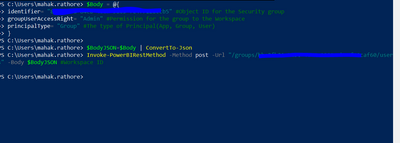
#Using AD Security group
$Body = @{
identifier= “<groupidfromAzureAD>” #Object ID for the Security group
groupUserAccessRight= “Admin” #Permission for the group to the Workspace
principalType= “Group” #The type of Principal(App, Group, User)
}
$BodyJSON=$Body | ConvertTo-Json
Invoke-PowerBIRestMethod -Method post -Url “/groups/<workspaceIDpastehere>/users” -Body $BodyJSON #Workspace ID
Cheers
Mahak
- Mark as New
- Bookmark
- Subscribe
- Mute
- Subscribe to RSS Feed
- Permalink
- Report Inappropriate Content
Yes, that seems to work well.
- Mark as New
- Bookmark
- Subscribe
- Mute
- Subscribe to RSS Feed
- Permalink
- Report Inappropriate Content
Awesome. Could you please mark it as Solution Provided i.e. my answer.
Cheers
Mahak
Helpful resources

FabCon & SQLCon – Barcelona 2026
Join us in Barcelona for FabCon and SQLCon, the Fabric, Power BI, SQL, and AI community event. Save €200 with code FABCMTY200.

Fabric Community Sticker Challenge - Barcelona 2026
If you love stickers, then you will definitely want to check out our community sticker challenge, Barcelona edition!

Power BI Monthly Update - July 2026
Check out the July 2026 Power BI update to learn about new features.

Power BI DataViz World Championships - June 2026
A new Power BI DataViz World Championship is coming this June! Don't miss out on submitting your entry.

| User | Count |
|---|---|
| 11 | |
| 10 | |
| 9 | |
| 5 | |
| 5 |


