FabCon is coming to Atlanta
Join us at FabCon Atlanta from March 16 - 20, 2026, for the ultimate Fabric, Power BI, AI and SQL community-led event. Save $200 with code FABCOMM.
Register now!- Power BI forums
- Get Help with Power BI
- Desktop
- Service
- Report Server
- Power Query
- Mobile Apps
- Developer
- DAX Commands and Tips
- Custom Visuals Development Discussion
- Health and Life Sciences
- Power BI Spanish forums
- Translated Spanish Desktop
- Training and Consulting
- Instructor Led Training
- Dashboard in a Day for Women, by Women
- Galleries
- Data Stories Gallery
- Themes Gallery
- Contests Gallery
- Quick Measures Gallery
- Notebook Gallery
- Translytical Task Flow Gallery
- TMDL Gallery
- R Script Showcase
- Webinars and Video Gallery
- Ideas
- Custom Visuals Ideas (read-only)
- Issues
- Issues
- Events
- Upcoming Events
Calling all Data Engineers! Fabric Data Engineer (Exam DP-700) live sessions are back! Starting October 16th. Sign up.
- Power BI forums
- Forums
- Get Help with Power BI
- Report Server
- Greate Solution
- Subscribe to RSS Feed
- Mark Topic as New
- Mark Topic as Read
- Float this Topic for Current User
- Bookmark
- Subscribe
- Printer Friendly Page

- Mark as New
- Bookmark
- Subscribe
- Mute
- Subscribe to RSS Feed
- Permalink
- Report Inappropriate Content
Unable to connect to data source. (Power BI dataset)
Hi all,
Im getting the error unable to connect to datasource, which is a powerbi dataset in powerbi report builder.
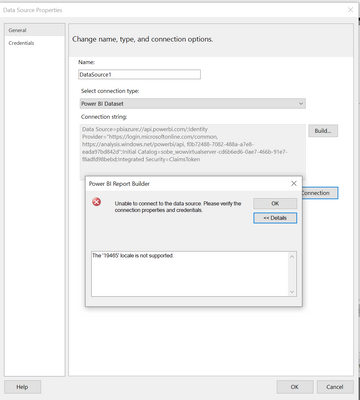
Details: The '19465' locale is not supported.
Solved! Go to Solution.
- Mark as New
- Bookmark
- Subscribe
- Mute
- Subscribe to RSS Feed
- Permalink
- Report Inappropriate Content
Just as an update. I have found a solution for this in my case.
I have changed the windows regional settings to English (United Kingdom), restarted the system and it started loading without any issue after that.
Locale: 19465 is en-AE (United Arab Emirates)

- Mark as New
- Bookmark
- Subscribe
- Mute
- Subscribe to RSS Feed
- Permalink
- Report Inappropriate Content
am having the same issue, did you find a solution for that?
- Mark as New
- Bookmark
- Subscribe
- Mute
- Subscribe to RSS Feed
- Permalink
- Report Inappropriate Content
Just as an update. I have found a solution for this in my case.
I have changed the windows regional settings to English (United Kingdom), restarted the system and it started loading without any issue after that.
Locale: 19465 is en-AE (United Arab Emirates)


- Mark as New
- Bookmark
- Subscribe
- Mute
- Subscribe to RSS Feed
- Permalink
- Report Inappropriate Content
lol, so strange i did same & it worked, i changed my regional settings from uae to uk and it worked,
very strange like if am in uae it should give an error unless i change settings to uk

- Mark as New
- Bookmark
- Subscribe
- Mute
- Subscribe to RSS Feed
- Permalink
- Report Inappropriate Content
I faced the same problem , and I do this solution and it works 100%
- Mark as New
- Bookmark
- Subscribe
- Mute
- Subscribe to RSS Feed
- Permalink
- Report Inappropriate Content
No, i havent found a solution for this. I installed power bi report builder on a different system and it was working there.


- Mark as New
- Bookmark
- Subscribe
- Mute
- Subscribe to RSS Feed
- Permalink
- Report Inappropriate Content
Hi @PhazedMorty ,
Is it possible to download the Pbix file and open the Pbix file with Power BI desktop? Also, if there is no confidential data in that dataset, please share your Pbix file and I will try it locally.
And refer:
https://community.powerbi.com/t5/Desktop/Locale-settings-not-working/m-p/49588
Best Regards
Lucien


- Mark as New
- Bookmark
- Subscribe
- Mute
- Subscribe to RSS Feed
- Permalink
- Report Inappropriate Content
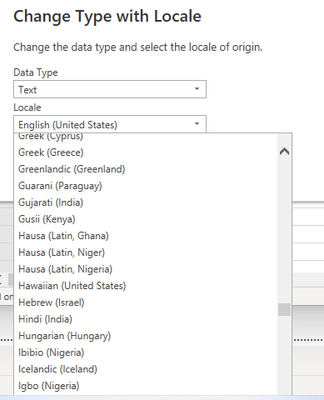
Do you know which locale was used in the queries for the dataset?
- Mark as New
- Bookmark
- Subscribe
- Mute
- Subscribe to RSS Feed
- Permalink
- Report Inappropriate Content
I am not sure. Below is the error I am getting. while trying to import a power bi dataset
Do I need a premium license to import a power bi dataset?
- Mark as New
- Bookmark
- Subscribe
- Mute
- Subscribe to RSS Feed
- Permalink
- Report Inappropriate Content
You are trying this from excel, right? See if you can use the Analysis Services connection instead.
- Mark as New
- Bookmark
- Subscribe
- Mute
- Subscribe to RSS Feed
- Permalink
- Report Inappropriate Content
The original data source is an oracle database. I can connect to the oracle database from report builder, but i do not have options to create relationships with tables other than through query and i do have custom columns created in the powerbi dataset i would like to recall.

Helpful resources

FabCon Global Hackathon
Join the Fabric FabCon Global Hackathon—running virtually through Nov 3. Open to all skill levels. $10,000 in prizes!

Power BI Monthly Update - September 2025
Check out the September 2025 Power BI update to learn about new features.

FabCon Atlanta 2026
Join us at FabCon Atlanta, March 16-20, for the ultimate Fabric, Power BI, AI and SQL community-led event. Save $200 with code FABCOMM.


| User | Count |
|---|---|
| 12 | |
| 3 | |
| 3 | |
| 3 | |
| 2 |


