Don't miss your chance to take the Fabric Data Engineer (DP-600) exam for FREE! Find out how by attending the DP-600 session on April 23rd (pacific time), live or on-demand.
Learn moreNext up in the FabCon + SQLCon recap series: The roadmap for Microsoft SQL and Maximizing Developer experiences in Fabric. All sessions are available on-demand after the live show. Register now
I tried to upgrade my instance of PowerBI Desktop when we upgraded to the October RS GA release. Unfortunately, the application fails to start. I was able to run the June and August releases without issue but for some reason the October one fails.
When I try to start PowerBI the yellow and black loading screen pops up followed by a command window. The command window briefly flashes with an exception code. (See screenshot below)
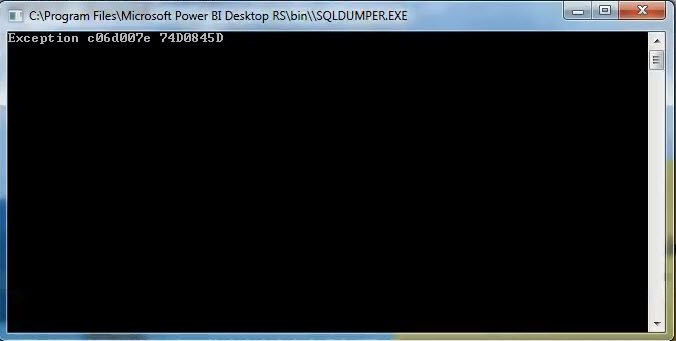
Following the error, I get a message saying it can't connect to the model.
This is running on a 32bit Win 7 machine. Initially, I just tried to upgrade my August version to the October version. Then I uninstalled everything, rebooted and tried a fresh install. Both wound up at the same spot.
My co-workers that are running a 64bit Win7 system had no problem upgrading and starting the desktop app.
Any help/tips/ideas would be appreciated.
Thanks.
11/10/17: I'm getting a similar error after installing the Oct-2017 RS desktop. I am running Win7 with 64 bit.
"We weren't able to connect to the model".
Hi @markc,
This issue has been reported by another community: http://community.powerbi.com/t5/Issues/32-bit-version-of-new-October-2017-Unable-to-start-Power-BI/i...
It should be a known issue with 32bit Power BI desktop optimized for report server. @riccardomuti Is there any plan to fix this issue?
Best Regards,
Qiuyun Yu
Yes, we've received a few reports of this error with the 32-bit build and we're investigating the cause.
If you have recently started exploring Fabric, we'd love to hear how it's going. Your feedback can help with product improvements.
A new Power BI DataViz World Championship is coming this June! Don't miss out on submitting your entry.
Share feedback directly with Fabric product managers, participate in targeted research studies and influence the Fabric roadmap.
| User | Count |
|---|---|
| 3 | |
| 2 | |
| 2 | |
| 1 | |
| 1 |