Join us at FabCon Atlanta from March 16 - 20, 2026, for the ultimate Fabric, Power BI, AI and SQL community-led event. Save $200 with code FABCOMM.
Register now!The Power BI Data Visualization World Championships is back! Get ahead of the game and start preparing now! Learn more
Hi guys
im putting in branding with company colors
but i cant find the id for one of the section of the branding
hope someone has it
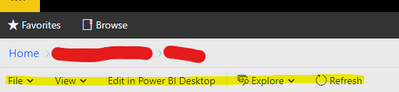
this is when you open a power bi report from the server
i need to be able to change the colors for the text marked in yellow
File, View, Edit in power Bi Desktop, Explore, Refresh
-b
Solved! Go to Solution.
I guess this is what you are looking for:
Branding the web portal - SQL Server Reporting Services (SSRS) | Microsoft Docs
Paul Zheng _ Community Support Team
If this post helps, please Accept it as the solution to help the other members find it more quickly.
I guess this is what you are looking for:
Branding the web portal - SQL Server Reporting Services (SSRS) | Microsoft Docs
Paul Zheng _ Community Support Team
If this post helps, please Accept it as the solution to help the other members find it more quickly.
I believe you'll find that menu uses the primaryContrast color.
The Power BI Data Visualization World Championships is back! Get ahead of the game and start preparing now!
| User | Count |
|---|---|
| 6 | |
| 3 | |
| 3 | |
| 3 | |
| 2 |
| User | Count |
|---|---|
| 10 | |
| 5 | |
| 5 | |
| 4 | |
| 3 |