cancel
Showing results for 
Search instead for 
Did you mean: 

The Power BI Data Visualization World Championships is back! Get ahead of the game and start preparing now! Learn more

Reply
Ceciliam
Frequent Visitor

what does ellipsis mean in table preview?

Hi,


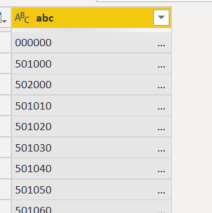
I'm not sure if you have seen ellipsis sign in your table preview before. What does it mean? They seem to go away after I adjust the field width to super wide. I am 100% sure I only have maximun of 6 digits here, so what is causing these ellipses to show still? Does anyone know? Thank you!

Ceciliam_0-1642559318133.png


1 ACCEPTED SOLUTION
BA_Pete
Super User
Super User

Hi @Ceciliam ,


It means there's more data in the cell that isn't visible due to the column not being wide enough.

In Power Query, select this column then go to Transform tab > Format > Trim and see if this helps. If it does, it means your source data has 'padded' values (lots of spaces on the end) - fairly common in many application databases.

If this doesn't work, then try Transform tab > Format > Clean. This will remove any special characters (tabs, linefeeds etc.) that may be causing this issue.


*NB* If you trim/clean a primary key field in, for example, a dimension table, but do not trim/clean the corresponding foreign key in each fact table, you may find that merges between these fields no longer work in Power Query as PQ is very precise on value matching. It should not, however, affect relationships in your data model, nor DAX calculations (measures/columns etc.), as DAX tends to ignore leading/trailing spaces in values.


Pete


Now accepting Kudos! If my post helped you, why not give it a thumbs-up?

Proud to be a Datanaut!


View solution in original post

2 REPLIES 2
Ceciliam
Frequent Visitor

Hi Pete, thank you! I added a trim step and the elipses are gone! 

BA_Pete
Super User
Super User

Hi @Ceciliam ,


It means there's more data in the cell that isn't visible due to the column not being wide enough.

In Power Query, select this column then go to Transform tab > Format > Trim and see if this helps. If it does, it means your source data has 'padded' values (lots of spaces on the end) - fairly common in many application databases.

If this doesn't work, then try Transform tab > Format > Clean. This will remove any special characters (tabs, linefeeds etc.) that may be causing this issue.


*NB* If you trim/clean a primary key field in, for example, a dimension table, but do not trim/clean the corresponding foreign key in each fact table, you may find that merges between these fields no longer work in Power Query as PQ is very precise on value matching. It should not, however, affect relationships in your data model, nor DAX calculations (measures/columns etc.), as DAX tends to ignore leading/trailing spaces in values.


Pete


Now accepting Kudos! If my post helped you, why not give it a thumbs-up?

Proud to be a Datanaut!


Helpful resources

Announcements
November Power BI Update Carousel

Power BI Monthly Update - November 2025

Check out the November 2025 Power BI update to learn about new features.

Fabric Data Days Carousel

Fabric Data Days

Advance your Data & AI career with 50 days of live learning, contests, hands-on challenges, study groups & certifications and more!

FabCon Atlanta 2026 carousel

FabCon Atlanta 2026

Join us at FabCon Atlanta, March 16-20, for the ultimate Fabric, Power BI, AI and SQL community-led event. Save $200 with code FABCOMM.