Get certified for free when you join Fabric Data Days 2026 and dive into Fabric, Power BI, SQL, AI, and other essential data skills.
Join nowData Days is here! Join us now for 60+ days of learning, challenges, and connection. Learn more
Hi,
I have extracted price data via a simple sql.
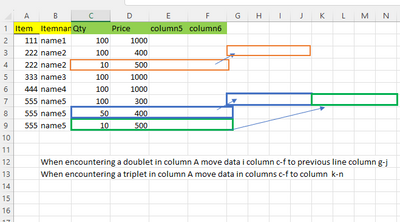
Som itemID have more than one price. In my sql extract I get a new line for each ItemID, which means I get Double or triple lines with same ItemID but different prices. I don't have knowledge to correct my sql so I only get one line per ItemID
I hope that I may be able to do the adjustments in Power query or with DAX.
I need one line per ItemID, and the data moved as shown in the figure.
Does anyone have a hint ?
Solved! Go to Solution.
Hi @Sober2010
You can put the following code to advanced editor in power query
let
Source = Table.FromRows(Json.Document(Binary.Decompress(Binary.FromText("i45WMjQ0VNJRykvMTQXRhgYGENJAKVYnWsnIyAgqaQSXNMEhByRMoVLGxsZQKWNMM01MTKCSJpiSpqamUElTuKQxVjlTZLega4O5JRYA", BinaryEncoding.Base64), Compression.Deflate)), let _t = ((type nullable text) meta [Serialized.Text = true]) in type table [Item = _t, Itemname = _t, Qty = _t, Price = _t]),
#"Changed Type" = Table.TransformColumnTypes(Source,{{"Item", Int64.Type}, {"Itemname", type text}, {"Qty", Int64.Type}, {"Price", Int64.Type}}),
#"Unpivoted Columns" = Table.UnpivotOtherColumns(#"Changed Type", {"Item", "Itemname"}, "Attribute", "Value"),
#"Grouped Rows" = Table.Group(#"Unpivoted Columns", {"Item", "Itemname", "Attribute"}, {{"Count", each _, type table [Item=nullable number, Itemname=nullable text, Attribute=text, Value=number]}}),
#"Added Custom" = Table.AddColumn(#"Grouped Rows", "Custom", each Table.AddIndexColumn([Count],"Index",1,1)),
#"Removed Columns" = Table.RemoveColumns(#"Added Custom",{"Count"}),
#"Expanded Custom" = Table.ExpandTableColumn(#"Removed Columns", "Custom", {"Value", "Index"}, {"Value", "Index"}),
#"Inserted Merged Column" = Table.AddColumn(#"Expanded Custom", "Merged", each Text.Combine({[Attribute], Text.From([Index], "en-US")}, " "), type text),
#"Removed Columns1" = Table.RemoveColumns(#"Inserted Merged Column",{"Attribute", "Index"}),
#"Pivoted Column" = Table.Pivot(#"Removed Columns1", List.Distinct(#"Removed Columns1"[Merged]), "Merged", "Value")
in
#"Pivoted Column"
Output

Best Regards!
Yolo Zhu
If this post helps, then please consider Accept it as the solution to help the other members find it more quickly.
Hi @Sober2010
You can put the following code to advanced editor in power query
let
Source = Table.FromRows(Json.Document(Binary.Decompress(Binary.FromText("i45WMjQ0VNJRykvMTQXRhgYGENJAKVYnWsnIyAgqaQSXNMEhByRMoVLGxsZQKWNMM01MTKCSJpiSpqamUElTuKQxVjlTZLega4O5JRYA", BinaryEncoding.Base64), Compression.Deflate)), let _t = ((type nullable text) meta [Serialized.Text = true]) in type table [Item = _t, Itemname = _t, Qty = _t, Price = _t]),
#"Changed Type" = Table.TransformColumnTypes(Source,{{"Item", Int64.Type}, {"Itemname", type text}, {"Qty", Int64.Type}, {"Price", Int64.Type}}),
#"Unpivoted Columns" = Table.UnpivotOtherColumns(#"Changed Type", {"Item", "Itemname"}, "Attribute", "Value"),
#"Grouped Rows" = Table.Group(#"Unpivoted Columns", {"Item", "Itemname", "Attribute"}, {{"Count", each _, type table [Item=nullable number, Itemname=nullable text, Attribute=text, Value=number]}}),
#"Added Custom" = Table.AddColumn(#"Grouped Rows", "Custom", each Table.AddIndexColumn([Count],"Index",1,1)),
#"Removed Columns" = Table.RemoveColumns(#"Added Custom",{"Count"}),
#"Expanded Custom" = Table.ExpandTableColumn(#"Removed Columns", "Custom", {"Value", "Index"}, {"Value", "Index"}),
#"Inserted Merged Column" = Table.AddColumn(#"Expanded Custom", "Merged", each Text.Combine({[Attribute], Text.From([Index], "en-US")}, " "), type text),
#"Removed Columns1" = Table.RemoveColumns(#"Inserted Merged Column",{"Attribute", "Index"}),
#"Pivoted Column" = Table.Pivot(#"Removed Columns1", List.Distinct(#"Removed Columns1"[Merged]), "Merged", "Value")
in
#"Pivoted Column"
Output
Best Regards!
Yolo Zhu
If this post helps, then please consider Accept it as the solution to help the other members find it more quickly.
Hi @Sober2010,
Can you please enlighten us why this step is needed?
I think it would be better if you will have a dim table for items and this table on your screenshot will be your fact table.
Hi Mussaenda.
My thoughts was to built a table with only uniqe values in this way - so I could built relations with a fact table
I'm probably down a wrong path. Those repeated items cause however problems for me.
I will try to split the sql extract up in several tables instead for one.
Don't miss out on Data Days, June 15 through August 7. Learn Fabric, Power BI, SQL, AI and more.
Check out the May 2026 Power BI update to learn about new features.
| User | Count |
|---|---|
| 4 | |
| 4 | |
| 3 | |
| 2 | |
| 1 |
| User | Count |
|---|---|
| 11 | |
| 11 | |
| 5 | |
| 4 | |
| 4 |