Forum Discussion

logo on slicer buttons
Amazing the capabilities of the chiclet slicer, with the ability to put a logo on each slicer button.Anyone can help with how to do it?I tried creating an excel with hyperlinks to some logos and subsequently importing it into power Bi ( desktop) with no success)
Thanks
Hi
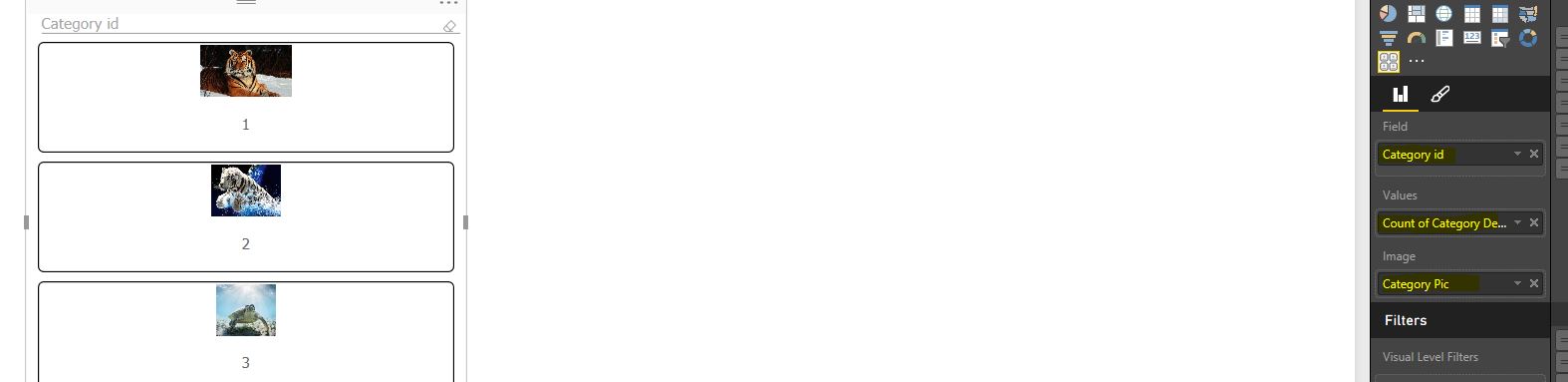
You've probably got this figured out by now, but if not, As per the above screenshot you need to have a value field as well as an image field applied to the slicer in order to get the images to display
8 Replies
 PowerBIGuy
Responsive Resident
Below is a picture of my sample file.
Here is a screen shot of teh values i entered for the slicer. Hope this helps.
- GrahamKnowles
Resolver I
Hi
You've probably got this figured out by now, but if not, As per the above screenshot you need to have a value field as well as an image field applied to the slicer in order to get the images to display
 AnonymousNot applicable
Whats is the data type requirements for the column. I have a SQL table using the image datatype and it imports into a query set as binary. But isn't coming across into the desktop as a selectable field?