Forum Discussion

logo on slicer buttons
 10 years ago
Hi
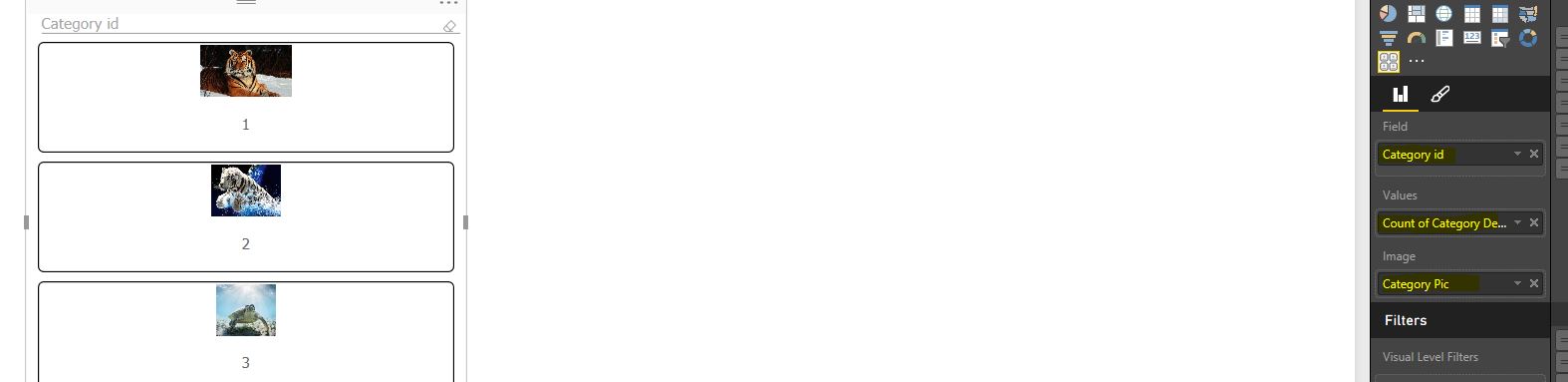
You've probably got this figured out by now, but if not, As per the above screenshot you need to have a value field as well as an image field applied to the slicer in order to get the images to display
 Responsive Resident
Below is a picture of my sample file.

Here is a screen shot of teh values i entered for the slicer. Hope this helps.
 Resolver I
Hi
You've probably got this figured out by now, but if not, As per the above screenshot you need to have a value field as well as an image field applied to the slicer in order to get the images to display
 Anonymous10 years agoNot applicable
Whats is the data type requirements for the column. I have a SQL table using the image datatype and it imports into a query set as binary. But isn't coming across into the desktop as a selectable field?
 ronnoc9 years ago
Advocate II
This feature must have been removed in a recent update because the only fields for my slicers are as follows:
:(
 lcasey9 years ago
Post Prodigy
You need to import the chiclet slicer from the online Power BI Visual Gallery Located here: https://app.powerbi.com/visuals/
Just search for chic
- ronnoc9 years ago
Ah I see the chiclet slicer is a custom visualisation. I have the same problem everyone else is having though, the pictures just do not show, have tried multiple URL's
- lcasey9 years ago
You need to fill in ALL the fields of the Chicklet slicer including "Values"