cancel
Showing results for 
Search instead for 
Did you mean: 

Next up in the FabCon + SQLCon recap series: The roadmap for Microsoft SQL and Maximizing Developer experiences in Fabric. All sessions are available on-demand after the live show. Register now

Reply
xerxel
Advocate II
Advocate II

You're good to go! (Personal Gateway)

Why is it that my Personal Gateway says everything is OK but when I look in the "Manage Gateways" page, it says "You don't have any data gateways".


Is this expected behaviour or do other people have their Personal Gateway listed on that page?


Thanks in advance.

5 REPLIES 5
Anonymous
Not applicable

Hi @xerxel,

This is an expected behavior. After you install Power BI personal gateway and configure the gateway, you are able to sign in data source and schedule refresh for the dataset in the dataset’s Settings screens, you can check the following example. For more details, please review this article: Power BI Gateway - Personal.
1.PNG


However, if you install on-premises gateway and register it on your machine, you will find the registered gateway in the "Manage Gateways" page.


Thanks,
Lydia Zhang

Lydia,

thanks for the clarity and screenshots. This is exactly what I needed!


For me, "Use your gateway" is not displayed. This must be the problem.


Next question: How do you know which ID / credentials the personal gateway is using to connect to PowerBI?

I have two IDs:

 1. My trial Azure ID

 2. My Corporate ID which I have switched to after the sucessful trial.


The personal gateway never asks for a login and password for PowerBI. It only asks for a service account to run the windows service. So how do you tell it which PowerBI account to use? I have checked the config files and support articles but can't find any reference except to details for proxys. I have logged in to both accounts on PowerBI and there is no text which says "use your gateway". I have tried from a corp network and from a total unrestricted internet connection.


Xerxel

Anonymous
Not applicable

Hi @xerxel

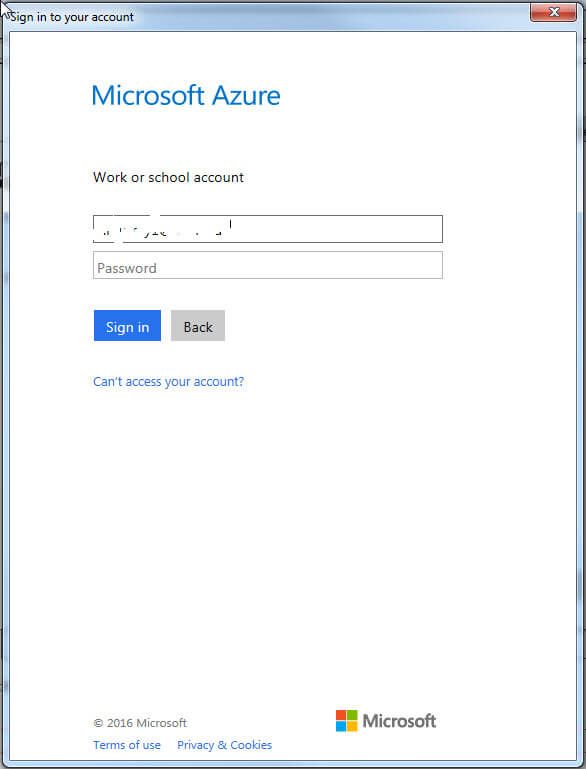
Do you install the personal gateway by yourself? When the Installation Wizard finishes, you’ll be prompted to launch the Configuration Wizard.You’ll need to sign in to Power BI with a Power BI Pro account from the Wizard, please check the following screenshots for more details.

1.jpg2.PNG.jpg

Reference:
Connect to on-premises data sources with Power BI Personal Gateway
Install and configure personal gateway (4-6)
           

Thanks,
Lydia Zhang

Thanks again for the screenshots - very useful.

The second screen is not displaying for me. This muct the problem. It jumps straight to "good to go".


I wonder if some kind of auto login is taking place. I tried it from 2 domain machines - a PC and a secrver. Will now try it from a PC not in the domain to see if it makes a difference.


Xerxel.

Anonymous
Not applicable

Hi @xerxel

How about uninstalling personal gateway and re-installing personal gateway? I would recommend you use CCleaner to completely uninstall personal gateway if you encounter any issues during the uninstallation process.

Thanks,
Lydia Zhang

Helpful resources

Announcements
New to Fabric survey Carousel

New to Fabric Survey

If you have recently started exploring Fabric, we'd love to hear how it's going. Your feedback can help with product improvements.

Power BI DataViz World Championships carousel

Power BI DataViz World Championships - June 2026

A new Power BI DataViz World Championship is coming this June! Don't miss out on submitting your entry.

Join our Fabric User Panel

Join our Fabric User Panel

Share feedback directly with Fabric product managers, participate in targeted research studies and influence the Fabric roadmap.

March Power BI Update Carousel

Power BI Community Update - March 2026

Check out the March 2026 Power BI update to learn about new features.