Forum Discussion

 Helper III
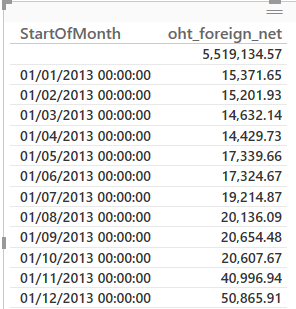
Why do I get a blank line total?
HI,
I seem to get an odd result. Any idea's why there is a blank line value and how do I get rid of it?
A likely issue is the time element of the date field. Create a new column in each table with something like =FORMAT([date],"mmddyyyy") and then use those fields to relate the two tables.
[date] is the reference to your date column, so in one of the tables, it would be [StartOfMonth].

3 Replies
- Greg_Deckler
Community Champion
Generally this means that some data is not matching up in a relationship that you have. My guess would be that StartOfMonth is in one table and oht_foreign_net is in another and for some reason you have rows in the table where oht_foreign_net is that do not match up with StartOfMonth.
 CraigBlackman
Thats is correct.
The issue i think is that I am trying to use the datestream app from Azure rather than the date field within our order_header table.
I have created a relationship between these 2, however i think i may have tackled this incorrectly.
Any suggestions on how best to link the 2 tables?
Many thanks for your help, Craig
- Greg_Deckler
A likely issue is the time element of the date field. Create a new column in each table with something like =FORMAT([date],"mmddyyyy") and then use those fields to relate the two tables.
[date] is the reference to your date column, so in one of the tables, it would be [StartOfMonth].