FabCon is coming to Atlanta
Join us at FabCon Atlanta from March 16 - 20, 2026, for the ultimate Fabric, Power BI, AI and SQL community-led event. Save $200 with code FABCOMM.
Register now!- Power BI forums
- Get Help with Power BI
- Desktop
- Service
- Report Server
- Power Query
- Mobile Apps
- Developer
- DAX Commands and Tips
- Custom Visuals Development Discussion
- Health and Life Sciences
- Power BI Spanish forums
- Translated Spanish Desktop
- Training and Consulting
- Instructor Led Training
- Dashboard in a Day for Women, by Women
- Galleries
- Data Stories Gallery
- Themes Gallery
- Contests Gallery
- QuickViz Gallery
- Quick Measures Gallery
- Visual Calculations Gallery
- Notebook Gallery
- Translytical Task Flow Gallery
- TMDL Gallery
- R Script Showcase
- Webinars and Video Gallery
- Ideas
- Custom Visuals Ideas (read-only)
- Issues
- Issues
- Events
- Upcoming Events
The Power BI Data Visualization World Championships is back! Get ahead of the game and start preparing now! Learn more
- Power BI forums
- Forums
- Get Help with Power BI
- Power Query
- Re: When connecting to a csv source, data shows wr...
- Subscribe to RSS Feed
- Mark Topic as New
- Mark Topic as Read
- Float this Topic for Current User
- Bookmark
- Subscribe
- Printer Friendly Page

- Mark as New
- Bookmark
- Subscribe
- Mute
- Subscribe to RSS Feed
- Permalink
- Report Inappropriate Content
When connecting to a csv source, data shows wrongly encoded
Dear team,
I have been using csv source for many of my reports untill today for one of the csv file, I am getting encoded data. I read online about the data having special characters could cause some problem but all values are within "" plus it is semi colon dxelimitted files but power BI or rather power query is not recognizing as a delimitter. Here is how it is coming. Any clue what settings I need to change to get this in readable format ?
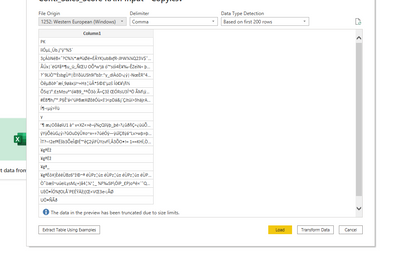
Thanks
Solved! Go to Solution.


- Mark as New
- Bookmark
- Subscribe
- Mute
- Subscribe to RSS Feed
- Permalink
- Report Inappropriate Content
Hi @simmi21 ,
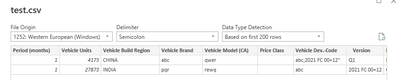
When testing with the sample data you have provided, seems like it works fine in Power BI:
The .txt file also works:
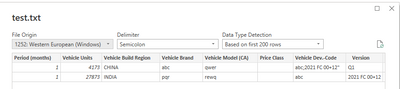
Perhaps you can re-create a txt file with data to try to connect it in Power BI to check, then change to .csv file to re-connect to check it again.
If the data just show one column in the navigator, you can click transform data and split by delimiter as @ AlexisOlson manually, use the first row as the header.
Best Regards,
Community Support Team _ Yingjie Li
If this post helps, then please consider Accept it as the solution to help the other members find it more quickly.


- Mark as New
- Bookmark
- Subscribe
- Mute
- Subscribe to RSS Feed
- Permalink
- Report Inappropriate Content
When you open the CSV file with Excel or a text editor, do you see the unencoded data?
- Mark as New
- Bookmark
- Subscribe
- Mute
- Subscribe to RSS Feed
- Permalink
- Report Inappropriate Content
yes, now its is unencoded but all in one column, the delimtter (which in my case is a semicolon ) is not working. This is how it is coming now :
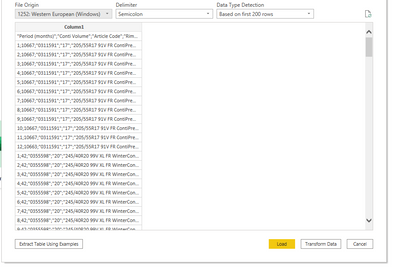
- Mark as New
- Bookmark
- Subscribe
- Mute
- Subscribe to RSS Feed
- Permalink
- Report Inappropriate Content
Can you please try importing with these same settings (snip below) and click Transform even though you only see the data in one column - then post a snip of what appears in the formula bar for the Source step?
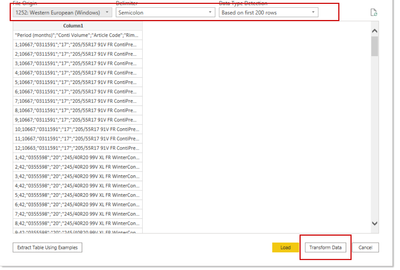
The arugments specified in this line can make a difference. I have listed some examples below. Can you also paste your sample data into a text editor, save as CSV, import into Power BI and show us what result you get? This will help narrow the possibilities.
Csv.Document(File.Contents({{FilePath}}),[Delimiter=",", Encoding=1252])
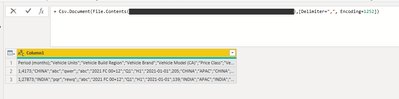
Csv.Document(File.Contents({{FilePath}}),[Delimiter=";", Encoding=1252, QuoteStyle=QuoteStyle.None])


- Mark as New
- Bookmark
- Subscribe
- Mute
- Subscribe to RSS Feed
- Permalink
- Report Inappropriate Content
You should be able to split the column in the query editor even if you load it as a single column.
- Mark as New
- Bookmark
- Subscribe
- Mute
- Subscribe to RSS Feed
- Permalink
- Report Inappropriate Content
Perhaps what looks like a semicolon is not a semicolon, but another character that appears similar. Can you please examine the characters to ascertain exactly what the character code is? You can do this in Excel with the UNICODE function; or using a Hex editor on the file.
- Mark as New
- Bookmark
- Subscribe
- Mute
- Subscribe to RSS Feed
- Permalink
- Report Inappropriate Content
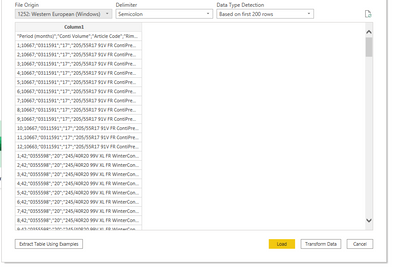
I tried to play around with the regional settings and here is how it looks, good news I don't see the encoding but still it is not delimitted the way it should.
- Mark as New
- Bookmark
- Subscribe
- Mute
- Subscribe to RSS Feed
- Permalink
- Report Inappropriate Content
The settings to change have to do with the File Origin box. But without knowing anything more about your csv file than the screenshot you shared, it's not possible to tell you how to change it.
You could try a trial and error approach; or you could provide more information about the csv file.
- Mark as New
- Bookmark
- Subscribe
- Mute
- Subscribe to RSS Feed
- Permalink
- Report Inappropriate Content
Can you provide a CSV sample (keep it small and cut out anything sensitive) that we can reproduce this with?
- Mark as New
- Bookmark
- Subscribe
- Mute
- Subscribe to RSS Feed
- Permalink
- Report Inappropriate Content
Here how the sample data looks
| Period (months);"Vehicle Units";"Vehicle Build Region";"Vehicle Brand";"Vehicle Model (CA)";"Price Class";"Vehicle Dev.-Code";"Version";"Period (quarters)";"Period (semester)";"Period";"Market Volume";"Region";"Global Region";"Planning Region";"Customer";"Customer Group";"Vehicle Model ";"Region (sales)";"Global Region (sales)";"Planning Region (Sales)";"Division";"Vehicle Segment";"Vehicle Model";"Conti Volume";"Article Code";"Article Description";"efg";"Sales";"Production Plant";"Rim" | |||||||||||||||||||||||||||||||
| 1;4173;"CHINA";"abc";"qwer";;"abc;"2021 FC 00+12";"Q1";"H1";"2021-01-01";205;"CHINA";"APAC";"CHINA";"CHINESE OEM OTHER";"CHINESE OEM";"SEV00h";"CHINA";"APAC";"CHINA";"xyz";"";"";0;"";"";0;0;"";"" | |||||||||||||||||||||||||||||||
| 1;27873;"INDIA";"pqr";"rewq";;"abc";"2021 FC 00+12";"Q1";"H1";"2021-01-01";139;"INDIA";"APAC";"INDIA";"OTHER KEY ACCOUNTS";"OTHER KEY ACCOUNTS";"DOST";"INDIA";"APAC";"INDIA";"xyz";"";"";0;"";"";0;0;"";"" |
- Mark as New
- Bookmark
- Subscribe
- Mute
- Subscribe to RSS Feed
- Permalink
- Report Inappropriate Content
Hi @simmi21 ,
When testing with the sample data you have provided, seems like it works fine in Power BI:
The .txt file also works:
Perhaps you can re-create a txt file with data to try to connect it in Power BI to check, then change to .csv file to re-connect to check it again.
If the data just show one column in the navigator, you can click transform data and split by delimiter as @ AlexisOlson manually, use the first row as the header.
Best Regards,
Community Support Team _ Yingjie Li
If this post helps, then please consider Accept it as the solution to help the other members find it more quickly.

- Mark as New
- Bookmark
- Subscribe
- Mute
- Subscribe to RSS Feed
- Permalink
- Report Inappropriate Content
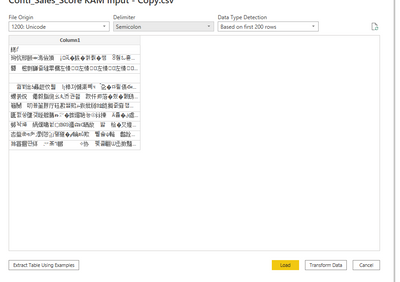
Could you try changing the "File Origin" to 1200 instead of 1252?
- Mark as New
- Bookmark
- Subscribe
- Mute
- Subscribe to RSS Feed
- Permalink
- Report Inappropriate Content
Nope, doesn't help.

Helpful resources

Power BI Dataviz World Championships
The Power BI Data Visualization World Championships is back! Get ahead of the game and start preparing now!

Power BI Monthly Update - December 2025
Check out the December 2025 Power BI Holiday Recap!

FabCon Atlanta 2026
Join us at FabCon Atlanta, March 16-20, for the ultimate Fabric, Power BI, AI and SQL community-led event. Save $200 with code FABCOMM.


