Join us at FabCon Atlanta from March 16 - 20, 2026, for the ultimate Fabric, Power BI, AI and SQL community-led event. Save $200 with code FABCOMM.
Register now!The Power BI Data Visualization World Championships is back! Get ahead of the game and start preparing now! Learn more
Hello All,
I am using Power BI October,2021 release.
I don't wnat to download the preview in Power Query.
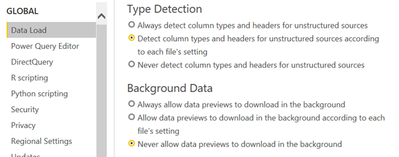
To achieve it, i have used settings as below:
However, it still downloads the preview as below:
Any help would be highly appreciated.
Unselecting the background data setting just means that previews will be computed on demand, whenever you select a given query/step, instead of being computed in the background for all queries/steps.
Hello @Ehren Is there a way to stop downloading the preview unless user explicitliy refresh the preview?
No, there isn't. Can you describe your scenario a bit more? I'm curious why you're wanting this behavior.
Hello @Ehren, Someone from team accidently deleted the data from datasource (dataverse).
As i have not refreshed the data since last week, just wanted to get the same. As preview gets downloaded, not able to get the data(without transformation).
Hm. I'm not sure there's much you can do in that case. Your options would be:
The Power BI Data Visualization World Championships is back! Get ahead of the game and start preparing now!
| User | Count |
|---|---|
| 19 | |
| 9 | |
| 8 | |
| 7 | |
| 6 |