- Power BI forums
- Updates
- News & Announcements
- Get Help with Power BI
- Desktop
- Service
- Report Server
- Power Query
- Mobile Apps
- Developer
- DAX Commands and Tips
- Custom Visuals Development Discussion
- Health and Life Sciences
- Power BI Spanish forums
- Translated Spanish Desktop
- Power Platform Integration - Better Together!
- Power Platform Integrations (Read-only)
- Power Platform and Dynamics 365 Integrations (Read-only)
- Training and Consulting
- Instructor Led Training
- Dashboard in a Day for Women, by Women
- Galleries
- Community Connections & How-To Videos
- COVID-19 Data Stories Gallery
- Themes Gallery
- Data Stories Gallery
- R Script Showcase
- Webinars and Video Gallery
- Quick Measures Gallery
- 2021 MSBizAppsSummit Gallery
- 2020 MSBizAppsSummit Gallery
- 2019 MSBizAppsSummit Gallery
- Events
- Ideas
- Custom Visuals Ideas
- Issues
- Issues
- Events
- Upcoming Events
- Community Blog
- Power BI Community Blog
- Custom Visuals Community Blog
- Community Support
- Community Accounts & Registration
- Using the Community
- Community Feedback
Register now to learn Fabric in free live sessions led by the best Microsoft experts. From Apr 16 to May 9, in English and Spanish.
- Power BI forums
- Forums
- Get Help with Power BI
- Power Query
- Unexpected end of input was found in JSON content
- Subscribe to RSS Feed
- Mark Topic as New
- Mark Topic as Read
- Float this Topic for Current User
- Bookmark
- Subscribe
- Printer Friendly Page

- Mark as New
- Bookmark
- Subscribe
- Mute
- Subscribe to RSS Feed
- Permalink
- Report Inappropriate Content
Unexpected end of input was found in JSON content
I am trying to refresh a dataset which retrieving data via an api from DY365. But everytime it gives below error in middle of a powerQuery step.

"Datasource. Error: ODATA: Invalid Json. Unexpected end of input was found in JSON content. Not all objects and array scopes were closed. "
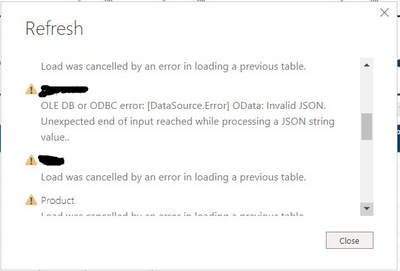
when refreshing the powerBI desktop and the service it gives a similar error as below.
"OLE DB or ODBC error: [DataSource.Error] OData: Invalid JSON. Unexpected end of input reached while processing a JSON string value.."
Appreciate any help since no support found online.
Thanks,
NeoC
Solved! Go to Solution.


- Mark as New
- Bookmark
- Subscribe
- Mute
- Subscribe to RSS Feed
- Permalink
- Report Inappropriate Content
Hello @Anonymous
this means a Json-file is corrupted. Maybe created by a interface. What you could do if one character is missing at the end and in case put it... so basically reading the binary from json, adding the missing character if missing and then reread it.
If this post helps or solves your problem, please mark it as solution (to help other users find useful content and to acknowledge the work of users that helped you)
Kudoes are nice too
Have fun
Jimmy
- Mark as New
- Bookmark
- Subscribe
- Mute
- Subscribe to RSS Feed
- Permalink
- Report Inappropriate Content
Hello @Anonymous
I think the error is not even caused by this query but the error is caused by the query you are merging with. So the error appears when the merged query is queried. But still.... the problem is probably a corrupted json-file.
If this post helps or solves your problem, please mark it as solution (to help other users find useful content and to acknowledge the work of users that helped you)
Kudoes are nice too
Have fun
Jimmy

- Mark as New
- Bookmark
- Subscribe
- Mute
- Subscribe to RSS Feed
- Permalink
- Report Inappropriate Content
I also had a similar issue, it git solved automatically after clearing my cache. I closed the existing file after clearing cache and then reopened it with another file name and then data got loaded in the desktop
- Mark as New
- Bookmark
- Subscribe
- Mute
- Subscribe to RSS Feed
- Permalink
- Report Inappropriate Content
Hello @Anonymous
this means a Json-file is corrupted. Maybe created by a interface. What you could do if one character is missing at the end and in case put it... so basically reading the binary from json, adding the missing character if missing and then reread it.
If this post helps or solves your problem, please mark it as solution (to help other users find useful content and to acknowledge the work of users that helped you)
Kudoes are nice too
Have fun
Jimmy
- Mark as New
- Bookmark
- Subscribe
- Mute
- Subscribe to RSS Feed
- Permalink
- Report Inappropriate Content
Hi @Jimmy801 ,
Update on above. Now it refreshes fine at the powerQuery level. Havent dont anything at all 🙄
and give the same below error after close and apply. But again it will pop up once i refresh the current view in powerQuery!
- Mark as New
- Bookmark
- Subscribe
- Mute
- Subscribe to RSS Feed
- Permalink
- Report Inappropriate Content
Hi @Jimmy801 ,
Thanks for the reply.
You think this is the case even the error comes at an middle of a applied step? Cuz when I try to expand a merged query it gives the error. But the destination table query refreshes perfectly fine at the individual refresh.

Thaks,
NeoBA
- Mark as New
- Bookmark
- Subscribe
- Mute
- Subscribe to RSS Feed
- Permalink
- Report Inappropriate Content
Hello @Anonymous
I think the error is not even caused by this query but the error is caused by the query you are merging with. So the error appears when the merged query is queried. But still.... the problem is probably a corrupted json-file.
If this post helps or solves your problem, please mark it as solution (to help other users find useful content and to acknowledge the work of users that helped you)
Kudoes are nice too
Have fun
Jimmy
- Mark as New
- Bookmark
- Subscribe
- Mute
- Subscribe to RSS Feed
- Permalink
- Report Inappropriate Content
Thanks @Jimmy801 ,
I have changed the source to SQL since there was no way to validate the json file. Anyway your idea helps.
Helpful resources

Microsoft Fabric Learn Together
Covering the world! 9:00-10:30 AM Sydney, 4:00-5:30 PM CET (Paris/Berlin), 7:00-8:30 PM Mexico City

Power BI Monthly Update - April 2024
Check out the April 2024 Power BI update to learn about new features.

Fabric Community Update - April 2024
Find out what's new and trending in the Fabric Community.