Join us at FabCon Vienna from September 15-18, 2025
The ultimate Fabric, Power BI, SQL, and AI community-led learning event. Save €200 with code FABCOMM.
Get registered- Power BI forums
- Get Help with Power BI
- Desktop
- Service
- Report Server
- Power Query
- Mobile Apps
- Developer
- DAX Commands and Tips
- Custom Visuals Development Discussion
- Health and Life Sciences
- Power BI Spanish forums
- Translated Spanish Desktop
- Training and Consulting
- Instructor Led Training
- Dashboard in a Day for Women, by Women
- Galleries
- Data Stories Gallery
- Themes Gallery
- Contests Gallery
- Quick Measures Gallery
- Notebook Gallery
- Translytical Task Flow Gallery
- TMDL Gallery
- R Script Showcase
- Webinars and Video Gallery
- Ideas
- Custom Visuals Ideas (read-only)
- Issues
- Issues
- Events
- Upcoming Events
Compete to become Power BI Data Viz World Champion! First round ends August 18th. Get started.
- Power BI forums
- Forums
- Get Help with Power BI
- Power Query
- Re: Transform data like two row with main title an...
- Subscribe to RSS Feed
- Mark Topic as New
- Mark Topic as Read
- Float this Topic for Current User
- Bookmark
- Subscribe
- Printer Friendly Page

- Mark as New
- Bookmark
- Subscribe
- Mute
- Subscribe to RSS Feed
- Permalink
- Report Inappropriate Content
Transform data like two row with main title and subtitle ?
can i tranform Left side to Right Side like this img, thank
Solved! Go to Solution.


- Mark as New
- Bookmark
- Subscribe
- Mute
- Subscribe to RSS Feed
- Permalink
- Report Inappropriate Content
Hello @utgqw
here another approach. It uses List.Generate to create a new column that identifies the main groups. In the Group-function the first row is deleted and a new column with the main-cat is added
let
    Source = Table.FromRows(Json.Document(Binary.Decompress(Binary.FromText("i45WcgQCJR0lQwMDpVidaKXE4pQ0INcYGw/CMYFwnIAAyDOC6itOBEvCjClPLQLyTJH1gTixAA==", BinaryEncoding.Base64), Compression.Deflate)), let _t = ((type nullable text) meta [Serialized.Text = true]) in type table [Cat = _t, Column1 = _t]),
    ChangedType = Table.TransformColumnTypes(Source,{{"Cat", type text}, {"Column1", Int64.Type}}),
    GenerateGroupColumns = List.Generate
    (
        ()=> [RunningTotal = ChangedType[Column1]{0}, Counter=0, Group=1],
        each [Counter]<= Table.RowCount(ChangedType)-1,
        (rec)=>
        [
            RunningTotal = if rec[RunningTotal] - ChangedType[Column1]{rec[Counter]+1}< 0 then ChangedType[Column1]{rec[Counter]+1} else rec[RunningTotal] - ChangedType[Column1]{rec[Counter]+1},
            Counter = rec[Counter]+1,
            Group = if rec[RunningTotal] - ChangedType[Column1]{rec[Counter]+1}< 0 then rec[Group]+1 else rec[Group]
        ],
        each [Group]
    ),
    CreateTable = Table.FromColumns(Table.ToColumns(ChangedType)&{GenerateGroupColumns}, Table.ColumnNames(ChangedType)&{"Group"}),
    GroupedRows = Table.Group
    (
        CreateTable,
        {"Group"},
        {
            {
                "AllRows",
                (tbl)=> Table.AddColumn(Table.Skip(tbl,1), "Main", each tbl[Cat]{0})
            }
        }
    ),
    RemovedOtherColumns = Table.SelectColumns(GroupedRows,{"AllRows"}),
    ExpandedAllRows = Table.ExpandTableColumn(RemovedOtherColumns, "AllRows", {"Cat", "Column1", "Group", "Main"}, {"Cat", "Column1", "Group", "Main"})
in
    ExpandedAllRows
Copy paste this code to the advanced editor in a new blank query to see how the solution works.
If this post helps or solves your problem, please mark it as solution (to help other users find useful content and to acknowledge the work of users that helped you)
Kudoes are nice too
Have fun
Jimmy


- Mark as New
- Bookmark
- Subscribe
- Mute
- Subscribe to RSS Feed
- Permalink
- Report Inappropriate Content
Hi, @utgqw
You can try my code, which currently has a data processing capacity of about 12,000 lines.
// output
let
    Source = Table.FromRecords(Json.Document(Binary.Decompress(Binary.FromText("bc2xDoIwFIXhV2nuzGApAWVTVl2qm3G4loY0kN6EW+JgeHd1qy3z+XL++xs0vcQZn3ZiaOFojGWm2VmGAjpafIC2UuVaJPDkRis0mjFyUm2za0DfR26fMwphsiy+TnQ4/MWl3HyNSKN2Gbn8JnReJLZscqsJ+9Spus7cjZbZ+SGlh2p9fAA=", BinaryEncoding.Base64),Compression.Deflate))),
    fx = (lsts)=> List.Transform(List.Skip(lsts), each {lsts{0}{0}}&_),
    rows = Table.ToRows(Source)&{{null, null}},
    acc = List.Accumulate(
             rows,
             {null, 0, {}, {}}, //{sub_total, running_total, list_sub_tbls, result}
             (s,c)=>
                if s{1}+c{1}=2*s{0} then {null, 0, {}, s{3}&{ Table.FromRows(fx(s{2}&{c}), {"Main", "Sub", "Count"}) }}
                else {if s{1}=0 or s{0}=null then c{1} else s{0}, s{1}+c{1}, s{2}&{c}, s{3}}
          ),
    result = Table.Combine(acc{3})
in
    result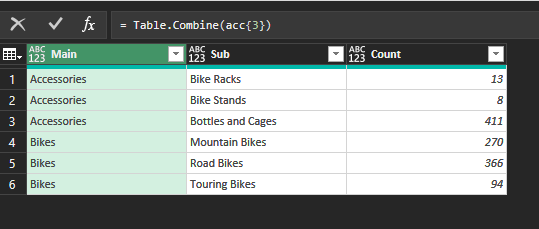
- Mark as New
- Bookmark
- Subscribe
- Mute
- Subscribe to RSS Feed
- Permalink
- Report Inappropriate Content
sry i'm newbie where i paste the code?
is it working with data like
HeadA
AAAA1
AAAA2
AAAA3
HeadB
BBBB1
BBBB2
HeadC
CCCC1
CCCC2
CCCC3
CCC4
(sub catalogy not equal) ? thank you
- Mark as New
- Bookmark
- Subscribe
- Mute
- Subscribe to RSS Feed
- Permalink
- Report Inappropriate Content
Hello @utgqw
here another approach. It uses List.Generate to create a new column that identifies the main groups. In the Group-function the first row is deleted and a new column with the main-cat is added
let
    Source = Table.FromRows(Json.Document(Binary.Decompress(Binary.FromText("i45WcgQCJR0lQwMDpVidaKXE4pQ0INcYGw/CMYFwnIAAyDOC6itOBEvCjClPLQLyTJH1gTixAA==", BinaryEncoding.Base64), Compression.Deflate)), let _t = ((type nullable text) meta [Serialized.Text = true]) in type table [Cat = _t, Column1 = _t]),
    ChangedType = Table.TransformColumnTypes(Source,{{"Cat", type text}, {"Column1", Int64.Type}}),
    GenerateGroupColumns = List.Generate
    (
        ()=> [RunningTotal = ChangedType[Column1]{0}, Counter=0, Group=1],
        each [Counter]<= Table.RowCount(ChangedType)-1,
        (rec)=>
        [
            RunningTotal = if rec[RunningTotal] - ChangedType[Column1]{rec[Counter]+1}< 0 then ChangedType[Column1]{rec[Counter]+1} else rec[RunningTotal] - ChangedType[Column1]{rec[Counter]+1},
            Counter = rec[Counter]+1,
            Group = if rec[RunningTotal] - ChangedType[Column1]{rec[Counter]+1}< 0 then rec[Group]+1 else rec[Group]
        ],
        each [Group]
    ),
    CreateTable = Table.FromColumns(Table.ToColumns(ChangedType)&{GenerateGroupColumns}, Table.ColumnNames(ChangedType)&{"Group"}),
    GroupedRows = Table.Group
    (
        CreateTable,
        {"Group"},
        {
            {
                "AllRows",
                (tbl)=> Table.AddColumn(Table.Skip(tbl,1), "Main", each tbl[Cat]{0})
            }
        }
    ),
    RemovedOtherColumns = Table.SelectColumns(GroupedRows,{"AllRows"}),
    ExpandedAllRows = Table.ExpandTableColumn(RemovedOtherColumns, "AllRows", {"Cat", "Column1", "Group", "Main"}, {"Cat", "Column1", "Group", "Main"})
in
    ExpandedAllRows
Copy paste this code to the advanced editor in a new blank query to see how the solution works.
If this post helps or solves your problem, please mark it as solution (to help other users find useful content and to acknowledge the work of users that helped you)
Kudoes are nice too
Have fun
Jimmy
- Mark as New
- Bookmark
- Subscribe
- Mute
- Subscribe to RSS Feed
- Permalink
- Report Inappropriate Content
Really nice but it hard for me to understand and apply for work ... thankyou
- Mark as New
- Bookmark
- Subscribe
- Mute
- Subscribe to RSS Feed
- Permalink
- Report Inappropriate Content
Hello @utgqw
I totally agree. The thing is... easy transformation can be made by using the gui. More complex ones you have to write your code on you own and therefore also not easy to apply. What you can try with my code is to replace my datasource steps with your query. Connect them by changing the step-names in my code and maybe also changing column names in my code.
Hope this helps a little bit
Jimmy
- Mark as New
- Bookmark
- Subscribe
- Mute
- Subscribe to RSS Feed
- Permalink
- Report Inappropriate Content
To create a new blank query in Power Query, copy and paste the code into the advanced editor of the query.
It doesn't matter if you can't distinguish between the main categories, as long as each main category in your data has a data summation for its subcategories, as in the example file you provided.
Does your new example only have one column of data? You try to simulate the data as close to the real data as possible, so that we can give you code suggestions to better fit your real data.
- Mark as New
- Bookmark
- Subscribe
- Mute
- Subscribe to RSS Feed
- Permalink
- Report Inappropriate Content


- Mark as New
- Bookmark
- Subscribe
- Mute
- Subscribe to RSS Feed
- Permalink
- Report Inappropriate Content
How does Power Query know what your main categories are?

________________________
If my answer was helpful, please consider Accept it as the solution to help the other members find it
Click on the Thumbs-Up icon if you like this reply 🙂
⭕ Subscribe and learn Power BI from these videos
⚪ Website ⚪ LinkedIn ⚪ PBI User Group
- Mark as New
- Bookmark
- Subscribe
- Mute
- Subscribe to RSS Feed
- Permalink
- Report Inappropriate Content
Nobody Know maybe data are copy paste from pivot table to normal range

- Mark as New
- Bookmark
- Subscribe
- Mute
- Subscribe to RSS Feed
- Permalink
- Report Inappropriate Content
@Fowmy - maybe using the count column...
take first row as a main category, and the all rows below, which will have total of the first row 😄
(eg. Accessories = 432, then take rows step by step till you reach 432, and so on)
its the only way based on this sample
- Mark as New
- Bookmark
- Subscribe
- Mute
- Subscribe to RSS Feed
- Permalink
- Report Inappropriate Content
Yes, the fastest way to get a solution is to upload a desensitized file that is close to the actual data.
- Mark as New
- Bookmark
- Subscribe
- Mute
- Subscribe to RSS Feed
- Permalink
- Report Inappropriate Content
@utgqw
Yes, that will be possible, but as per the sample you have, the Title has two categories AAAA and BBBB with subcategories starting the 1st Letter. Is it the same structure as your real dataset? you can post a sample of the actual dataset after removing any confidential information.
How to paste sample data with your question?
You can save your files in OneDrive, Google Drive, or any other cloud sharing platforms and share the link here.
________________________
If my answer was helpful, please consider Accept it as the solution to help the other members find it
Click on the Thumbs-Up icon if you like this reply 🙂
⭕ Subscribe and learn Power BI from these videos
⚪ Website ⚪ LinkedIn ⚪ PBI User Group

Helpful resources

Fabric Community Update - July 2025
Find out what's new and trending in the Fabric community.

Power BI Monthly Update - July 2025
Check out the July 2025 Power BI update to learn about new features.


