Join us at FabCon Vienna from September 15-18, 2025
The ultimate Fabric, Power BI, SQL, and AI community-led learning event. Save €200 with code FABCOMM.
Get registered- Power BI forums
- Get Help with Power BI
- Desktop
- Service
- Report Server
- Power Query
- Mobile Apps
- Developer
- DAX Commands and Tips
- Custom Visuals Development Discussion
- Health and Life Sciences
- Power BI Spanish forums
- Translated Spanish Desktop
- Training and Consulting
- Instructor Led Training
- Dashboard in a Day for Women, by Women
- Galleries
- Data Stories Gallery
- Themes Gallery
- Contests Gallery
- Quick Measures Gallery
- Notebook Gallery
- Translytical Task Flow Gallery
- TMDL Gallery
- R Script Showcase
- Webinars and Video Gallery
- Ideas
- Custom Visuals Ideas (read-only)
- Issues
- Issues
- Events
- Upcoming Events
Compete to become Power BI Data Viz World Champion! First round ends August 18th. Get started.
- Power BI forums
- Forums
- Get Help with Power BI
- Power Query
- Re: Something similar to excels CountIF in Query E...
- Subscribe to RSS Feed
- Mark Topic as New
- Mark Topic as Read
- Float this Topic for Current User
- Bookmark
- Subscribe
- Printer Friendly Page

- Mark as New
- Bookmark
- Subscribe
- Mute
- Subscribe to RSS Feed
- Permalink
- Report Inappropriate Content
Something similar to excels CountIF in Query Editor
Hi there,
first of all I am very grateful because I have found a lot of very helpful posts in this forum already, but for my current case I could´t find anything suitable.
So what I would like to do within the query editor:
I have one table called "Cost Center":
Columns:
A Cost element (text)
B Cost Center (text) e.g. 0008/123456, dublicates existing
C Partner Cost Center (text) e.g. 0007/456789 dublicates existing
D Value (decimal number)
EDIT:
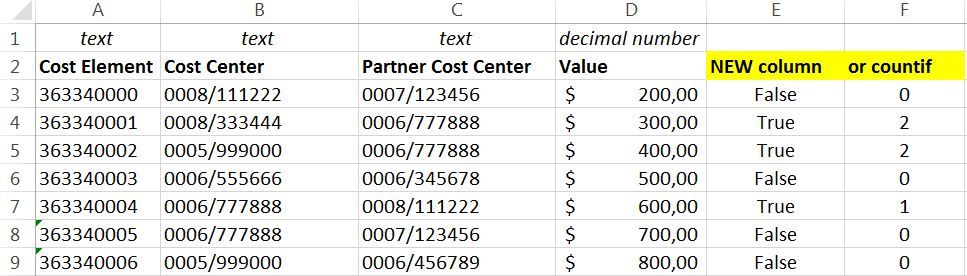
Next to these columns there are a coulple of other columns but I guess they are irrelevant.
Basicly what I aim for is a new colum E which tells me for each row if the Partner Cost Center is somewhere - not exlicitly in the same row - in the column "Cost Center". In a second step I would like to exclude these rows from my model using the standard filter option.
So the new colum could say "true" or just count and I would then filter for 0.
In Excel I would use Countif(B:B;C1) and copy paste it for each row.
I have read a lot of posts about CountIf in Dax or CountX and list.contain in this forum but I couldn´t transfer it to my case.
Any help is appreciated.
Thanks and regards
Daniel
Solved! Go to Solution.


- Mark as New
- Bookmark
- Subscribe
- Mute
- Subscribe to RSS Feed
- Permalink
- Report Inappropriate Content
Hi @Dandiel ,
yes sorry, my bad.
What you're trying to accomplish doesn't need any additional column. Just change the JoinKind in the merge-operation to: "Left Anti":
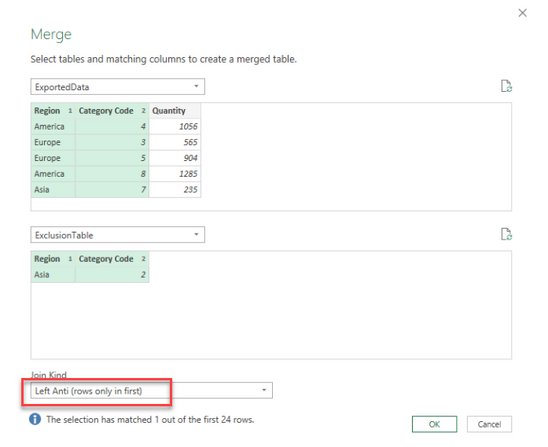
It automatically excludes all matches from the merged table.
See this blogpost for more details: https://www.poweredsolutions.co/2019/01/10/merge-operations-in-power-bi-power-query-part-3-left-anti...
Imke Feldmann (The BIccountant)
If you liked my solution, please give it a thumbs up. And if I did answer your question, please mark this post as a solution. Thanks!
How to integrate M-code into your solution -- How to get your questions answered quickly -- How to provide sample data -- Check out more PBI- learning resources here -- Performance Tipps for M-queries

- Mark as New
- Bookmark
- Subscribe
- Mute
- Subscribe to RSS Feed
- Permalink
- Report Inappropriate Content
Hi @Dandiel ,
Could you try this and let me know if you encounter any difficulty ?
let
  Source = Table,
  #"JoinTables" = Table.NestedJoin(Source, {"PartnerCostCenter"}, Source, {"CostCenter"}, "newIsSomewhere", JoinKind.LeftOuter),
  #"CountResult" = Table.AggregateTableColumn(#"JoinTables", "newIsSomewhere", {{"CostCenter", List.NonNullCount, "Count"}})
in
  #"CountResult"
If you dont want to use the query editor just ask, I can explain you how to do it in a more simple way.
Regards, Etienne
- Mark as New
- Bookmark
- Subscribe
- Mute
- Subscribe to RSS Feed
- Permalink
- Report Inappropriate Content
Hi @Anonymous ,
thank you for your fast response!
I have tried your code. After I hit "done" in the advanced editor PBI has started to load. At the bottom right corner it started to count the mega bytes. After over 10 GB and 35min I canceled the calculation assuming something went wrong.
After that I deleted the #"CountResult" line in your code, hoping I can take a look at the joint table. So I clicked on a random "table" in the new column "newIsSomewhere" and PBI said it´s empty.
Do you have any idea why this is happening?
I don't think thats the reason but just in case for your information, the table consists of almost 200k rows.
And I don't mind using the editor or another option as long as it works properly 🙂
Thanks and regards, Daniel
- Mark as New
- Bookmark
- Subscribe
- Mute
- Subscribe to RSS Feed
- Permalink
- Report Inappropriate Content
Hi @Dandiel ,
Indeed if it reached 10GB after 35mins it can't be a good solution  mybad then
I think this should work even better
let
    Source = Table,
    CostCenterToList = Table.ToList(Table.SelectColumns(Source,"Cost Center")),
    #"Add Column" = Table.AddColumn(Source,"PartnerCostCenterExists", each List.Contains(CostCenterToList,[Partner Cost Center]))in
    #"Add Column"
What am i doing :
Convert the column "Cost Center" into a list so we can use List.Contains for each value of "Partner Cost Center" to determine if it exists.
The only thing with this solution is that you only have a result as true false and not a count but i think that's what you want. If you need a count just tell me !
I hope this will work for you, i didnt try it for a huge data amount.
Regards,
Etienne
- Mark as New
- Bookmark
- Subscribe
- Mute
- Subscribe to RSS Feed
- Permalink
- Report Inappropriate Content
Hi @ImkeF
thank you very much for your input. It works just fine!
Only really small disadvantage is that I cannot really see what happens / which rows were excluded nor can I filter for it. But I am happy J
And in addition I have learned quite a lot about the merge function via your link.
Hi @Anonymous
thank you very much as well!
I have tried your new code. It creates the column within a couple of seconds just fine. Within the first 200 rows its only false. When I try to scroll down or filter using “load more” it starts to load. Again after around 30min of loading I stopped it. Your solution where I can actually see for each row if it needs to be excluded would be nice but performance wise the proposal of ImkeF seems to be the more efficient one.
In fact I hope I did everything correctly with your code so it´s not the case that your code is fine and the problem is with the user aka me.
So kudos to both of you and regards
Daniel
- Mark as New
- Bookmark
- Subscribe
- Mute
- Subscribe to RSS Feed
- Permalink
- Report Inappropriate Content
Hi @Anonymous ,
you would help us answerers if you could post some sample data with before data and desired result.
Possible reasons for empty results are deviations in cases (as Power Query is case sensitive) or unprintable characters (use Text.Trim and Text.Clean before).
Imke Feldmann (The BIccountant)
If you liked my solution, please give it a thumbs up. And if I did answer your question, please mark this post as a solution. Thanks!
How to integrate M-code into your solution -- How to get your questions answered quickly -- How to provide sample data -- Check out more PBI- learning resources here -- Performance Tipps for M-queries
- Mark as New
- Bookmark
- Subscribe
- Mute
- Subscribe to RSS Feed
- Permalink
- Report Inappropriate Content
Hi @ImkeF ,
I assume you wanted to address me with your post.
I have edited my first post and provided sample data.
Thanks for trying to help me out.
Daniel
- Mark as New
- Bookmark
- Subscribe
- Mute
- Subscribe to RSS Feed
- Permalink
- Report Inappropriate Content
Hi @Dandiel ,
yes sorry, my bad.
What you're trying to accomplish doesn't need any additional column. Just change the JoinKind in the merge-operation to: "Left Anti":
It automatically excludes all matches from the merged table.
See this blogpost for more details: https://www.poweredsolutions.co/2019/01/10/merge-operations-in-power-bi-power-query-part-3-left-anti...
Imke Feldmann (The BIccountant)
If you liked my solution, please give it a thumbs up. And if I did answer your question, please mark this post as a solution. Thanks!
How to integrate M-code into your solution -- How to get your questions answered quickly -- How to provide sample data -- Check out more PBI- learning resources here -- Performance Tipps for M-queries
Helpful resources

Fabric Community Update - July 2025
Find out what's new and trending in the Fabric community.

Power BI Monthly Update - July 2025
Check out the July 2025 Power BI update to learn about new features.

| User | Count |
|---|---|
| 11 | |
| 6 | |
| 6 | |
| 5 | |
| 5 |


