FabCon is coming to Atlanta
Join us at FabCon Atlanta from March 16 - 20, 2026, for the ultimate Fabric, Power BI, AI and SQL community-led event. Save $200 with code FABCOMM.
Register now!- Power BI forums
- Get Help with Power BI
- Desktop
- Service
- Report Server
- Power Query
- Mobile Apps
- Developer
- DAX Commands and Tips
- Custom Visuals Development Discussion
- Health and Life Sciences
- Power BI Spanish forums
- Translated Spanish Desktop
- Training and Consulting
- Instructor Led Training
- Dashboard in a Day for Women, by Women
- Galleries
- Data Stories Gallery
- Themes Gallery
- Contests Gallery
- QuickViz Gallery
- Quick Measures Gallery
- Visual Calculations Gallery
- Notebook Gallery
- Translytical Task Flow Gallery
- TMDL Gallery
- R Script Showcase
- Webinars and Video Gallery
- Ideas
- Custom Visuals Ideas (read-only)
- Issues
- Issues
- Events
- Upcoming Events
The Power BI Data Visualization World Championships is back! Get ahead of the game and start preparing now! Learn more
- Power BI forums
- Forums
- Get Help with Power BI
- Power Query
- Re: Query editor shows rows but data is not availa...
- Subscribe to RSS Feed
- Mark Topic as New
- Mark Topic as Read
- Float this Topic for Current User
- Bookmark
- Subscribe
- Printer Friendly Page


- Mark as New
- Bookmark
- Subscribe
- Mute
- Subscribe to RSS Feed
- Permalink
- Report Inappropriate Content
Query editor shows rows but data is not available in data view
Hi all,
We have recently started using D365 for Finance. To create visualisations and analyse data we use Power BI which we connect to CDS/Dataverse.
The issue we encounter is that in the Power Query for some tables all data is presented but when going to the data view certain rows are simply not shown.
An example is the table AGR_WorkerHolidayBalanceEntity which shows 6 rows for a certain person, exactly alike the registration in D365.
In the view however only 2 rows are shown and can be used in visualisations. (This also happens for some other tables.)
This table has not that many rows in total (11) and no 'null' values. Even when only pulling this single table into Power BI, it still shows all rows in the query editor but only a subset in the data view.
As far as we can see the data has no special characters nor does it help transforming the data into different types (e.g. text into numeric or date/time into date only).
We also tried to clear cache and use a different date table and adding an (extra) index column but to no avail.
Hopefully this is a common thing and there is an obvious answer but so far we haven't found it yet.
Any help would be great.
Cheers,
Richard
Solved! Go to Solution.
- Mark as New
- Bookmark
- Subscribe
- Mute
- Subscribe to RSS Feed
- Permalink
- Report Inappropriate Content
Dear all,
one of the issues we found is that in a certain table an array was present and CDS did not handle this the way it was expected. Instead of using CDS we now use ODATA (and manipulated the applicable table), which allows us to link to the necessary data/tables. Using ODATA, in our case, also solves some other random issues like Timeouts.


- Mark as New
- Bookmark
- Subscribe
- Mute
- Subscribe to RSS Feed
- Permalink
- Report Inappropriate Content
Hi @Richard77 ,
Please try to disable "load" of the table and apply. After that, enable "load" and apply again. Can this help?
Please note that, this will delete all calculated columns/measures of the table.
In addition, if copy the table into excel and then import it, will the same issue occurr?
Best Regards,
Icey
- Mark as New
- Bookmark
- Subscribe
- Mute
- Subscribe to RSS Feed
- Permalink
- Report Inappropriate Content
Dear Icey,
my apologies, i thought i replied to your message but apparently something went wrong.
I've tried your option to disable and then enable the load, but that did not change anything. Also downloading the data into Excel gave the same result (6 rows, same as in the Power Query after filtering) so i assume that importing the data goes as expected.
I did make some screenshots that might be helpful:
Cheers,
Richard
- Mark as New
- Bookmark
- Subscribe
- Mute
- Subscribe to RSS Feed
- Permalink
- Report Inappropriate Content
Hi @Richard77 ,
I can't reproduce your issue.
Could you check if all rows show in Power BI Desktop Data View, not Report View?
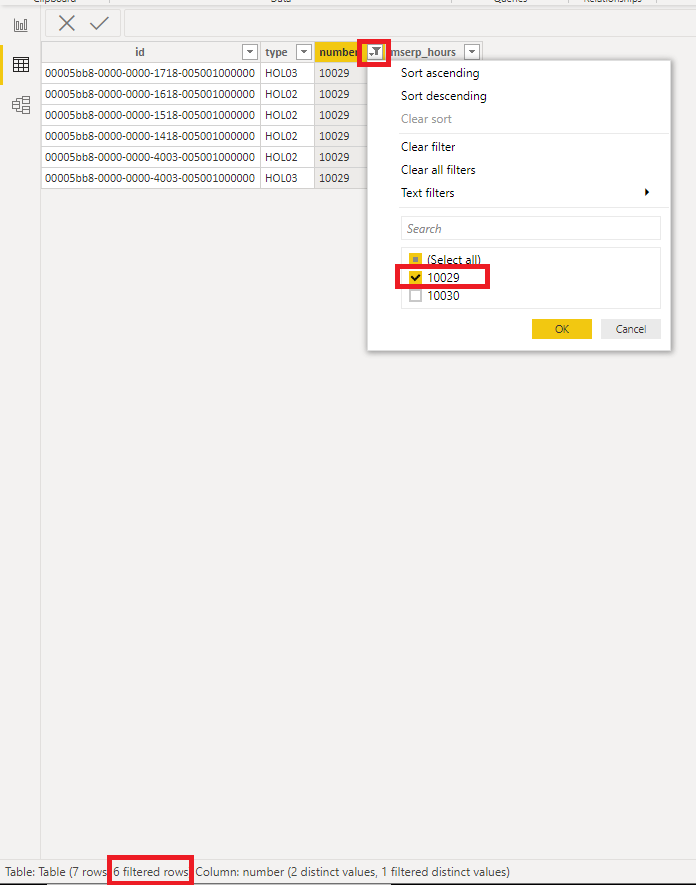
In addition, please check if any other slicers, filters or visual interactions affect the result.
Best Regards,
Icey
If this post helps, then please consider Accept it as the solution to help the other members find it more quickly.
- Mark as New
- Bookmark
- Subscribe
- Mute
- Subscribe to RSS Feed
- Permalink
- Report Inappropriate Content
Dear Icey,
there is no 'header' table nor a 'parent-child' relationship. So far, together with a developer, we have confirmed that the data in D365 is correct and has a unique column.
Adding an index column does not work (404 rows become 360), 'Group by' does not work (it leaves 404 unique rows).
I have found one solution that works, but i'm not very confident that this should be it, and that is when i merge the table 'WorkerEntity' with the applicable 'WorkerHolidayBalanceEntity' based on the column personnel number. Adding simply the name of an employee in 'WorkerHolidayBalanceEntity' via this merge i get all the applicable rows (404) in the report view.
So we now have a workaround but no solution for the issue.
Cheers,
Richard
- Mark as New
- Bookmark
- Subscribe
- Mute
- Subscribe to RSS Feed
- Permalink
- Report Inappropriate Content
Dear Icey,
thank you again.
what i see here is that there are 404 (probably no pun indended) rows imported but after adding an index column there are 360 rows left. Also adding a 'Group by' using a 'count Distinct Rows' gives me 360 rows instead of the expected 404.
What i expect now, is that i am missing a 'header table' that is necessary as maybe (just maybe) the 44 missing rows are linked to the same header and the rows are generated upon a change in the data instead of a new data entry.
The screenshot you added also triggered me as i did not see that the ID is not unique (the last 2 rows contain the exact same ID).
I will investigate this further and will let you know any outcome.
Cheers,
Richard
- Mark as New
- Bookmark
- Subscribe
- Mute
- Subscribe to RSS Feed
- Permalink
- Report Inappropriate Content
Dear all,
one of the issues we found is that in a certain table an array was present and CDS did not handle this the way it was expected. Instead of using CDS we now use ODATA (and manipulated the applicable table), which allows us to link to the necessary data/tables. Using ODATA, in our case, also solves some other random issues like Timeouts.


- Mark as New
- Bookmark
- Subscribe
- Mute
- Subscribe to RSS Feed
- Permalink
- Report Inappropriate Content
The Power BI visuals will ALWAYS try to aggregate everything. If you don't want that you need to add unique columns (like an index column) to the visual. For good measure also enable the "show items with no data" feature.
- Mark as New
- Bookmark
- Subscribe
- Mute
- Subscribe to RSS Feed
- Permalink
- Report Inappropriate Content
Dear Ibendlin,
thank you for your help. Unfortunatly this did not help. D365 already offers a unique index column and next to that, we have tried to add an extra index column. The results were still the same.
My thoughts are heading towards an issue where Power BI does not handle the processing of Dataverse data correctly.
Cheers,
Richard

Helpful resources

Power BI Dataviz World Championships
The Power BI Data Visualization World Championships is back! Get ahead of the game and start preparing now!

Power BI Monthly Update - November 2025
Check out the November 2025 Power BI update to learn about new features.

FabCon Atlanta 2026
Join us at FabCon Atlanta, March 16-20, for the ultimate Fabric, Power BI, AI and SQL community-led event. Save $200 with code FABCOMM.


