Forum Discussion

PowerBI Desktop Get Data from SP - invalid CRLF characters
I am trying to Get Data from an on-prem version of SharePoint 2013 and while I do seem to authenticate ok, I'm getting stuck with the following error:
Unexpected error: Specified value has invalid CRLF characters
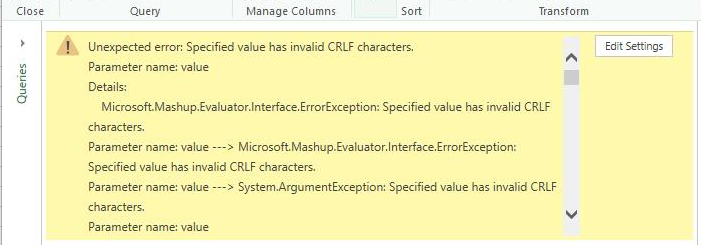
To try and determine whether or not it was related to the content of the list, I created a new basic list and I get the same error. I haven't been able to find much online and was hoping someone might have some ideas what types of things can cause this error that would help or point me in the right direction.
Thanks,
Greg
19 Replies
 ZargRegular Visitor
Hi,
I managed to fix this problem by going to Data Source settings, then edit permissions, then edit, then sign in as different user.
I just logged back under my account and it solved all the problems.Hope that helps someone.
 NileshJagtapNew Member
This is work for me
 OlaOlaOlaNew Member
Worked for me too! Thank you so much!
 AnonymousNot applicable
Thanks so much! It works for me as well!
- Greg_Deckler
Community Champion
When you say basic list, are you referring to a list with a Title field only?
A while ago, there was an issue with having column names in a list that started with a number and it messed up access to the entire site from Power BI. Perhaps something like this is going on or perhaps your site name is weird.
You might try creating an entirely new site or even site column, put a list with only a Title field and see if that works. If it does, perhaps it is something similar to the above issue I cited.
- geschingerRegular Visitor
Yes, I created a brand new list - title field only. The site name is odd and unfortunately I do not have the ability to set one up with any other format. It's a generated site name in the format of WS_###### where ###### is a unique number.
Have you heard of any issues with sites with an underscore in the name?
- geschingerRegular Visitor
One other thing I noticed is that when I get the CRLF error there is no attempt being made to connect to SharePoint. I'm running Fiddler filtered for more SharePoint host. I see traffice on the authentication to the point where authentication to SP is successful but nothing after that.
When I am on the dialog - Unable to Connect - "Specified value has invalid CRLF characters. Parameter name: value" if I click Retry, I get the connecting... dialog followed by the error again. During this time no requests submitted to the SharePoint site.
- curth
Power BI Team
When we've seen this error in the past, it's because the server has put invalid characters into a cookie. The .NET web stack strictly enforces the RFCs governing legal cookie characters, and not all servers are compliant. If you'd like to confirm this as the problem, you could "send a frown" and attach a Fiddler trace.
- geschingerRegular Visitor
Thank you. I tried this and captured a fiddler trace to a frown sent in yesterday. I'm hoping that might lead to a solution as I couldn't find anything in the trace that jumped out at me but I can't say that I really know what to specifically look for.
- TePe
Helper IV
Hi,
did you ever solve that issue? I'm getting the same error message now and I have no clue how to fix it...
Thanks,
Thomas
 jworkFrequent Visitor
Hello,
I'm running into this exact issue - on prem sharepoint and organizational account.
Was this ever resolved for you? Any tips?
- AnonymousNot applicable
Facing the same issue :(, any fix?
- NorbertMNew Member
I'm facing the same issue. Did someone manage to resolve the error?
- kolbackNew Member
Same problem. Trying to query a survey in SharePoint 2013 on-prem using Excel 2016 and my organization account.
 niwrejimNew Member
Hello,
I am also experiencing the same issue? Any updates?
Thank you.
Best Regards,
Jimmy
 BeenSearchingFrequent Visitor
Same issue. Anyone find a solution without using IWA?

