Forum Discussion

 Resolver III
Personal gateaway - can't enter credentials when I publish Power BI desktop file and data comes from
Hi, everybody
I hope someone can help me.
I publish a Power BI file desktop file in Power BI Service and dataset was created.
Data sources in Power BI desktop file come from ODATA Feed and .csv file that is in local drive (no sharepoint neither onedrive).
I have installed personal gateaway to refresh data in Power BI Service.
The problem is I can't introduce credentials because it doesn't appear.
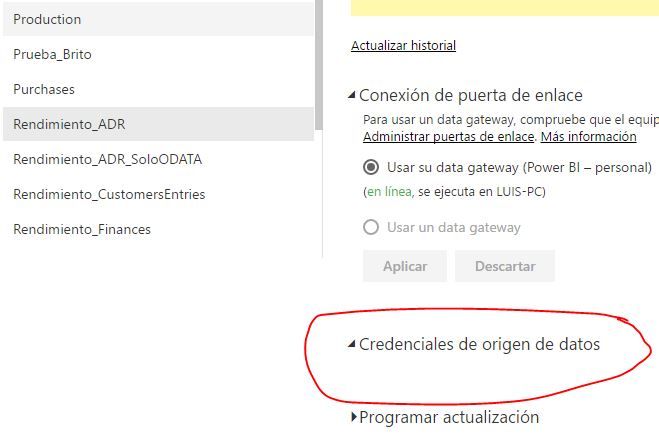
I think the problem is csv file because If I remove it the file from power bi desktop, edit credentials appears.
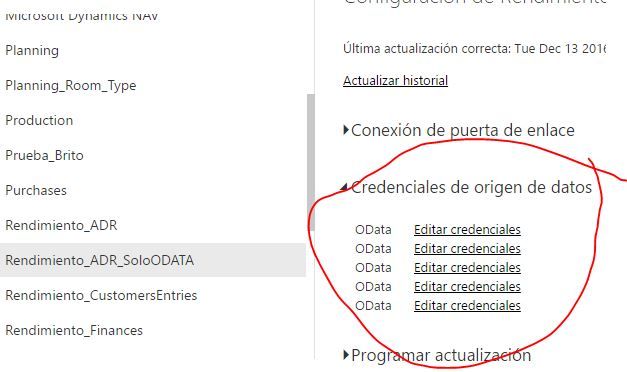
Does anyone know how can I refresh data from a dataset that includes csv file and ODATA feed?.
Any help will be appreciated.
Thanks,
Hello everyone,
This issue is now fixed. Could you please try re-publishing your report and confirm back if it's working again for you?
Thanks a lot for your continious feedback and follow ups!
Dimah
6 Replies
 AnonymousNot applicable
- kcantor
Community Champion
Anonymous While misery loves company, I am sorry you are affected as well. I have now been told by support that my ticket will be archived as I have been FORCED off of the personal gateway. They cannot tell me why it will not work nor can they tell me when it will be fixed.
 dimazaid
Microsoft Employee
Hello everyone,
This issue is now fixed. Could you please try re-publishing your report and confirm back if it's working again for you?
Thanks a lot for your continious feedback and follow ups!
Dimah
