Forum Discussion

 Kudo Commander
Personal Gateway Settings not appearing in PowerBI.com
I have installed the Personal Gateway on my 64 bit server and it is currently running (new install today).
I used the same account to create a PowerBI page and uploaded a test file with a single connection to an on Prem SQL Server.
The data is loaded to the data model and I have a singe PowerView report. I created two tests, one in an Excel Data Model and the other as a PowerBI Desktop (PBIX) file.
The files were both upload to PowerBI, and when I try to refresh then, there is no indication that it is finding my Personal Gateway. I tried connecting from the same machine on which the gateway is running as well as a different machine, but neither work.
I am currently running under the PowerBI Pro Trial.
26 Replies
 AnonymousNot applicable
Hi Braney,
Couple questions.
When installing the Personal Gateway - did that install successfully?
When you are trying to schedule a refresh on one of the datasets, what are you seeing? Do you get an error?Are the files on the same machine as the gateway?
- BraneyBI
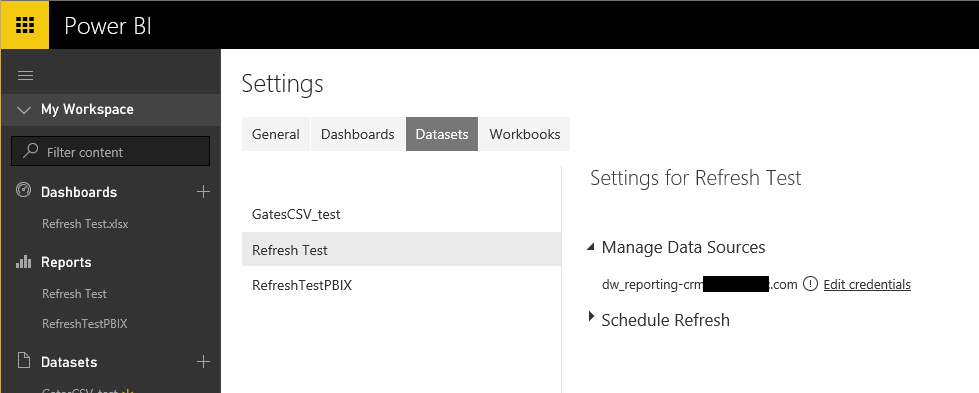
Yes, the gateway installed successfully and when I go to "Datasets" for the Refresh_Test file, I don't see the Gateway settings (like I saw in Miguel's video). When I try to update the credentials, the connection fails.
I have not been able to find any guidance on how to troubleshoot the fact that the Gateway is not appearing.
- andre
Memorable Member
I am guessing that means that even though the gatway is installed, it is not being seen by the service.
- andre
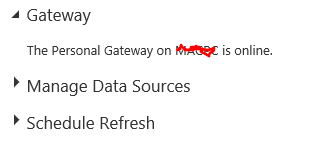
BraneyBI when you mouse over the data set, you will see three dots to the right, click on that and then click on Schedule Refresh. Then you should be able to drill into Gateway section and see if your Gateway is running. If it's not, you have a problem. If it is you may want to click into Data sources and make sure you have working credentials specified there and then you can go and specify the refresh schedule. But if the Gateway is not identified as Online, your refresh will not work.
 jjblanco
Advocate II
Hi. In case somebody else reads this thread, I went through some very similar issues and obscure connection errors when attempting to schedule a refresh on a dataset, and it ended up being a firewall issue.
Check my detailed comment on http://community.powerbi.com/t5/Integrations-with-Files-and/Does-the-Data-Management-Gateway-need-to-be-publicly-accessible/m-p/6887#M1251
Cheers!
 anywhereanytime
Helper III
OK, we have "successfully configured" Personal Gateway, logged into the Power BI service with a Dashboard + Reports + Dataset but, when we go to Settings > Dataset we only get a "blank white screen" = any ideas, I mean I could understand a "can NOT connect' but why blank?
We see now other way to "configure" the data source?