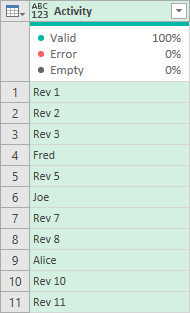
Hi steve-m,
Yes, the same approach may be applied to a list.
In fact, when I use Source[Activity] as the first parameter of List.RemoveMatchingItems, Source[Activity] is a list. In other words referencing a column as table[column] in this context treats the column as a list.
I’ll give an example closer to your requirement. I made this table with a column of lists. Each lists contains items beginning with “Rev”.
Table unexpanded

You can see the lists contain Rev by expanding the column by clicking on the arrows in the column header.
Table expanded
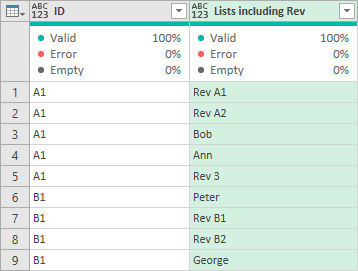
Then, I added a column to the unexpanded table using the code,
    #"Added Custom" = Table.AddColumn(
        Source,
        "Lists excluding Rev",
        each List.RemoveMatchingItems(
                [Lists including Rev],
                {"Rev"},
                each Text.Start(_,3) <> "Rev"
        )
    )
This added a column of lists with items beginning “Rev” removed. This can be seen when you expand the new column.
The full code of the example is
let
    Source = #table(
        {"ID", "Lists including Rev"},
        {
            { "A1", {"Rev A1", "Rev A2", "Bob", "Ann", "Rev 3"} },
            { "B1", {"Peter", "Rev B1", "Rev B2", "George"} }
        }
    ),
    #"Added Custom" = Table.AddColumn(
        Source,
        "Lists excluding Rev",
        each List.RemoveMatchingItems(
                [Lists including Rev],
                {"Rev"},
                each Text.Start(_,3) <> "Rev"
        )
    ),
    #"Expanded Lists excluding Rev" = Table.ExpandListColumn(#"Added Custom", "Lists excluding Rev"),
    #"Removed Columns" = Table.RemoveColumns(#"Expanded Lists excluding Rev",{"Lists including Rev"})
in
    #"Removed Columns"
Hope this helps. Unfortunately I'm getting a message "Server too busy" and I'm unable to upload screen shots of the added and expanded column. I'll edit the reply later, if I can, to add these but the full code of the example should be able to show you everything.